

The real question a small-business owner asks about AI agents is not "can it do this?" It is sharper: what can I actually hand over, and where do I still have to stand? An agent can genuinely run a real slice of your work today. It can also step over a line it has no business crossing. This post draws both. First, the bias worth knowing up front: we make Praxivara, the software that builds and runs these agents. That is why our list of what to keep human is as blunt as the list of what to hand over. We traced every research figure in this article through our 2026 Small-Business Automation Report, and where a statistic is thin, old, or untraceable, we say so. Statements about what the software does are product capabilities as of July 2026, not research findings.
Start with the ceiling. A 2017 McKinsey model estimated that about half the activities people are paid to do were technically automatable with the technology already demonstrated then — a capability estimate, not a forecast, and not a claim about today. Under 5% of occupations could be automated end to end. Automation absorbs tasks, not whole jobs. So an agent is not a person you hired. It is a way to lift specific, repeatable chores off the people you did hire.
The surveys don't even agree on how common this already is. Depending on who you ask, somewhere between about 1 in 5 and roughly three-quarters of small businesses now use AI. That huge gap comes down to who was surveyed, how 'using AI' was defined, and how the question was worded. Treat any single headline number with care; the honest range is wide.
So this is a catalog with two halves that matter equally. Twenty-five jobs an agent can genuinely run, each paired with the human check it still needs. Then ten jobs to keep human, and what the agent should do instead. The useful part was never a longer list of tricks. It is knowing exactly where the machine stops and you take back over. This post calls that spot the Approval Line, and draws it later on.
One definition first, so the rest reads cleanly. In this post an AI agent means software with a defined job, a way to start — a schedule or an event — and a set of tools it is permitted to use. It carries that job through several steps on its own, then either reports back to you or stops for your approval before anything binding happens. Some jobs in this catalog are hybrids: a fixed automation handles the trigger and the rules while the AI handles the interpreting and the drafting.
How to read this catalog
Every job below is written the same way, so you can scan fast. Each one gives you four parts: the job, stated the way you'd hand it to a person; what the agent actually does with it; where it runs, meaning the channel it works on; and your check, meaning how closely you still have to look.
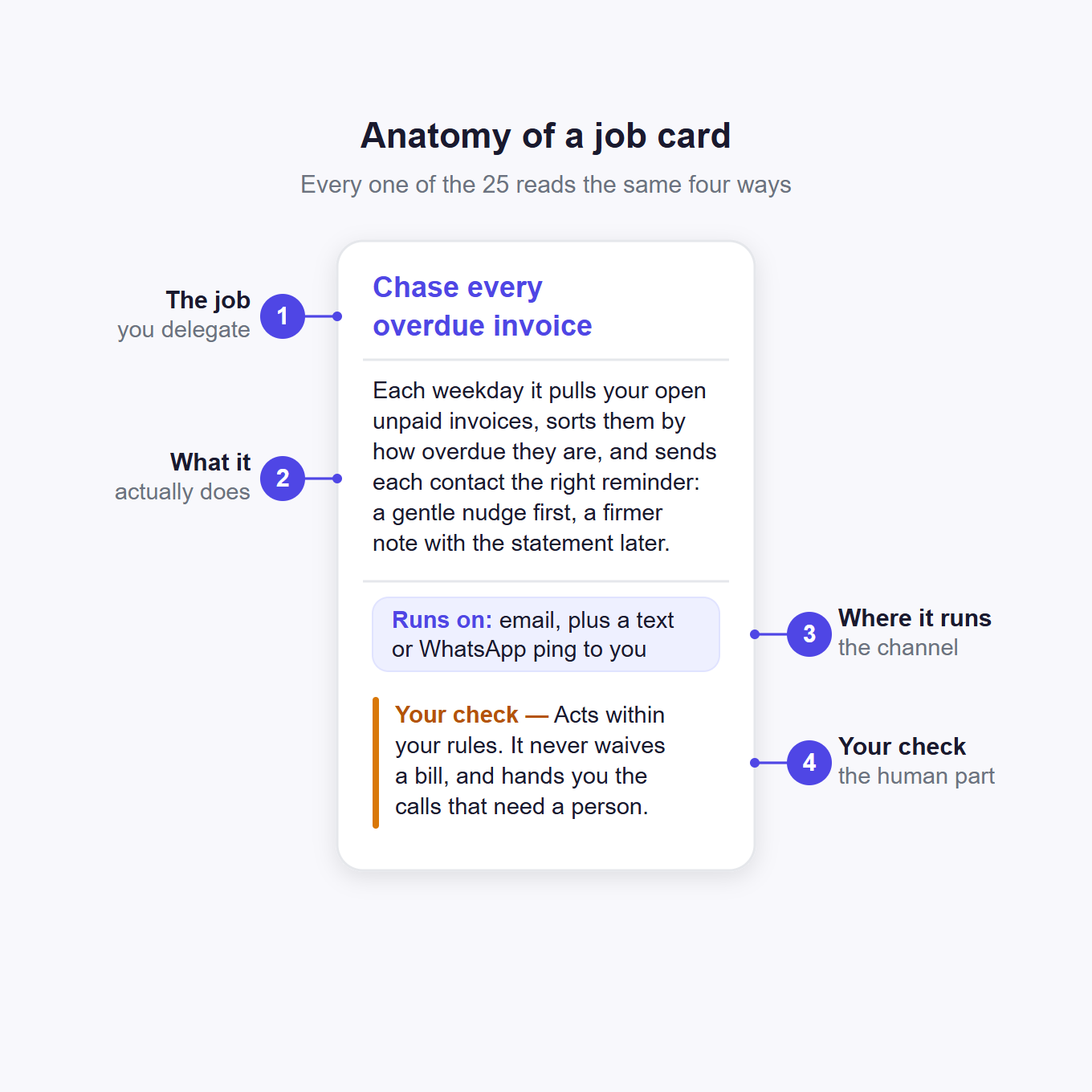
That last part matters most, so it comes in three plain levels. Reads and reports means there is nothing to approve; you just read what it found. Drafts and you approve means it does the work and writes the message, but you press send. Acts within your rules means it runs on limits you set, and hands back anything past them.
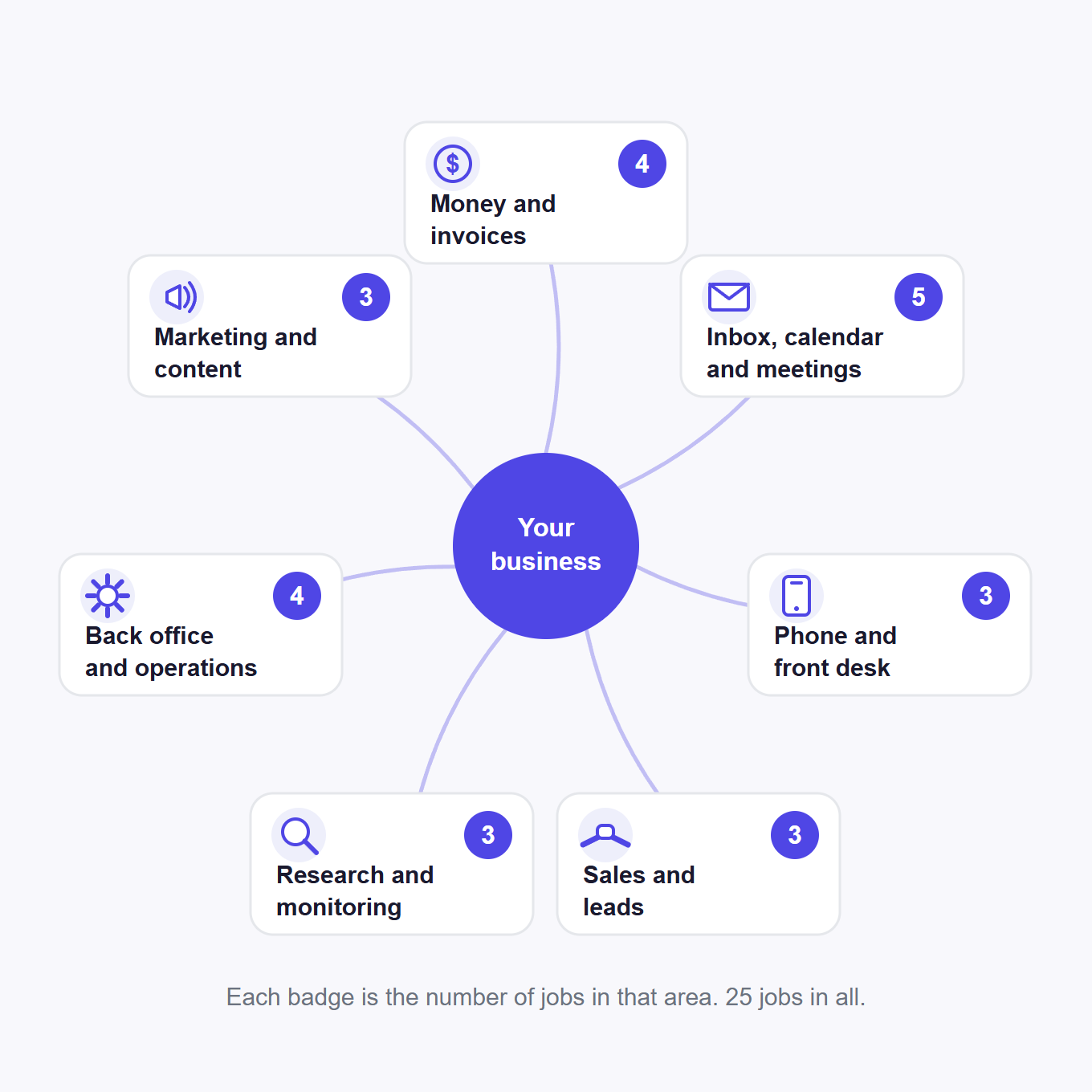
The 25 jobs sort into seven areas of the business: money and invoices; your inbox, calendar and meetings; phone and front desk; sales and leads; research and monitoring; back office and operations; and marketing and content.
Read the "your check" line on every card. It is the honest part, and it marks the boundary the machine has to stop at: the Approval Line, coming up.
25 jobs an AI agent can genuinely run
Here is the full catalog: 25 jobs grouped by the part of the business they sit in, each with the channel it runs on and the check it needs. Scan the table, then read the cards.
| Area | Job | Where it runs | Your check |
|---|---|---|---|
| Money and invoices | Chase every overdue invoice | Email + your channel | Acts within your rules |
| Money and invoices | Catch failed payments and cancellations | Email + your channel | Acts within your rules |
| Money and invoices | Turn receipts into an expense ledger | Email + Sheets + accounting | Drafts, you approve |
| Money and invoices | Compute a daily revenue and recurring-revenue brief | Your channel + weekly PDF | Reads and reports |
| Inbox, calendar & meetings | Triage your inbox and draft replies | Gmail / Outlook | Drafts, you approve |
| Inbox, calendar & meetings | Deliver a prioritized morning brief | WhatsApp / SMS / email | Reads and reports |
| Inbox, calendar & meetings | Write the recap and follow-up for every meeting | Tasks + CRM + mailbox | Drafts, you approve |
| Inbox, calendar & meetings | Brief you on every outside meeting | Your channel | Reads and reports |
| Inbox, calendar & meetings | Confirm tomorrow's appointments by phone | Voice (your number) | Acts within your rules |
| Phone and front desk | Answer the after-hours call | Voice (your number) | Acts within your rules |
| Phone and front desk | Call your on-call engineer when an incident fires | Voice + Slack | Acts within your rules |
| Phone and front desk | Text callers back and cover missed calls | SMS / WhatsApp | Acts within your rules |
| Sales and leads | Answer every new lead within minutes | CRM + mailbox | Drafts, you approve |
| Sales and leads | Source outbound prospects that fit | Sheets + CRM + mailbox | Drafts, you approve |
| Sales and leads | Keep CRM records enriched and current | Your CRM | Acts within your rules |
| Research and monitoring | Track competitor prices, flag real moves | WhatsApp / SMS + digest | Reads and reports |
| Research and monitoring | Monitor brand mentions, warn you fast | Your channel + digest | Drafts, you approve |
| Research and monitoring | Run deep research, hand you a sourced report | Document / PDF | Reads and reports |
| Back office and operations | Screen every new order for fraud | Slack + your channel | Acts within your rules |
| Back office and operations | Triage and route every support ticket | Helpdesk + Slack/SMS | Drafts, you approve |
| Back office and operations | Build a ranked candidate shortlist | Sheets + mailbox | Drafts, you approve |
| Back office and operations | Crunch your data in an isolated sandbox | Your channel | Reads and reports |
| Marketing and content | Turn a keyword queue into drafts | Google Docs | Drafts, you approve |
| Marketing and content | Repurpose each post into social drafts | Docs + Slack | Drafts, you approve |
| Marketing and content | Audit your site's SEO weekly | PDF + Slack | Reads and reports |
Money and invoices
The money jobs are where owners feel the drag most. Across more than 32,000 US small businesses using Xero, ledger data showed an average of about 28.8 days to get paid. It is a strong operational measurement, though the sample is Xero customers, not every US small business. An agent runs the chasing and bookkeeping legwork; the deciding stays yours.
Chase every overdue invoice
Stop being your own collections clerk. Each weekday it pulls unpaid invoices from QuickBooks, Stripe, Wave, or Zoho Books, buckets them by age, and, on the schedule you set, emails each contact the right nudge from the template you approved when you built it, firmer as days pass. Hand it the cadence with the Escalation Clock.
Your check: it chases on your rules but never waives a bill, and flags the accounts that now need a phone call.
Catch failed payments and cancellations as they happen
When a failed charge, cancellation, or ending trial fires on your Stripe or GoCardless triggers, it emails the follow-up you set up when you built it, a card-update link or a win-back note, and pings you only above your amount line.
Your check: you set the wording and the alert threshold, and no notice fires twice.
Turn inbox receipts into a clean expense ledger
When a receipt lands in your inbox it proposes the category, adds the details to a review ledger in Google Sheets, files the original in Drive, and prepares the accounting entry, flagging odd spend and quiet price rises. See the Junior Bookkeeper Test first.
Your check: a human still signs off, because an agent repeats the same miscode every month without blinking.
Compute a daily revenue and MRR brief
It pulls the previous day of billing into a brief of your monthly recurring revenue (MRR): new revenue, expansion, contraction, and churn, delivered on your channel, plus a weekly PDF. The math runs in an isolated sandbox with no network access, so it computes rather than guesses.
Your check: nothing to approve; you read the brief and decide where to step in.
Your inbox, calendar and meetings
These are the daily-driver jobs that quietly eat an hour before lunch. An agent clears the noise and preps your day; you keep the send button.
Triage your inbox and draft replies in your voice
On every new email it labels the message, archives the noise, and drafts a reply in your voice in Gmail or Outlook. In a randomized study of 453 professionals completing defined writing assignments, access to an AI writing tool cut completion time by about 40% and raised rated quality by about 18%. That supports using AI for first drafts, not sending replies without review.
Your check: you tap send; it pings you only for a VIP, a deadline, or a payment.
Deliver a prioritized morning brief
Before you start it reads the overnight mail that needs you, today's calendar with conflicts flagged, the deals and revenue that moved, and overdue tasks, then writes one brief that leads with today's two or three real decisions. It arrives on WhatsApp, SMS, Telegram, iMessage, or email.
Your check: pure summary; you set the send time, timezone, and VIP list.
Write the recap and follow-up for every meeting
After a call ends it takes the transcript, writes a short recap of decisions and open points, pulls each action item with an owner and due date into your task tool and CRM, and drafts the follow-up email. It flags any owner or date that was never agreed.
Your check: the follow-up stays a draft to send, and you can adjust the tasks.
Brief you on every outside meeting before it starts
Walk in already knowing the room. Ahead of each external meeting it looks up the attendees, runs a 90-day news pass, pulls your last thread and the open deal from your CRM, and writes a one-screen rundown with talking points on your channel.
Your check: you set the lead time and which internal domains to skip.
Confirm tomorrow's appointments by phone
Cut the no-shows before they happen. On the schedule you set, it reads tomorrow's bookings and calls each client from your rented number with the script you approved when you built it, taking keypad input to confirm, reschedule, or cancel, and logging what each client says. Acting on the calendar afterwards, moving or removing an event, is a separate step you approve, not something it does live on the call. A 2018 systematic review of healthcare studies put the average no-show rate near 23%, though it varies by industry, and randomized trials show reminders cut non-attendance, so a confirming touch helps.
Your check: the script carries only name, time, and place, and you get a nightly roll-up.
Phone and front desk
The voice jobs below run through your rented Praxivara number. Text follow-ups use a separately connected SMS or WhatsApp channel. The well-worn "62% of calls go unanswered" figure is a single 2016 study of 85 businesses, old and tiny, so treat it as folklore. How many of your own missed calls actually turn into lost business is worth measuring directly — the widely quoted voicemail-abandonment figures don't trace to a solid source.
Answer the after-hours call with a real keypad menu
After-hours callers reach a real menu instead of voicemail. On calls to your rented number it answers with the business name, greeting, and keypad menu you set up when you built it, takes a name and callback number and reads it back, and logs what each caller needs. An urgent call it flags right away and alerts you on your channel, with the caller's number and message. Measure your own losses first with the Missed-Call Audit.
Your check: you set the hours, greeting, and menu, and some calls stay with a human.
Call your on-call engineer when an incident fires
Make sure the 2am alert actually reaches a person. When your monitoring fires an incident trigger, an agent places a call to your on-call contact and reads the alert aloud, then posts the details to Slack so the incident is logged where the team can see it. It turns a silent alert into a phone that rings.
Your check: you set which incidents trigger a call, the number it dials, and the Slack channel it posts to.
Text callers back and cover missed calls
Close the loop by text, not by hope. Using a texting channel you have connected, not the call-only rented number, it sends the booking or callback confirmation you set up when you built it by SMS or WhatsApp, so a promise made on a call is backed up in writing instead of left to memory. It messages only the person who reached you.
Your check: a hard rule keeps your internal assistant line from ever texting a stranger; you pick the texting channel and the templates.
Sales and leads
The sales jobs turn on speed and follow-through, the parts reps skip when busy.
Answer every new lead within minutes
Beat the competitor who replies tomorrow. When a new contact, deal, or sales email appears, it enriches the contact, scores the lead against your ideal customer, and drafts a first reply with a specific hook. Answering fast beats answering in days, though the "5 minutes makes you 21x more likely to qualify" rule traces to a 2007 sales deck, not real research.
Your check: whether it ever sends on its own is up to how you build it; left as the templates ship, it drafts the first reply and leaves the send to you.
Source outbound prospects that fit your customer
It searches many sources for companies that match your ideal customer, finds the decision-maker, verifies a work email, drops anyone already in your CRM, and scores each on fit. It writes prospects to Google Sheets, creates CRM records, and drafts a first-touch email.
Your check: it saves outreach as drafts only and never sends; you review the top-fit list.
Keep CRM records enriched and current
The CRM stays current instead of going stale between updates. It writes enrichment, lead scores, meeting recaps, and billing events onto the matching contact or deal in HubSpot, Pipedrive, Salesforce, or Zoho, using one of over 1,000 actions across your connected tools. It runs inside your other workflows, not as a chore.
Your check: the writes run automatically; you pick which CRM and which fields it maintains.
Research and monitoring
The watch-and-tell jobs run constantly and stay silent until something matters.
Track competitor prices and flag only real moves
You find out when a rival moves without living on their site. On a schedule it reads price, stock, and rating across your watchlist, diffs against the last snapshot and your margins, and stays silent unless a price crosses your threshold or a competitor sells out. When it speaks, on WhatsApp or SMS, it names the reprice.
Your check: you set the threshold and margin, and decide whether to match.
Monitor brand mentions and warn you fast
Hear the bad review before your customers do. It finds new mentions of your brand across the web, news, and review sites, scores each positive, neutral, or negative, and drafts a reply for each negative one. Memory stops double-reporting, and it texts you the moment a one- or two-star review appears.
Your check: the replies are drafts, never auto-posted; you decide what gets a public response.
Run deep research and hand you a sourced report
An open question comes back as a sourced brief, not a pile of tabs. It searches the web, reads the top sources in full, cross-checks the facts, and writes a structured report or PDF. On tasks inside its competence consultants using a strong model ran about 25% faster at higher-rated quality, but accuracy drops outside it, so it reports and you judge.
Your check: you review the output, and its fetching is constrained to safe sources by design.
Back office and operations
The back-office jobs are quiet until they aren't: the fraud check, and the hire you keep meaning to source.
Screen every new order for fraud and problems
Catch the risky order before you ship it. When an order lands it checks value, address mismatches, location, first-time high-value buyers, and past chargebacks, and does nothing when an order passes. When something trips a rule it posts to Slack, messages you, and creates a task.
Your check: it holds or tags an order only if you asked; you set the thresholds and checks.
Triage and route every support ticket
Every ticket gets a fast, grounded first pass. On each new ticket it sorts topic and severity, looks the customer up in billing, sets tag, priority, and assignee, and drafts a first reply grounded strictly in your help docs, citing the source. Giving frontline staff an AI assistant raised issues resolved per hour by about 14%, and more for the newest agents.
Your check: replies stay drafts, and it escalates for an angry, canceling, legal, or high-value customer.
Build a ranked candidate shortlist
A ranked shortlist sits ready instead of a blank search. Once a week it sources passive candidates for each open role, checks what competing employers pay, scores every profile against your scorecard, skips anyone already contacted, and writes a ranked Google Sheet with source links. It drafts a tailored outreach note per candidate.
Your check: the outreach stays unsent; a human owns every hiring decision.
Crunch your data in an isolated sandbox
The numbers come from real code, not a language model's guess. It fetches live data with its guarded tools, then runs real code in an isolated sandbox to age invoices into buckets, compute a revenue waterfall, or score a scorecard the same way every run. The sandbox has no network access and cannot touch your accounts.
Your check: you see the computed result, and the sandbox never reaches the internet or your systems.
Marketing and content
The content jobs are draft-heavy and publish-light on purpose. An agent produces the first version fast, but nothing goes public without your yes.
Turn a keyword queue into publish-ready drafts
Keep the content pipeline moving without writing every word. It takes the next keyword from your queue, researches what currently ranks, checks nothing of yours already competes, writes the full piece in your brand voice, adds internal links, and saves the draft to Google Docs.
Your check: it saves to Docs for your review; publishing is always your call.
Repurpose each new post into native social drafts
One article becomes a week of posts. When you publish something it reads the piece and writes a LinkedIn post, a short thread, a newsletter blurb, and a few short-form hooks, each native to its format, plus a couple of pull-quote graphics.
Your check: it never posts to any network; you review the set and publish.
Audit your site's SEO weekly and hand you a fix list
A prioritized fix list arrives, not a crawl you have to run yourself. It crawls your whole site for broken links, missing meta, thin and orphan pages, checks uptime, watches what competitors just published, finds keyword gaps, and produces an action list sorted by likely impact. It emails a PDF and posts a summary to Slack.
Your check: you pick the competitors, keywords, and run day, then work the list.
The Approval Line: where the machine stops
An agent assists a person. It does not run the whole job alone. On TheAgentCompany's 175-task benchmark in a simulated software company, the best tested baseline in the paper — Gemini 2.5 Pro using OpenHands — fully completed 30.3% of the tasks. That is a benchmark result for long, multi-step work, not a universal success rate for business agents. More AI is not always faster, either. In a randomized trial with early-2025 AI tools, experienced open-source developers working on repositories they knew well took about 19% longer, even though they believed the tools had sped them up. Every widely circulated 'hours saved per week' claim we traced led back to a seller's own survey or an untraceable citation chain. So the skill worth having is not adding one more job to the list. It is knowing exactly where the machine should stop.
That spot has a name. The Approval Line is the point where an action turns irreversible, judgment-heavy, or legally or financially binding. A well-built agent works right up to it at full speed, then hands a person a decision that is ready to approve. The important call never rides on the agent guessing.
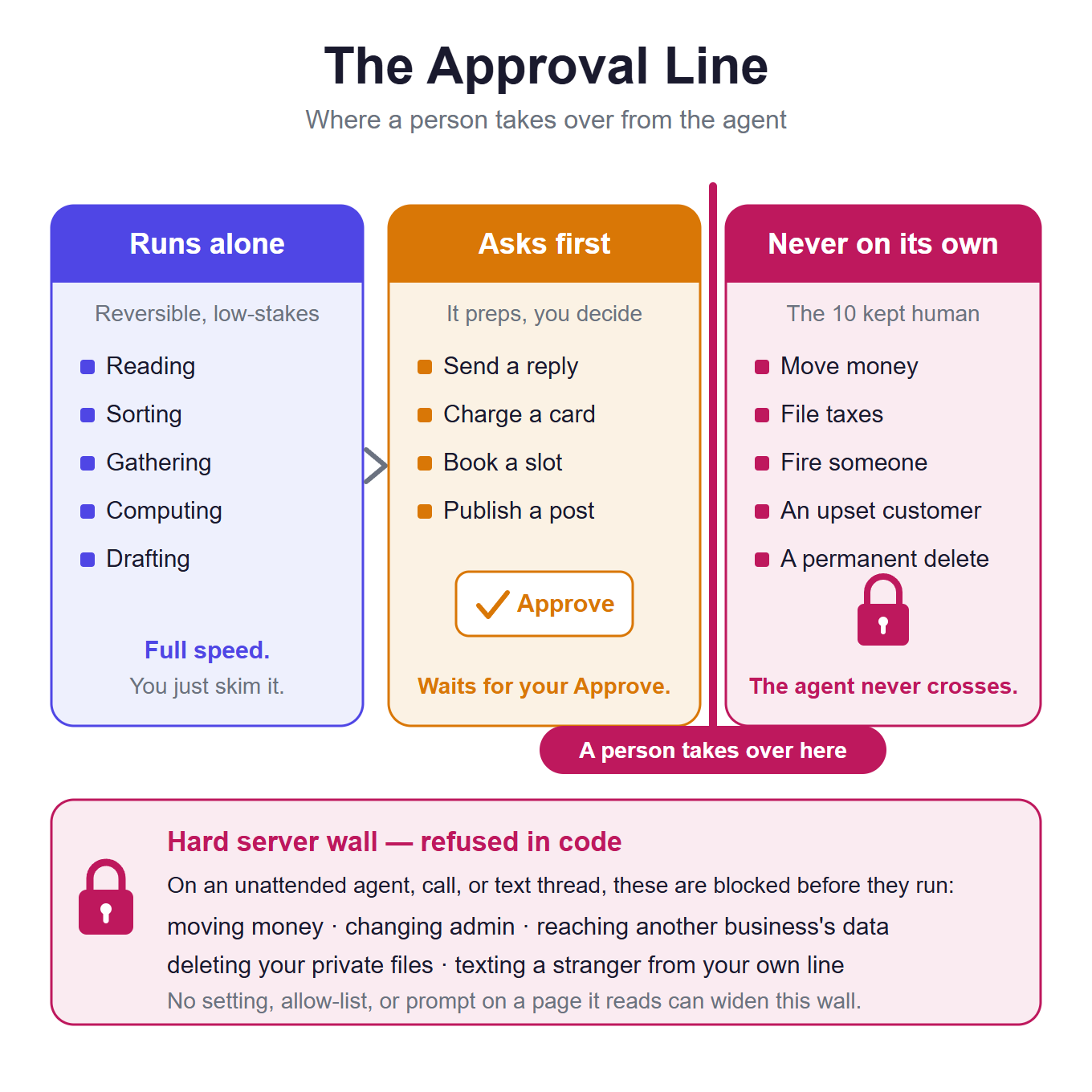
The line sorts work into three zones. Some tasks run alone: reading, sorting, gathering, computing, drafting, briefing. That work is reversible and low-stakes, so the agent moves at full speed and you skim the result. Most of the 25 jobs live here, or one step up. Other tasks ask first. The agent does everything up to the send, the charge, or the booking, then stops. You choose when Praxivara stops to ask. In web chat, the request appears right above the chat box, and you allow it or deny it. For an agent that runs on a schedule, you choose when you build it: set it to check with you and it asks you by message before a step that needs your OK; set it to run on its own and it sends unattended. Leave the send tool out, or tell it to draft, and it stops at a draft. The ready-made templates are built to draft and leave the send to you, so that is the default you start from.
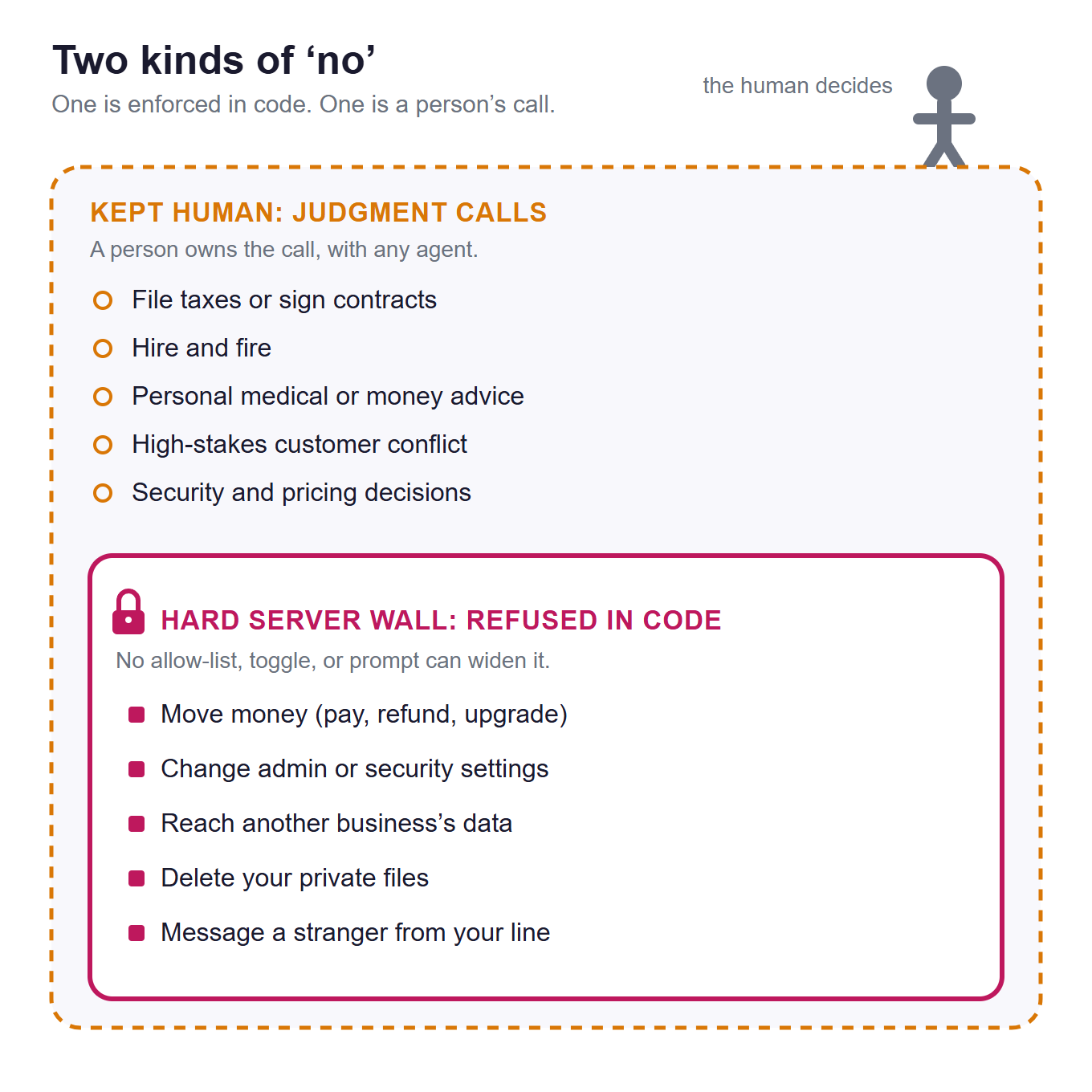
The last zone is never on its own: the binding, high-judgment calls that can't be undone, which are the 10 coming next. A person owns those. The agent still helps right up to the edge, gathering the facts and drafting the options, and it never steps past.
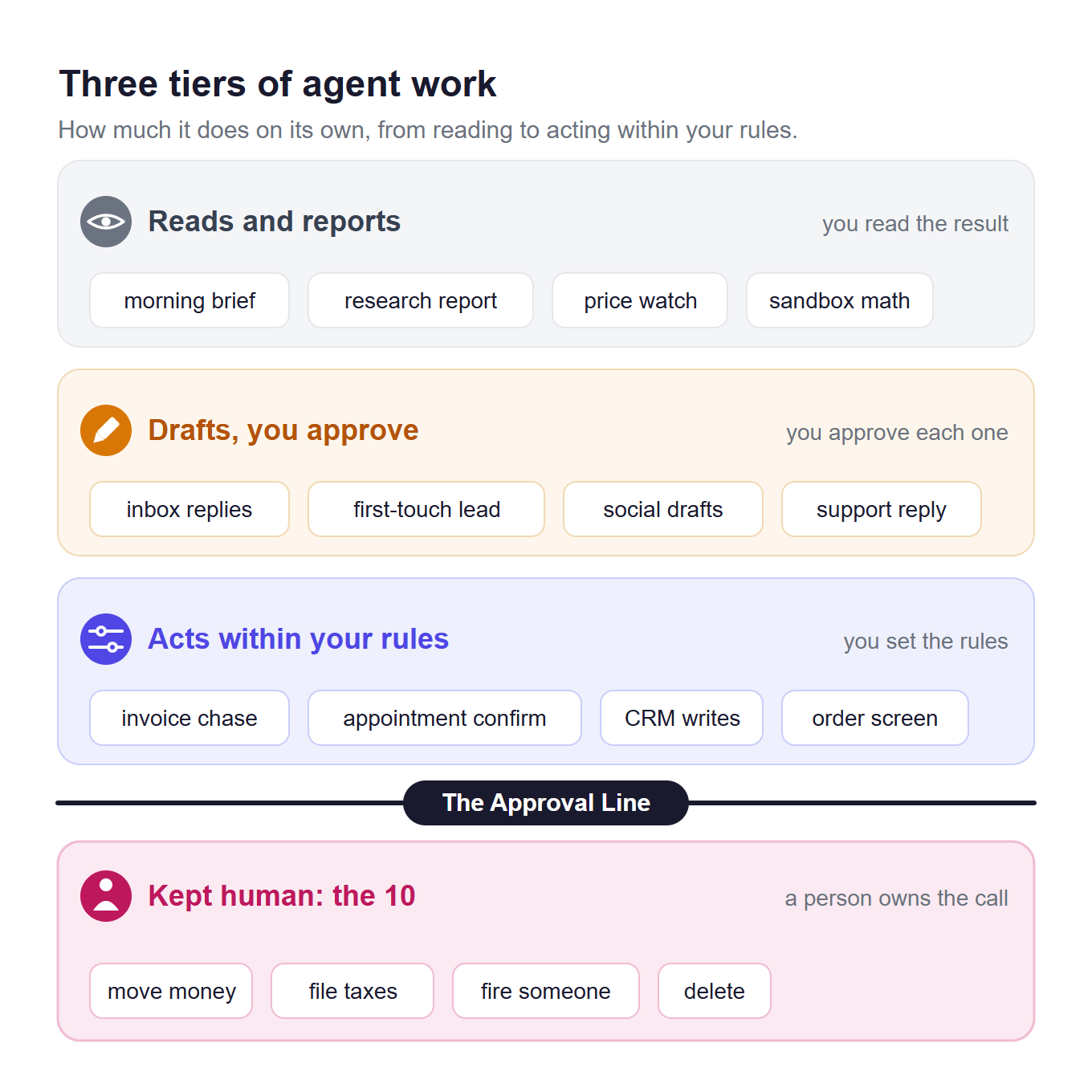
Part of that line is not left to good intentions. It is enforced in code.
The wall you can't move. On unattended surfaces, an agent, a voice call, or a text thread, some actions are refused before they run, no matter what a prompt says: changing your Praxivara plan or buying credits, any platform-admin or account-security action, reaching another business's data, or messaging a stranger from your own internal line. No allow-list, admin toggle, or instruction planted on a page it read can widen that wall. In web chat, you choose when it checks with you before it sends or charges.
One distinction keeps this straight. The Approval Line marks where a person takes over; the Delegation Ladder is about how much you hand over as trust grows. This post is about the first.
10 jobs to keep human
Twenty-five times, the "your check" line promised a person stays in the loop. Here is where that promise gets serious. These ten jobs sit past the Approval Line, and no agent should own them. Some are blocked in code and cannot happen on an unattended surface. The rest are a judgment call that holds for any vendor's agent, ours included. Either way, the agent works right up to the line and hands you the decision.
Move money on its own
Paying a bill, sending a refund, upgrading a plan, or buying credits charges a real card with no undo. On an unattended surface there is no button to catch a mistake, so the model alone would decide to spend. It can also be steered by untrusted text it just read on a page or in a forwarded email. Changing your Praxivara plan or buying credits is blocked in code outright; any other spend it should prepare and leave for you to approve.
What it should do instead: Prepare the payment, show you the amount and the payee, and wait for your OK.
Change your settings, billing, or security
Admin controls can move billing, grant access, or alter another user's state. A single misread instruction, or one planted on a page the agent read, could quietly widen what it is allowed to do. A user-built agent should never even reach that surface, so on unattended surfaces this is a hard server rule, not a setting you toggle.
What it should do instead: Tell you in one sentence exactly what to change and where, then let you make the change while signed in. It never self-authorizes.
Reach into another business's data
One business's agent reading or writing another's records is a data breach, plainly. This is never a judgment call, so it is not left to one. It is enforced on the server, not a setting you or a prompt can turn off: every agent works only inside its own account, and that boundary is resolved on the server where a prompt cannot touch it.
What it should do instead: Nothing crosses the boundary. Your private keys and secrets are never placed in the model's view, and the wall is built in rather than promised.
Decide on its own what to send, who should receive it, or which policy exception to make
A reminder you set up and approved when you built it can run on your schedule; that is a job in the catalog above. What stays with you is the open-ended call: what to write when no template covers it, who a message should go to, and whether to grant a policy exception. Those carry your voice and your relationships, they are judgment calls, and a wrong one cannot be pulled back once it is out.
What it should do instead: Draft the open-ended message in your voice and stage it for you. In web chat you choose when it checks with you before a send, and the default setting asks before an email goes out. On a scheduled run, whether it sends is set when you build the agent: an agent set to run on its own sends unattended, which is why the open-ended messages belong in drafts you release yourself.
Own an emotional or high-stakes customer moment
An agent reads the words, not the room. It will answer a family-emergency cancellation with the standard policy paragraph, and it will state a made-up refund rule with total confidence. In Moffatt v. Air Canada, a British Columbia tribunal held the company responsible for inaccurate information supplied by its website chatbot. A tone-deaf or over-generous reply either escalates the moment or costs you real money. That is a judgment call for any vendor's agent.
What it should do instead: Capture the full context, draft the options, and route it to a person to own. Because any refund is money moving, keep that step behind your OK.
File your taxes or sign your contracts
A filed return or a signed contract is legally binding and often irreversible, and payroll-tax mistakes in particular carry steep IRS penalties. The model holds no license and has no professional accountability to stand behind a filing. This one is a judgment call, no matter whose agent you use.
What it should do instead: Assemble the numbers, pull the documents, and prepare the draft, then hand it to a licensed accountant, a lawyer, or you for the actual filing and signature.
Make hiring, firing, or discipline calls
These decisions affect people's livelihoods and carry real discrimination and wrongful-termination exposure. They also need context a model cannot fully hold. They belong to a person who can stand behind them and be accountable. No agent, from any vendor, should own the call.
What it should do instead: Schedule the interviews, organize the notes, draft the job description, and build the comparison. Then a person decides and delivers the decision.
Give personalized medical or financial advice
Personal medical or investment advice can cause real harm and usually requires a license. A generative model is not a doctor or a licensed advisor, and it should not pose as one however confident it sounds. Treat this as off-limits for any agent.
What it should do instead: Surface general, sourced information and say plainly that a licensed professional should make the personal call. It declines the personal recommendation.
Permanently delete anything
A hard delete or a destructive bulk edit cannot be undone. An agent acting on a misread instruction destroys data with no recovery, and it will do it at the same speed it does everything else. A stranger-facing agent is blocked from touching your private files, and you choose when Praxivara checks with you before a delete.
What it should do instead: Propose exactly what would go, prefer reversible moves like archiving or sending to trash, and wait for your explicit yes before anything is destroyed.
Own a security incident or your pricing
A live security incident and a pricing decision are high-stakes, strategic calls with legal, financial, and competitive weight. An agent should not self-authorize either, and it cannot reach your security settings to try. But the decision itself belongs to a person, every time.
What it should do instead: Detect, gather the facts, draft the options and trade-offs, and model the scenarios, then present them to you to decide. It runs analysis up to the line, never past it.
An honest way to start
Pick one job you already do the same way every week, and hand that one over first. Set it to "drafts, you approve," and watch it for two weeks before you loosen the leash. That is the whole method. You do not need a grand rollout across every department. You need one job, one channel, and two weeks of reading what the agent produces before you trust it with more.
Good first jobs share three traits: they repeat, they run on rules you can write down, and they are easy to undo. A morning brief, or an inbox triage. Leave anything that sends money or a public message for later, once the agent has earned it on the safe work. If you want a fast way to score a candidate job against those traits, the Green-Light Grid does it in a few minutes.
For a first win with real evidence behind it, automated appointment reminders are hard to beat. Across randomized trials they cut no-shows by roughly a third, one of the best-evidenced results in this whole catalog. The job is reversible and the rules are simple, and the payoff shows up on your calendar within weeks rather than in a vendor's pitch.
Your safe first hand-off
- One repeatable job you already do the same way every week.
- One channel it runs on, not five.
- Drafts, not sends, for at least the first two weeks.
- One threshold written down, so it knows when to stop and ask you.
- One thing you will never hand over, named out loud before you start.
When you are ready to build that first agent, the agent quickstart walks you through the setup, and the integrations catalog shows which of your tools it can reach once you connect them. Start with the one job. Widen its reach only when the drafts stop needing your edits.
Questions owners actually ask
What's the difference between an AI agent and an AI assistant or chatbot?
An assistant waits for you to ask, then answers. An agent runs a whole job on its own once you set it up. It waits for a trigger, then does the work across your connected tools and reports back on your channel. A chatbot just talks. Every job in this catalog is agent work: a real task, fired by a schedule or an event, with a defined check on the end.
Can AI agents replace my employees?
No. Agents take over tasks, not whole jobs. They clear the repetitive part of the work, the parts you do the same way every week, so your people spend their hours on judgment and relationships, the work a model should never own. The honest goal here is handing off the dread, not cutting headcount. An agent with no one reading its output is a liability, not a saving.
What should I not trust an AI agent with?
Anything past the Approval Line: work that is irreversible, legally or financially binding, or heavy on judgment. That is the whole point of the ten below. The three owners worry about most are the ones to hold hardest: moving money on its own, letting it decide on its own what to send and to whom, and owning an emotional or high-stakes customer moment. An agent can prepare all three and stop at the line.
Are AI agents safe for a small business?
The riskiest actions are the ones held behind a wall. On an unattended surface, changing your Praxivara plan, buying credits, any platform-admin action, and reaching another business's data are refused before they run, no matter what a prompt or a planted instruction tries to tell it. Whether an agent sends a customer-facing message or only drafts it is set when you build it, and the ready-made templates draft for your review; in web chat you choose when it checks with you first. On a messaging channel like iMessage, SMS, or WhatsApp, it asks by message and you reply YES to allow it or NO to skip it; platform billing, admin, account-security, and cross-account actions stay blocked over any channel no matter how you reply. Your data stays inside your own account. For a deeper safety checklist, our executive-assistant guide answers is it safe to give an AI access to your business.
The line is the point
The value of an agent is not how much it does. It is how cleanly it stops. A good one takes the dull, repeating work off your plate and hands the judgment back to you at the exact moment it matters. You give up the dread. You keep the call.
That is the whole catalog in one thought: 25 jobs you can hand over, 10 you should keep, and a clear line between them. The 25 buy back your week. The 10 protect what a wrong move would cost you, from money you cannot claw back to a customer relationship that a bad reply can end. An agent is worth having when it knows which side of that line it is on.
None of this asks you to trust a machine with the parts of your business that need a person. The point is the reverse: stop pouring your best hours into the parts that don't.
Build and run jobs like these from one chat. Explore Praxivara Agents