
2026 small-business software stack audit
Open last month’s software bill. Beside every line item, ask one question: does this app hold a record, move money, prove a commitment, or protect access? Or does it mostly ask someone to read, decide, copy, chase, summarize, and update?
The second group is where AI agents can often replace software or reduce how much of it you need in 2026. The first group usually stays.
AI agents can often replace narrow tools for drafting, classification, routing, follow-up, scheduling, document assembly, and recurring report production. They can reduce seats or premium features in broader platforms. They usually should not eliminate the controls and authoritative records behind your books, customer history, identity, payments, signed agreements, or other durable business truth.
The safest stack strategy is simple: keep the records, remove the wrappers, and let a governed agent carry work between the remaining systems.
This guide gives every major small-business software category one of four decisions: Cancel, Downshift, Connect, or Keep gated. It also includes a worked 14-product audit, a six-gate cancellation test, and a clear picture of where Praxivara fits.
Inside the audit
Which SaaS tools can AI agents replace? The at-a-glance answer
The easiest cancellation targets do one narrow coordination job and hold little or no unique data. The hardest targets are systems of record, execution rails, and control planes. Most of the stack belongs between those extremes.
| Software category | Likely 2026 decision | What the agent can absorb | What should remain |
|---|---|---|---|
| Single-purpose AI writing and repurposing tools | Cancel | Research, drafting, repurposing, formatting | Approved sources, CMS, brand review |
| Report assemblers and digest tools | Cancel or downshift | Source collection, reconciliation, narrative, delivery | Warehouse, BI definitions, financial records |
| Inbox classifiers and reminder bots | Cancel | Triage, context retrieval, drafting, follow-up | Email, shared history, retention controls |
| Meeting-note products | Cancel or downshift | Summary, decisions, tasks, CRM updates | Reliable transcript source and consent controls |
| Scheduling and booking | Downshift | Time negotiation, reminders, context, rescheduling | Calendar; routing or booking infrastructure when needed |
| Workflow automation | Consolidate selectively | Variable paths, language, exceptions, verification | Stable, high-volume deterministic flows |
| CRM add-ons and admin seats | Downshift | Research, hygiene, updates, follow-up, summaries | CRM contact, deal, consent, and ownership records |
| Help desks and project systems | Connect and reassess | Triage, chasing, updates, briefs, resolution checks | Shared case or work history, permissions, SLAs |
| Email marketing | Connect | Drafting, segmentation proposals, QA, scheduling | Consent, suppression, unsubscribe, delivery history |
| Accounting, payments, payroll | Keep gated | Preparation, collection, explanation, exception detection | Authoritative ledger, transaction rail, reconciliation, approvals |
| Identity, passwords, security, backup | Keep gated | Review packets, summaries, reminders, evidence assembly | Control plane, custody, detection, enforcement, recovery |
| E-signature and legal records | Keep gated | Intake, extraction, comparison, routing, reminders | Executed agreement, signature evidence, legal authority |
Do not audit the logo. One product may hold a record and perform a workflow. One business responsibility may span five products. Audit the job, the record, the rail, and the risk hidden inside the subscription.
What “replace” actually means in 2026
AI agents rarely replace an entire software product in one move. They replace the operating work happening inside and between products. That creates four materially different outcomes:
- Cancel: the agent can perform the complete job, the authoritative data already lives elsewhere, and the point tool adds no essential rail or evidence.
- Downshift: the product still matters, but the agent removes premium automation, add-on AI, extra seats, or usage.
- Connect: the software remains the record or execution rail; the agent becomes its operator.
- Keep gated: the system remains, and consequential actions stay behind explicit approval and a named human owner.
That is why predictions about “the end of SaaS” are less useful than they sound. Even analyses that expect agent-driven pressure on software spending describe a gradual shift in operating models, not the overnight disappearance of business applications. Deloitte’s 2026 analysis of AI agents and SaaS makes the same broad distinction: agent adoption changes how software is used before it replaces whole categories.
The financial test must be equally precise. Avoidable annual cost is not the sum of every vendor’s “starting at” price. A sound model is:
Avoidable annual cost = cancelled subscriptions + removed seats + downgraded tiers + avoided add-ons + admin hours saved, minus agent run cost + human review + integration or migration cost + expected exception and rework cost.
Seats, tasks, contacts, responses, resolutions, storage, and agent credits are different units. Compare the full cost of one responsibility before and after the change, not two headline prices.
Use the Stack Anatomy Audit
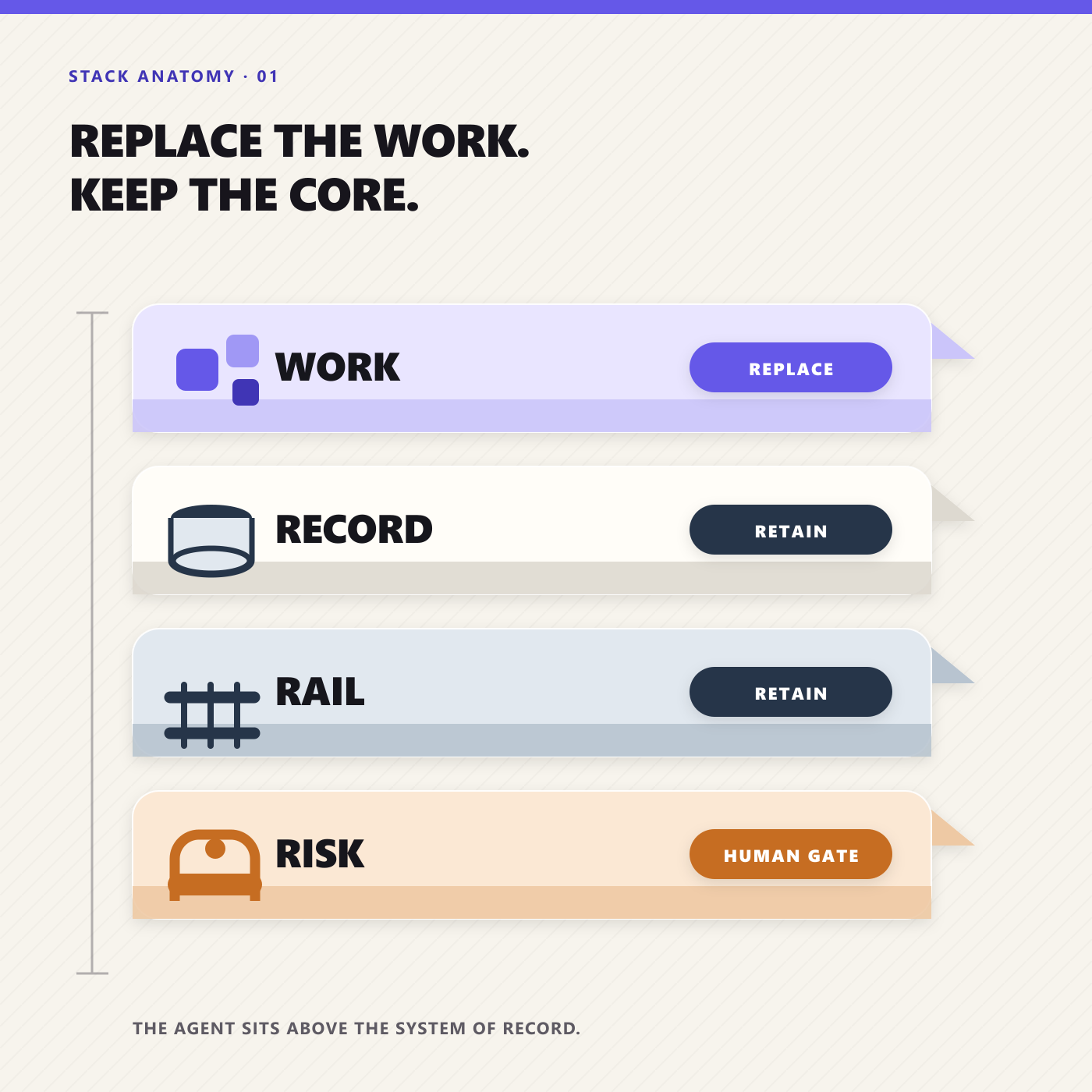
Every subscription contains some combination of four layers. Separating them keeps a useful cancellation from becoming an operational hole.
- Work: drafting, classifying, routing, chasing, summarizing, scheduling, and updating. This is the layer agents absorb most readily.
- Record: canonical customer, project, employee, financial, or policy history. This must remain authoritative, whether it lives in a retained platform or in supported native business records.
- Rail: infrastructure that delivers email, moves money, signs an agreement, runs payroll, manages identity, or performs regulated execution. The agent can use the rail; it is not the rail.
- Risk: permissions, approvals, exception handling, evidence, and accountable ownership. This determines how much authority the agent should receive.
A tool becomes a strong cancellation candidate only when the work is narrow, required data is portable, every necessary action is supported, outputs are easy to verify, failures are reversible, and no unique customer experience or audit evidence disappears with it.
If one of those conditions fails, the right answer is usually downshift, connect, or keep gated. That is not a timid result. It is how a smaller stack becomes more reliable instead of merely cheaper.
The category-by-category audit: what can actually leave your stack?
Communication and scheduling: remove the traffic control, not the roads
Email and calendars are infrastructure. They preserve addresses, threads, invitations, retention settings, and shared history. Keep Google Workspace or Microsoft 365. What is open to replacement is the collection of products used to watch those systems: an inbox classifier, follow-up reminder, meeting brief generator, scheduling assistant, and a tool that turns every call into another summary nobody reads.
An agent can monitor designated inboxes, recognize the customer or project, retrieve context from connected systems, draft a response, propose times, update the relevant record, and flag the thread only when judgment is needed. That is one continuous job. Five disconnected utilities often treat it as five separate features.
Scheduling products are not automatically waste. Calendly’s current pricing and feature structure combines routing, multiple calendars, reminders, integrations, and team controls, and the company is adding its own AI scheduling features. A recruiting team with round-robin rules and public booking pages may still need that machinery. A founder who only needs an agent to negotiate ordinary times over email may not need the same tier or a separate subscription.
Meeting transcription deserves the same test. If the product is your searchable meeting archive, keep it connected. If its only contribution is a transcript that another tool summarizes, a lower plan plus an agent may be enough. Otter’s plan page puts meaningful recording and import limits behind paid tiers, so actual usage should drive the renewal.
Audit call: Cancel a single-purpose classifier, reminder bot, or basic scheduling layer whose whole workflow the agent can own. Downshift meeting-note and scheduler plans when premium automation is no longer needed. Connect email, calendar, contacts, and any shared inbox that holds customer history. Keep external sends, mass invitations, cancellations, and sensitive messages gated.
Sales and marketing: keep the commercial memory; consolidate the busywork
Your CRM should survive the audit if it records accounts, contacts, opportunities, consent, ownership, and pipeline history. HubSpot explicitly describes Smart CRM as the system of record beneath its sales tools. That is the useful dividing line: the record belongs in the CRM; the activity around the record can often belong to an agent.
After a prospect completes a form, a typical stack may enrich the contact, research the company, score the lead, write a personalized opener, enroll a sequence, create a task, notify an owner, and generate a pipeline summary. Small teams frequently buy separate products for several of those steps. A connected agent can perform the research, apply a qualification policy, prepare the message, create or update the CRM record, and route the opportunity, with approval before anything consequential leaves the business.
A specialist data provider may still have proprietary coverage an agent cannot reproduce. Mature teams may need forecasting, territory controls, deliverability, coaching, and attribution. Marketing platforms also preserve consent, suppression, unsubscribe, and campaign history. The agent can draft, segment, QA, and schedule; it should not pretend those rails are generic text generation.
Audit call: Cancel narrow copy generators, simple lead routers, and follow-up utilities that add no proprietary data or control. Downshift sequence, enrichment, or marketing-automation capacity that duplicates agent work. Connect the CRM, approved data sources, CMS, ad accounts, and analytics. Keep bulk outreach, discounts, performance claims, consent changes, and budget increases gated.
Support and customer operations: replace the swivel-chair work, not the case history
A help desk is more than a box that displays messages. It can own ticket history, service-level timers, routing, customer identity, permissions, collision prevention, and auditability. Help Scout’s current plans, for example, package multiple inboxes, knowledge bases, workflows, and service controls. If your team depends on those controls, keep the help desk.
The replaceable layer is the repetitive movement around it. An agent can classify the request, identify the account, retrieve order or subscription context, search approved knowledge, draft a tailored answer, request missing information, and update the case. It can also verify whether the promised action occurred before marking the issue resolved. That last step is more valuable than another chatbot that declares success after sending a paragraph.
For a very small business with low volume, an agent operating across a shared inbox and customer system may remove a thin support overlay. As volume, staffing, contractual SLAs, or channel complexity grows, the help desk becomes durable infrastructure again. The agent acts as the worker inside it, not its substitute.
Audit call: Cancel standalone summarizers, macro generators, and thin overlays that store no unique history. Downshift duplicated AI or automation add-ons. Connect the help desk or shared inbox, CRM, order system, knowledge base, and service data. Keep refunds, credits, account changes, deletions, security incidents, and irreversible resolutions gated.
Projects and internal operations: one operator can remove a surprising amount of status software
Project tools become cluttered when people must maintain a second version of work just to prove that work is happening. An agent can convert an approved request into tasks, chase missing owners, collect updates, prepare a weekly brief, identify blocked dependencies, and deliver the finished artifact to the right place.
That does not mean every team should cancel its project platform. Asana’s current plans bundle dependencies, timelines, reporting, forms, automation, and AI into progressively higher tiers. A team using client visibility, capacity planning, permissions, files, or a durable project archive still needs the shared work graph. A small firm using the platform mostly as a prettier checklist may discover that an agent’s queue and delivery feed cover the real requirement.
Workflow automation belongs here too. Deterministic automation remains excellent when the rule is stable: when event A occurs, copy field B to system C. Zapier’s pricing page now presents workflows and agents as related but distinct products. Keep dependable fixed rules for high-volume transfers. Use an agent when the work requires context, choice, exception handling, or a finished result. Our guide to AI agents versus workflow automation goes deeper on where each belongs.
Audit call: Cancel status-chasing bots, standup collectors, and task-copying utilities that exist only between systems. Downshift premium project or automation tiers used chiefly for features the agent supplies. Connect the project system, team communications, files, and operating databases. Keep customer deadlines, accountable-owner changes, destructive updates, and event-critical workflows gated.
Content, reporting, and knowledge: replace assembly lines, preserve provenance
This category contains some of the easiest cancellations because many products wrap one generation step. A generic headline writer, social repurposer, document formatter, presentation outline tool, and report narrator may each be useful alone. Together they create handoffs: export, paste, repair formatting, and then search for the original evidence again.
A capable agent can start with approved sources and finish with the deliverable the business needs. The value is not unlimited content. It is continuity between research, production, review, delivery, and the next scheduled run.
Knowledge systems should remain boring and authoritative. Keep the shared drive, document platform, wiki, CMS, data warehouse, or analytics product that owns the source material. An agent is valuable because it can find, compare, transform, and distribute that material, not because it should quietly rewrite the canonical policy or manufacture a metric. Every consequential report should retain its time window, source, and assumptions.
Audit call: Cancel generic text wrappers, repurposing utilities, and recurring report assemblers with no unique data. Downshift premium AI seats scattered across authoring products. Connect approved files, knowledge, analytics, CMS, and brand assets. Keep publication, source deletion, numerical claims, customer quotations, and policy changes gated.
Finance: preserve the authoritative ledger; automate the preparation
Finance is the clearest example of why authority matters more than a software logo. Keep an authoritative ledger with the controls, reconciliation, reporting, and history your business requires, along with the bank, payment, payroll, and approval controls around it. That ledger may remain in an existing accounting platform, or a business may use native records that support its tested workflow. The requirement is reliable financial truth, not permanent loyalty to a particular vendor.
Praxivara itself provides native business records for supported accounting workflows, including invoices and estimates, vendors and bills, and a double-entry ledger. That does not make every specialist accounting system automatically redundant. It means the stack audit should compare the records and controls the business actually needs instead of assuming that QuickBooks, or any other external ledger, must stay forever.
The surrounding work is rich with agent opportunities. An agent can collect invoice context, prepare payment follow-ups, match an expense document to a project, assemble the close checklist, identify missing approvals, generate a variance explanation from approved figures, and deliver a weekly cash summary. Those jobs often live in reminder apps, document tools, inbox rules, and manual spreadsheets that can be retired or reduced. For a fuller operating model, see our published guide to automating the back office with AI.
The boundary should be visible. An agent may prepare or coordinate a journal entry; consequential postings should follow the business’s configured approval policy. It may assemble a payment packet; an authorized person releases funds. It may detect changed vendor bank details; it should stop, verify through an independent channel, and escalate.
Audit call: Cancel invoice-chasing, receipt-renaming, and financial-narrative tools that hold no authoritative record. Downshift duplicated workflow or reporting add-ons. Connect authoritative accounting, billing, expense, and planning records through least-privilege access, whether they remain in connected systems or use supported native business records. Keep payments, vendor-master edits, journal postings, payroll, filings, write-offs, and redirected funds gated.
HR: consolidate coordination, protect employment decisions
Hiring and employee operations contain many small coordination jobs: screening for stated requirements, scheduling interviews, preparing interviewer packets, collecting feedback, sending onboarding checklists, answering policy questions from approved documents, and chasing missing forms. An agent can make those processes calmer without becoming the employer of record or decision-maker.
Keep the HRIS, payroll platform, applicant record, benefits system, and signed-document repository. They contain sensitive data and formal history. Cancel or reduce the reminder, scheduling, FAQ, and document-assembly tools around them when the agent can perform those jobs under one policy.
The approval boundary must account for bias and dignity, not only reversibility. A person should own candidate rejection, compensation, promotion, discipline, accommodations, leave exceptions, and termination. The agent can organize evidence and enforce a consistent process; it should not turn a probabilistic score into an unexplained employment outcome.
Audit call: Cancel narrow onboarding chasers, interview-scheduling overlays, and policy-answer bots with no independent source value. Downshift recruiting add-ons used mainly for coordination. Connect HRIS, ATS, payroll, calendar, and approved policies. Keep access to sensitive records and decisions affecting employment, pay, benefits, discipline, or candidate disposition gated.
Security and access: this is not a consolidation target
Do not cancel the password manager, identity provider, endpoint protection, backup, monitoring, or access-control system because an AI agent can interact with it. Those products enforce the boundaries the agent itself must obey. 1Password’s business plans center on shared vaults, administration, and security controls. Their durable value is the control plane, not a clever interface.
An agent can still remove labor around security. It can assemble access-review packets, identify accounts without an owner, summarize alerts for the responsible person, remind managers about expiring access, and organize evidence of a completed review. Give it the minimum permissions necessary and separate observation from action.
Audit call: Cancel only redundant notification or report-formatting utilities that add no detection or enforcement. Downshift overlapping visibility products only after a qualified review confirms real duplication. Connect identity, password, device, backup, and monitoring systems through read-only or narrowly scoped permissions. Keep account disabling, privilege grants, credential rotation, restoration, retention changes, and incident declarations gated.
Legal and contracts: automate the queue, preserve authority
Contract work has an obvious coordination layer: intake, document collection, clause extraction, comparison against approved language, obligation tracking, renewal reminders, and routing. An agent can handle much of that queue and produce a clean issue list instead of asking counsel or an operator to begin every review from a blank page.
The signed agreement, e-signature trail, approved template, retention policy, and legal advice remain outside the replacement zone. PandaDoc’s plan structure, for example, separates basic document production from workflow approvals, CRM integration, and signing infrastructure. Drafting is not the same responsibility as preserving execution evidence.
Audit call: Cancel basic clause extractors, reminder products, or intake routers whose only value is coordination. Downshift contract-workflow add-ons when volume does not justify them. Connect e-signature, the contract repository, approved templates, customer records, and obligation calendars. Keep signatures, nonstandard terms, legal conclusions, holds, retention changes, and notices that create or end an obligation gated.
Across all nine areas, the pattern holds: cancel software that only moves information and prompts the next step; connect software that preserves truth; gate software that can create lasting harm. The best post-audit stack is not empty. It is smaller at the edges, stronger at the center, and easier to operate.
A worked 14-product small-business stack audit
Consider a fictional 16-person commercial property-services company called Northline. It has a general manager, two salespeople, three coordinators, nine field staff, and an owner who still spends Friday afternoons assembling the weekly report. The example is illustrative, not a customer result or savings claim.
Northline pays for 14 software products. Some hold indispensable records. Others give people a place to work. A third group exists mainly because somebody must keep moving information between systems.
The team writes one sentence beside every renewal: What business responsibility would fail if this product disappeared tomorrow? “The team likes it” is not an answer. Neither is “we have always used it.”
| Part of the stack | What it owns | Decision | Reason |
|---|---|---|---|
| Email and calendar | Identity, correspondence, appointments | Keep | Core communication infrastructure and durable history |
| CRM | Accounts, contacts, opportunities | Keep | Revenue system of record |
| Accounting | Ledger, invoices, reconciliation | Keep gated | Financial truth requires authoritative records and purpose-built controls |
| Payment processor | Credentials and transaction rail | Keep gated | The agent coordinates work; it does not become the rail |
| Password manager | Credentials and access | Keep gated | Security infrastructure is not a convenience app |
| E-signature and contracts | Executed agreements and evidence | Keep gated | The legal record must stay stable and retrievable |
| Field-work system | Assignments, status, service proof | Connect | The record remains useful; manual updates shrink |
| Help desk | Threads, ownership, service history | Connect, reassess | Agent handles triage while the case record remains |
| Automation tool | Fixed app-to-app transfers | Consolidate selectively | Keep stable flows; move context-heavy paths |
| Standalone scheduler | Booking and reminders | Replacement trial | Bounded, reversible, and easy to verify |
| Meeting-note app | Transcript summaries and tasks | Replacement trial | Outcome matters more than a duplicate archive |
| Single-purpose AI writing subscription | Drafts and rewrites | Cancel | Drafting becomes one step inside a larger job |
| Reporting connector | Weekly metric assembly | Replacement trial | Known sources, audience, and deadline |
| Form-to-inbox router | Request classification | Consolidate | Keep the public form; remove the extra routing layer |
This audit does not end with Northline deleting nine products. It creates three queues.
The keep queue contains systems that preserve identity, money, agreements, communication, or durable operating records. The connect-and-reassess queue contains products whose records remain useful while interface work may shrink. The replacement-trial queue contains narrow coordination tools.
Northline chooses the weekly report first. The job is clear: collect open opportunities from CRM, overdue invoices from accounting, unresolved cases from support, and next week’s capacity from the project system; flag anomalies; prepare an executive summary; deliver it by 4 p.m. Friday.
For four weeks, an agent runs beside the existing process. A coordinator checks source totals and records every correction. The agent may read the required data and draft the report; it may not edit financial records or message a customer. Northline now has evidence about accuracy, exceptions, review time, and run cost.
Six proof gates to clear before cancelling a SaaS product
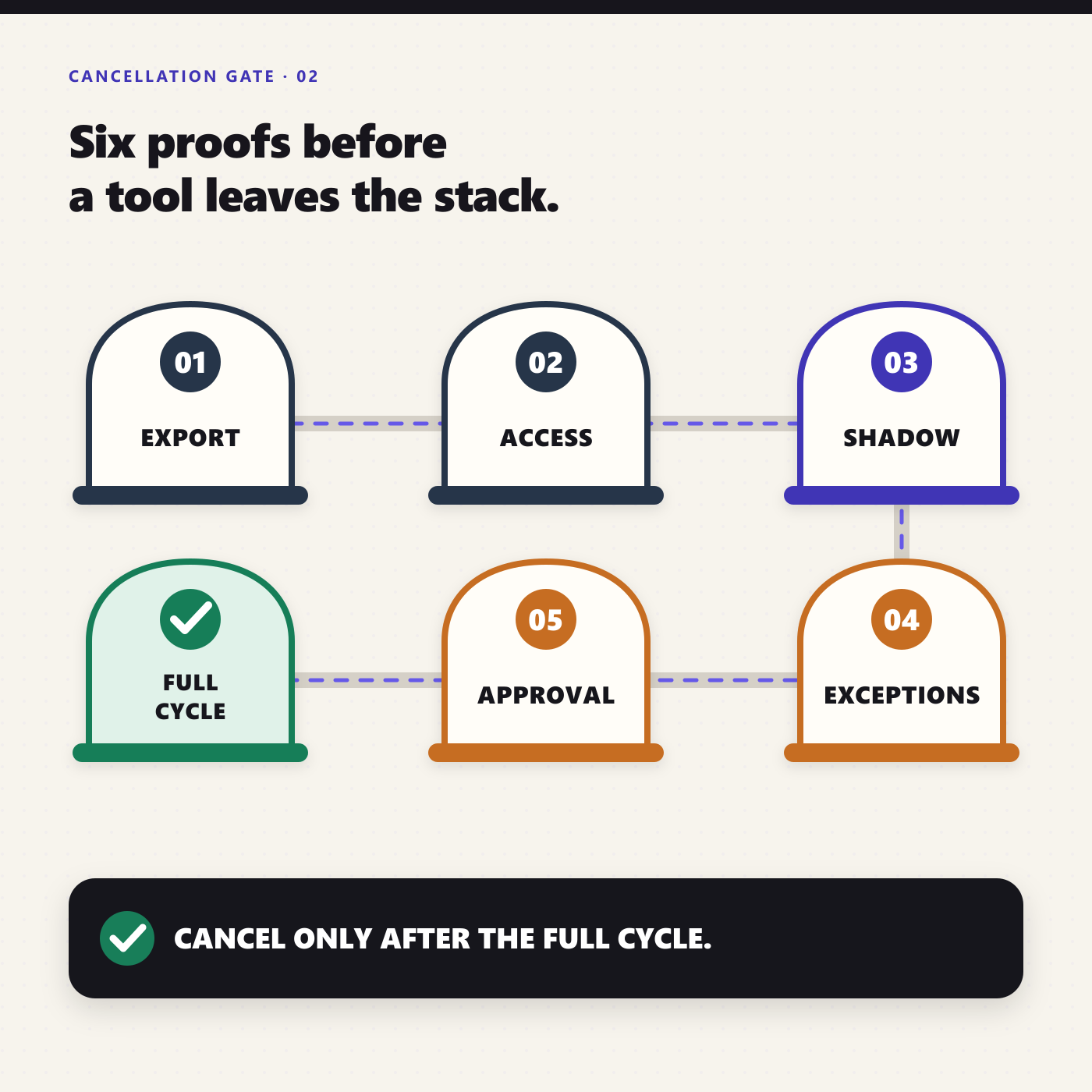
An agent demo can look excellent and still fail on an ordinary Tuesday. Before cancellation, make the replacement clear six gates using real work, not a polished sample.
1. Export and preserve what is unique
Identify transcripts, approvals, templates, customer history, analytics, signatures, or other records the product holds. Export what must be retained, confirm the export is readable, record its new owner, and test retrieval. A cancelled tool is not a backup strategy.
2. Confirm complete action coverage
List the job’s start conditions, sources, decisions, outputs, deadlines, and destinations. Confirm that every required read and write is supported under the actual account permissions. Test missing fields, duplicates, conflicting records, unavailable systems, and after-hours inputs.
A pass means the agent completes the agreed scope without a person quietly finishing hidden steps. If someone must still copy the result, rename files, chase inputs, or update the system of record, the replacement is incomplete.
3. Run in shadow mode
Run the agent beside the current product for at least one real business cycle. Compare outputs against defined quality thresholds. For Northline’s report, every total must reconcile to its source, every account reference must point to the correct record, and unsupported conclusions must be removed.
A typo in an internal summary is not equivalent to a wrong invoice status or invented customer commitment. Do not hide different consequences inside one “accuracy” percentage.
4. Test exceptions and outages
Good automation is not the absence of exceptions. It is disciplined handling of them. Define what the agent may resolve, what it must clarify, what needs approval, and what should stop the run.
The proof is a clean exception path: ambiguous items surface with context, ownership, and a recommended next step. If the agent guesses when evidence conflicts, it has not passed.
5. Put authority and recovery in writing
Map every action as read, draft, create, update, send, approve, pay, delete, or administer. Give the agent only what the tested job needs. Place approval before sensitive or difficult-to-reverse actions, not after them.
Then test recovery. Pause the job. Correct a bad output. Rerun a failed step without duplicating messages or records. Confirm that a manager can reconstruct the trigger, sources, output, actions, approvals, and errors.
6. Complete the economics and ownership review
Compare subscriptions, seats, agent usage, setup, review time, exception work, retained software, and failure cost. Name an internal owner for instructions, permissions, quality thresholds, and change control.
A replacement passes when the total operating burden is sustainably lower or the outcome is materially better, not merely because the agent can perform the happy path. Sometimes the correct decision is to keep the product and let an agent remove the labor around it.
What an agent-centered Praxivara stack looks like
Praxivara is the operating layer across the systems a business chooses to keep, while also providing native business records for supported workflows. It is not meant to replace every specialized system in the stack. Identity providers, payment rails, regulated systems, and any record system whose controls the business still depends on should remain connected and authoritative where appropriate.
The Praxivara AI business assistant handles immediate work through conversation. Custom AI Agents handle recurring responsibilities. A team can describe the role in plain language; the builder asks clarifying questions and configures instructions, allowed tools, a schedule or supported trigger, and approval rules. The team reviews a visual Blueprint before enabling the Agent.
An Agent can run on demand, on a schedule, or from a supported event. Configured approval gates pause a run before a consequential action. Deliveries show the result, while recent Activity provides evidence about status, timing, tool steps, usage, output, and errors. Version History preserves restorable configuration snapshots as the job evolves; it does not reverse actions already completed in outside systems.
Praxivara works across hundreds of supported integrations. Exact actions and triggers vary by provider, connection, and account permissions, so the right feasibility check is the specific job in the current integration catalog, not a logo count.
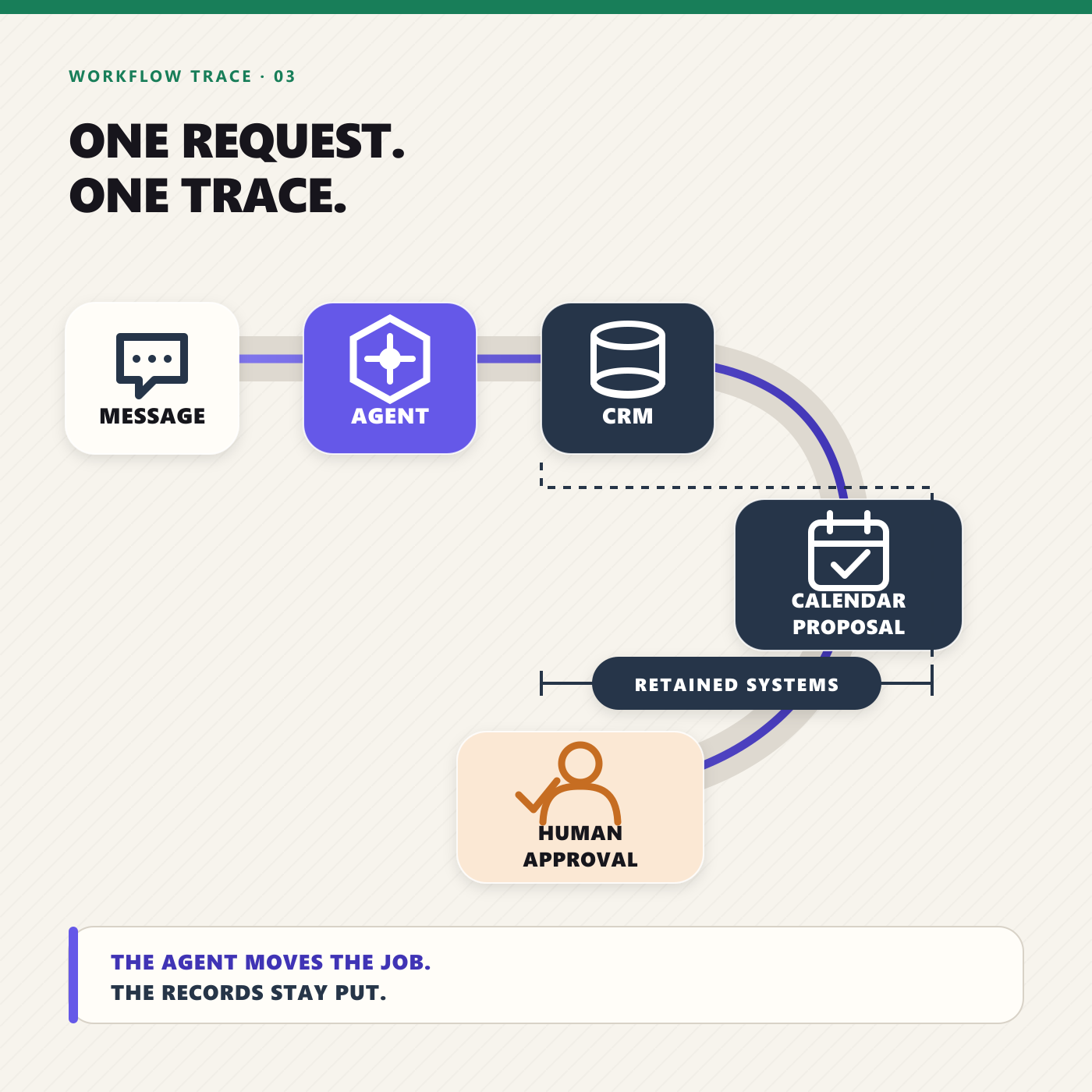
Return to Northline. Its first Agent could be described this way:
“Every Friday, gather the agreed operating metrics from our connected CRM, accounting, support, and project systems. Reconcile each figure to its source, identify exceptions, draft the executive report, and send it for approval by 3:30 p.m.”
The Blueprint gives the manager a concrete object to inspect. The approval rule prevents delivery until a reviewer accepts it. Deliveries and Activity provide evidence for the six proof gates. If the responsibility passes, Northline can retire the standalone reporting layer while the systems holding customer, financial, support, and project records remain.
Praxivara can reduce point-solution sprawl by taking ownership of complete, controlled responsibilities across the retained stack. The goal is fewer handoffs, fewer thin coordination subscriptions, and a clearer operating model, not one app pretending to be everything. If you are comparing the broader market, our current AI agent platform evaluation explains the tradeoffs among 25 options.
How to run your first stack audit this week
- Export the bill: list every recurring software charge, owner, renewal date, billing unit, seats, and actual 90-day usage.
- Name the responsibility: write the business outcome each tool supports. If the answer is a feature rather than a responsibility, keep asking why.
- Mark record, rail, and risk: identify unique data, execution infrastructure, permission boundaries, and evidence you cannot lose.
- Assign a verdict: Cancel, Downshift, Connect, or Keep gated. Uncertainty belongs in Connect, not Cancel.
- Choose one trial: start with frequent, reversible work that has an observable correct result. Weekly reporting, meeting follow-up, inbox triage, or simple scheduling are better than payroll or payments.
- Run the six gates: do not cancel until the agent has completed a real business cycle and the named owner accepts the new operating burden.
Do not begin by asking how many apps an agent can delete. Begin with one responsibility that currently crosses several systems and consumes attention every week. When that job is controlled, verified, and cheaper or materially better to run, move to the next.
Frequently asked questions
Can an AI agent replace my entire SaaS stack?
Usually no, and that should not be the goal. Keep software that holds durable truth, protects identity, moves money, records agreements, or performs specialized regulated work. Use agents to replace or consolidate coordination, drafting, triage, follow-up, reporting, and cross-system operating work.
Which SaaS category should a small business audit first?
Start with a narrow point solution supporting a frequent, low-risk, reversible job with an obvious correct result. Recurring report assembly, meeting follow-up, simple scheduling, inbox classification, and routine document drafting are better first trials than accounting, security, payments, or core customer records.
Can AI agents replace CRM software?
An agent can replace many CRM-administration tasks and some add-ons, but the CRM often remains the authoritative customer and deal record. Downshift administrative seats or premium workflow features only after the agent proves it can preserve data quality, ownership, consent, and history.
Can AI agents replace accounting software?
Not as a blanket rule. A business still needs an authoritative ledger with the controls, reconciliation, reporting, history, and qualified review its work requires. Agents can collect documents, prepare entries, explain variances, chase approvals, and draft collections messages; consequential postings and money movement should follow configured approval policies. Praxivara can provide native business records for supported workflows, while an existing accounting system should remain authoritative wherever its controls or dependencies are still required.
Can an AI agent replace workflow automation?
Sometimes, but not automatically. Deterministic workflows remain better for exact, stable, high-volume paths. Agents are stronger when work contains language, ambiguity, context, or changing exceptions. Many small businesses should keep simple reliable automations and consolidate only the brittle chains that imitate human judgment.
Can AI agents replace Calendly?
Sometimes. Cancel or downshift when the job is ordinary one-to-one scheduling and an agent can check calendars, negotiate times, and confirm. Connect or keep Calendly when public booking pages, routing, round-robin assignment, payments, or team controls are part of the job.
Can AI agents replace Otter.ai?
Sometimes. Downshift or cancel when a reliable transcript already exists and you mainly need summaries, tasks, and follow-up. Keep or connect Otter when it is the capture system or searchable archive, with the required consent, retention, and access controls.
Can AI agents replace Zapier?
Not wholesale. Keep stable, high-volume workflows with deterministic triggers and steps. Consolidate context-heavy paths involving judgment, drafting, research, or exceptions. Cancel only after shadow testing proves equivalent coverage, retries, evidence, and operating cost.
Can AI agents replace Asana?
Usually not when Asana is the team’s shared work graph. Connect it when ownership, dependencies, files, permissions, timelines, or history matter. Downshift or cancel only when it is mostly a checklist and status-chasing layer the agent can fully replace.
How long should a replacement trial run?
Long enough to include the workflow’s actual cycle and exceptions. Test several weekly runs for weekly work, a real month-end for monthly reporting, and a representative mix of customer cases for support. Exposure to routine, edge, and failure conditions matters more than a fixed number of days.
Are AI agents cheaper than SaaS subscriptions?
They can reduce total cost when one governed agent absorbs several narrow tools or manual handoffs, but savings are not automatic. Count agent usage, setup, human review, exceptions, migration, retained systems, and failure cost alongside cancelled subscriptions, seats, and add-ons.
What if the agent trial fails?
Keep the existing product, narrow the job, or redesign the controls. A failed trial is useful evidence if it prevents a premature cancellation. The audit succeeds when it produces the correct operating decision, even when that decision is “keep this tool.”
Source note: Product capabilities and public pricing were checked on September 17, 2026. Vendor pricing and features change, and promotional prices may expire. Confirm current terms and the exact integration actions your job requires before making a purchase or cancellation decision. This guide is operational analysis, not legal, tax, accounting, employment, or security advice.
Audit one responsibility with Praxivara. Describe the recurring job, connect the supported systems, review the Blueprint and approval rules, and run it beside your current process before you cancel anything. Start your seven-day trial.