
Sunday, 9 p.m. You open QuickBooks for the first time in three weeks. The For Review tab says 412. Half are obvious. Then there's $84.12 at Costco from March. Office supplies, groceries, or both? You can't remember, so it goes to Ask My Accountant with the rest of them. Next Sunday, you tell yourself. You told yourself that last Sunday too.
First, the part most lists bury: we make Praxivara, an AI assistant that connects to QuickBooks, and it's one of the tools ranked in this guide. That means we have a stake. So we'll tell you exactly where our tool loses and when to skip it entirely. If you only want the winners, skip to the table.
Almost every "best AI for QuickBooks" list on the internet is written by a vendor that ranks itself first. This one is too. The difference: we ranked jobs, not tools, and we lose three of the five.
The hours are documented, too. In NSBA's 2025 taxation survey, most owners reported spending more than 20 hours a year on federal taxes alone, and about 2 in 5 spend more than 40 — even though most already pay someone to handle it. The Sunday ritual sits on top of all that.
Five jobs, then, the ones owners actually try to hand off: invoicing and chasing, categorizing transactions, paying bills, reports and answers, and connecting the books to everything else. Each one gets a winner and a runner-up, plus the catch that comes with both. Every price is quoted from the vendor's own pages, checked in late July 2026. And before we rank anything you'd have to pay for, a straight answer to the question the other lists skip: whether the AI already inside QuickBooks is enough.
Why you don't trust AI in your books (and why you're right)
If the suggestions in QuickBooks ever filed a credit-card payment under a different credit card, you already know why you don't trust this. That happened to real owners, at scale, and they wrote it up in Intuit's own support forums.
Whole threads exist asking how to turn the AI off. Owners described suggestions that were wrong far more often than right. They described settings that would not stay off, and mis-matched bank transactions that meant checking everything twice instead of once. Some longtime users said the experience had them shopping for alternatives. That wasn't a few cranky reviews. It was a genre.
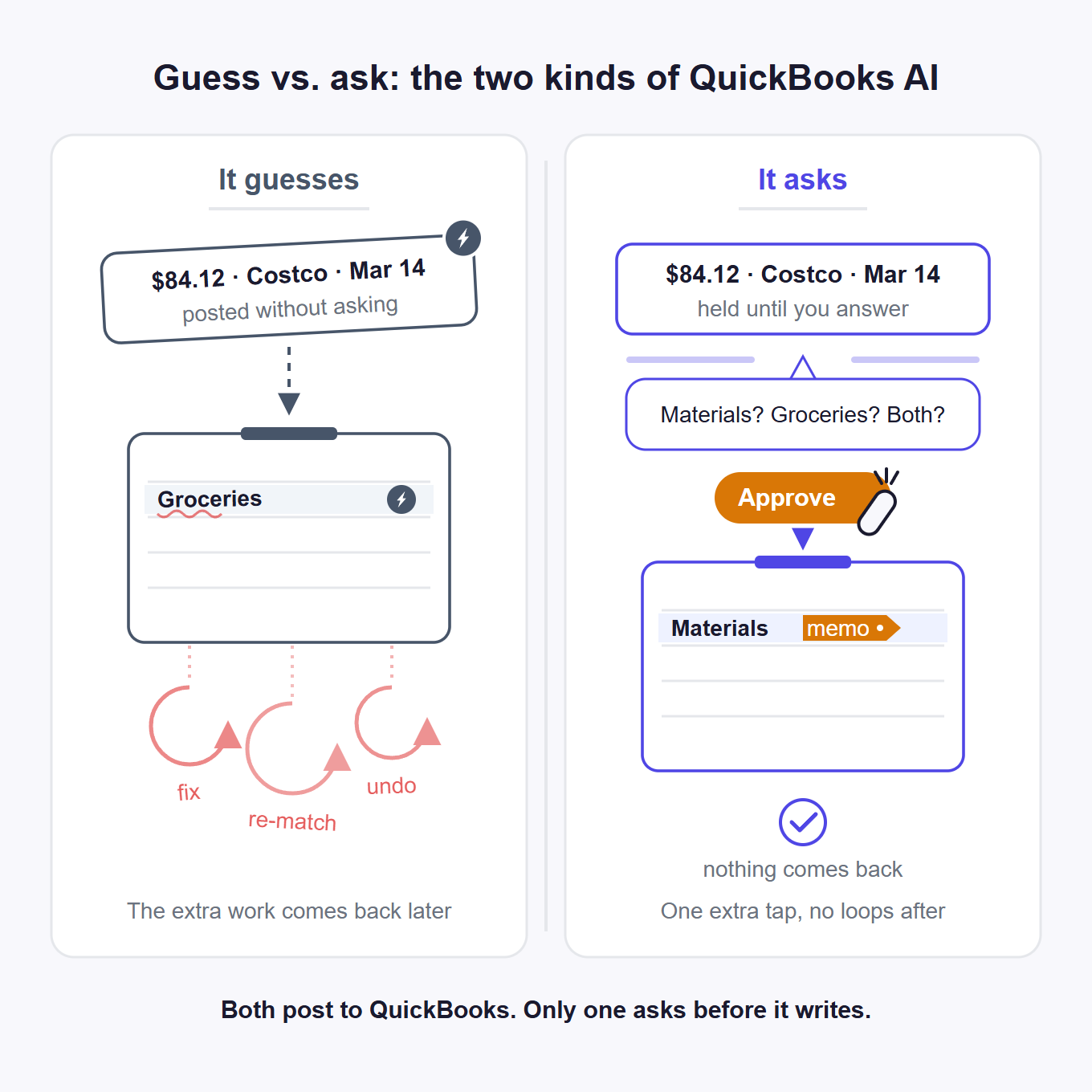
None of this makes Intuit a villain. Even Intuit's own moderators have acknowledged that the software works from patterns and sometimes needs more context to get a category right. That sentence is the whole problem. Pattern-matching guesses. A good bookkeeper asks. The $84.12 Costco charge from March isn't hard because the math is hard. It's hard because only you know what it was. To Intuit's credit, its newer AI (covered below) is a different, more deliberate product than those old bank-feed suggestions. So hold the lesson as a criterion, not a grudge: software that guesses silently creates review work, and software that asks removes it.
There's a second scar. A well-known books-done-for-you service shut down abruptly days before a year-end. Customers found out when their logins stopped working. Some had prepaid for the full year. The books lived inside that company's system, not in a file the owners controlled.
The criterion that falls out of that story: whatever helps with your books, your ledger should live somewhere you control — for most owners, that means inside QuickBooks. A tool you can cancel tomorrow without losing an entry is a tool you can afford to try.
So the skepticism is earned. Keep it. What would an AI have to do to earn a place in your books? That's a hiring question, and it deserves a hiring test.
The Junior Bookkeeper Test: five questions before any AI touches your books
Before any AI touches your books, ask it the same five questions you'd ask before hiring a junior bookkeeper who never sleeps. You are not hiring an autopilot. You're hiring someone who drafts the easy 80% and asks about the weird 20%. Nothing posts unless you saw it first. We call it the Junior Bookkeeper Test, and every tool in this guide gets run through it.
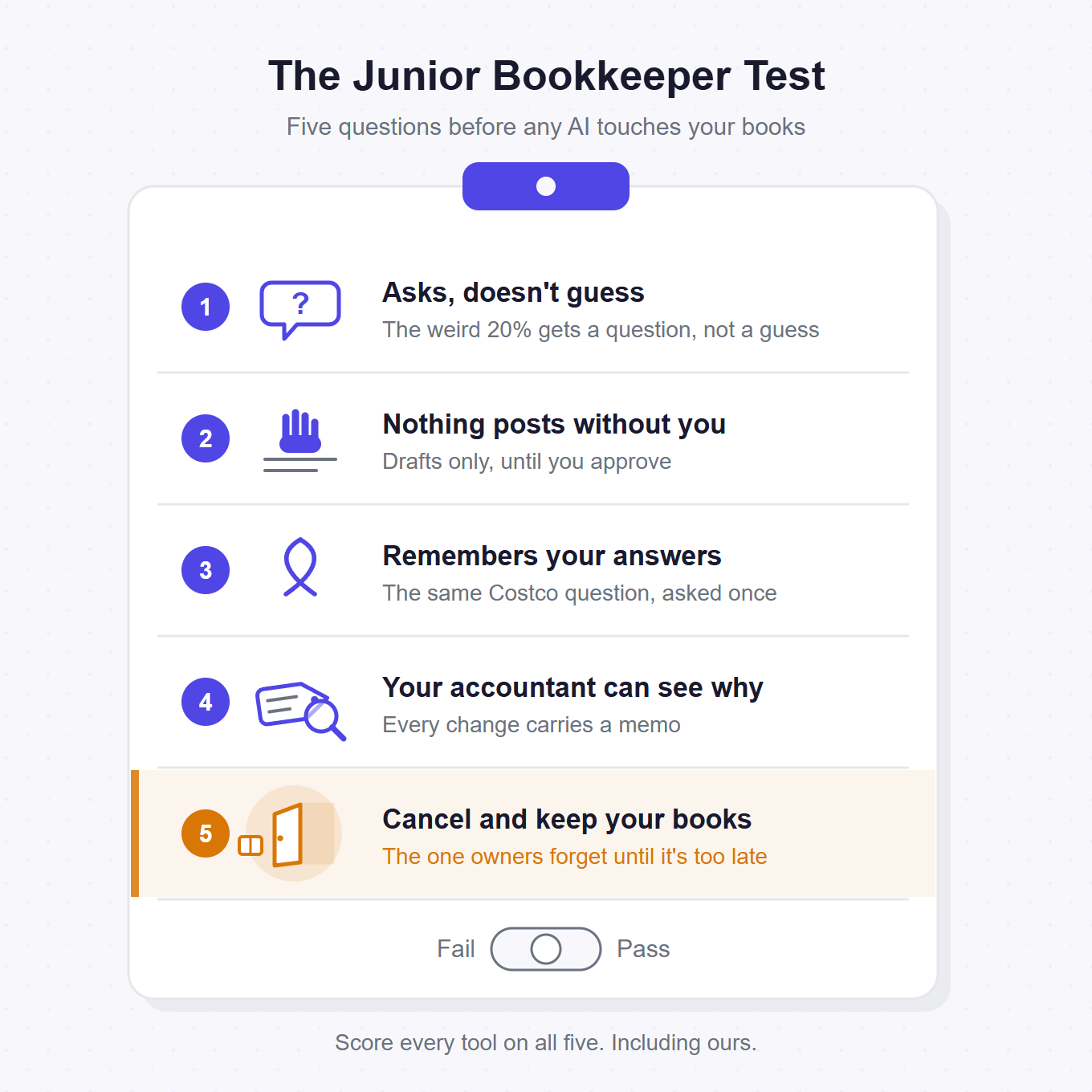
1. Does it ask or guess? A junior who sees $312 at Home Depot and doesn't know your business yet should ask: job materials, or your deck? Software that guesses there hands you a tax problem in April. Even Intuit has acknowledged that pattern-based suggestions sometimes need more context to categorize a transaction precisely. That's the gap in one sentence: patterns guess, and a good hire asks.
2. Does anything post without you? Drafts cost nothing. Silent writes are how you lose track of your own ledger, one unreviewed entry at a time.
3. Does it remember your answers? If you're answering the same Costco question every month, the tool isn't learning. You're still the bookkeeper. You've hired a fast note-taker.
4. Can your accountant see what it did and why? Every touched entry needs a visible trail. If your CPA can't tell what changed, they'll bill hours to audit it, or they'll tell you to turn it off. Either way, you paid twice.
5. If you cancel tomorrow, do your books stay yours? Tools that work inside your QuickBooks file pass this one automatically. Services that move your ledger into their own system fail it just as automatically. You should be able to walk away and lose nothing but the tool.
Question 2 is a hard line for us, not a preference. An AI that posts to your ledger without an approval step is disqualified, no matter how accurate it claims to be. Accuracy isn't the metric here. Verification cost is. A tool earns its keep only when reviewing its work is one skimmable pass, not a second job.
One honest warning: week one with an asking tool is heavier than week zero. It asks a lot at first, because it doesn't know your business yet. That front-loaded work pays off only if question 3 is a yes, so your answers compound instead of repeating.
The Junior Bookkeeper Test
- Does it ask or guess?
- Does anything post without you?
- Does it remember your answers?
- Can your accountant see what it did and why?
- If you cancel tomorrow, do your books stay yours?
Paste these five questions into the notes doc you bring to your accountant before you connect anything.
Every tool below gets these five questions in plain sentences, not scores. So does ours.
How we ranked (and what we make)
We ranked five jobs, not twelve tools. A tool only appears in a cell it genuinely wins or places in. That means no tool shows up in more than three cells, and several excellent ones show up in exactly one.
Every price and every feature claim below comes from the vendor's own pages, checked in late July 2026. Where a vendor does not publish an answer, we write "not disclosed" and let you weigh that silence yourself. No scores, no stars. Each tool gets plain sentences and the five questions of the Junior Bookkeeper Test.
Our stake is already on the table: we sell one of these tools, which is exactly why the cells it loses are spelled out in the same flat language as the cells it wins.
One scope line before anything gets ranked. This guide is for owners who run their own books in QuickBooks Online. If a bookkeeping firm runs your books, your tools live in a different aisle. And if you want an assistant for your whole business rather than the books, our broader roundup of AI assistants for small business covers that field.
Last verified July 2026. Every price and claim in this guide was checked against each vendor's own pages. If we got something wrong, tell us at the help center and we'll correct it. QuickBooks and Intuit are registered trademarks of Intuit Inc. Every other product named here is a trademark of its owner. None of these vendors endorses this guide, and we're not affiliated with any of them.
Start with the AI you already have: Intuit Intelligence
Before you pay for anything on this list, check what's already sitting in your QuickBooks. Intuit Intelligence is Intuit's own AI, built into QuickBooks Online, and Intuit rolled what it used to call Intuit Assist into it. Being current on the name matters, because most lists in this category are still reviewing the old one. Intuit's own overview of Intuit Intelligence describes it as AI plus business intelligence: it answers questions and automates financial tasks inside QuickBooks, working from your company data with no manual entry.
The launch-era feature set comes from Intuit's own Assist announcement. It could turn forwarded emails and photographed documents into estimates, invoices, or bills, and auto-match transactions from the QuickBooks ecosystem to the matching bank transactions. It also watched for potential cash-flow shortages and suggested actions.
Its edge is real, and nothing else on this page can copy it. It's first-party. There's nothing to connect and nothing to sync, and no outside tool will ever see your QBO data at the depth Intuit's own product does.
Intuit Intelligence is enough on its own if: you're a US QuickBooks Online user, your pain is invoices, receipts, and cash-flow visibility inside the books, you don't need AI to touch your email, calendar, or phone, and metered chat usage doesn't bother you. If that's you, the tool you already have covers it — the rest of this guide is for the jobs it doesn't reach.
The limits are on Intuit's pages too. Per Intuit's help center, updated late July 2026, it's available for QuickBooks Online and the accountant suite at this time. The Assist launch materials scoped it to US QuickBooks Online customers, and it isn't included with Solopreneur or Self-Employed. Chat usage is metered: that same help center carries articles on buying additional prompts and on canceling a prompt subscription. And its scope is the books. It won't chase an invoice through your email threads, and it doesn't act in any app outside QuickBooks.
Run it through the Junior Bookkeeper Test and you get a split answer. On question 5 it's the strongest tool in this guide — it is QuickBooks, so cancel-tomorrow risk barely applies and your data never leaves. On question 1, history is the weak spot: the old bank-feed suggestions guessed, while the newer product is built to be more deliberate about it.
If your whole problem lives inside the books, start here and stay here. The rest of this guide is for everything it doesn't reach.
Who wins each QuickBooks job: the matrix
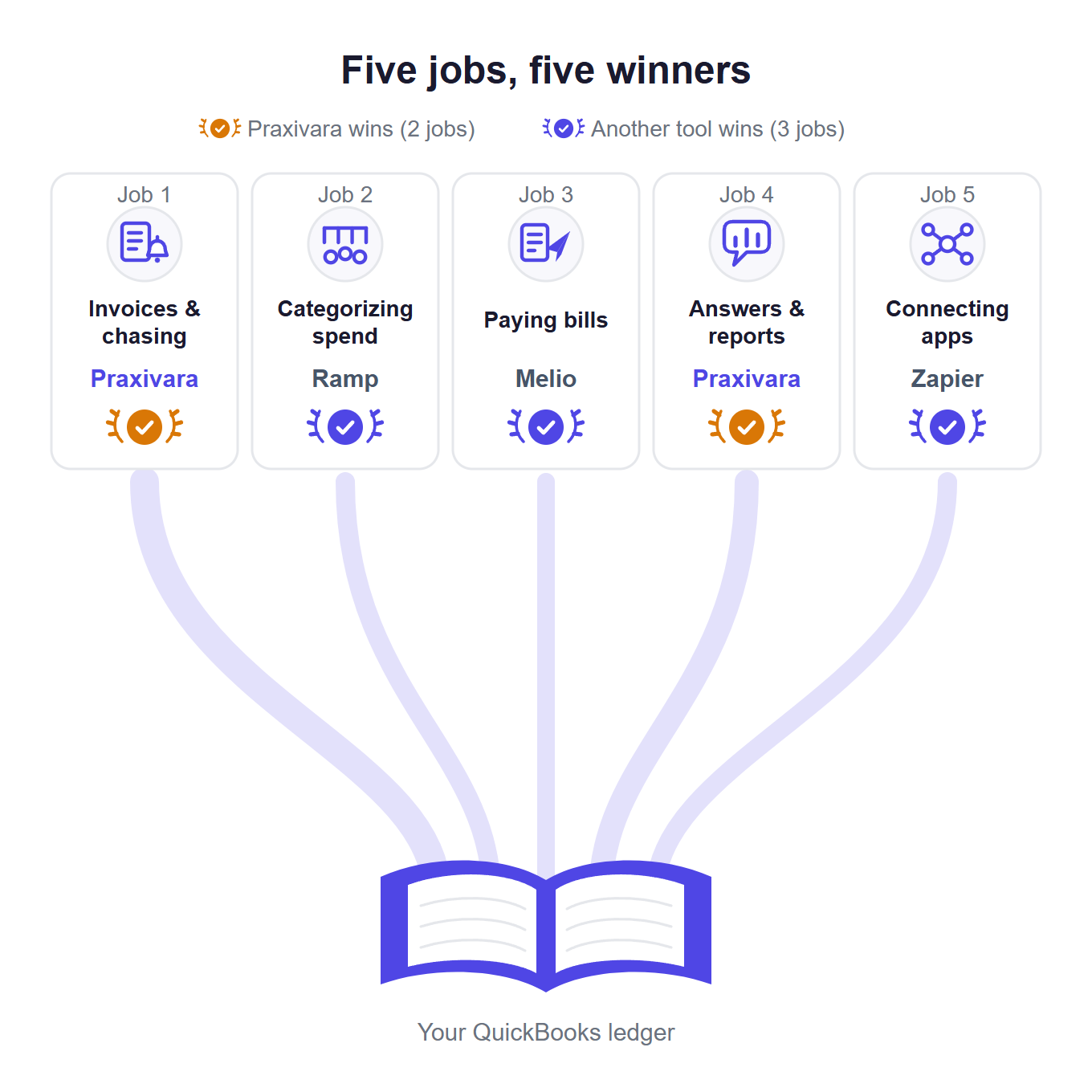
These are the five jobs owners actually try to hand off, with a winner and a runner-up for each, plus the catch that comes with every cell. No first-to-last ranking exists anywhere on this page, on purpose.
| Job | Winner | Runner-up | The catch |
|---|---|---|---|
| Invoices & chasing | Praxivara | Intuit Intelligence | Agents can be set to send without asking each time |
| Categorizing spend | Ramp (card spend) | Bank rules (with a bookkeeper) | Nobody can touch the For Review queue — not us, not anyone |
| Paying bills | Melio | BILL | Melio's card fee is 2.9%; BILL doesn't publish subscription prices there |
| Answers & reports | Praxivara | Intuit Intelligence | Praxivara has 3 curated reports; Intuit meters chat prompts |
| Connecting apps | Zapier | Synder (e-commerce) | Pipes move data; they don't understand it |
The job list isn't ours. In QuickBooks' own 2026 late-payments survey, the things owners most wanted AI to take over were reminders to pay bills (40%), data entry (37%), and spending insights (33%). That wish list maps almost row for row onto the table.
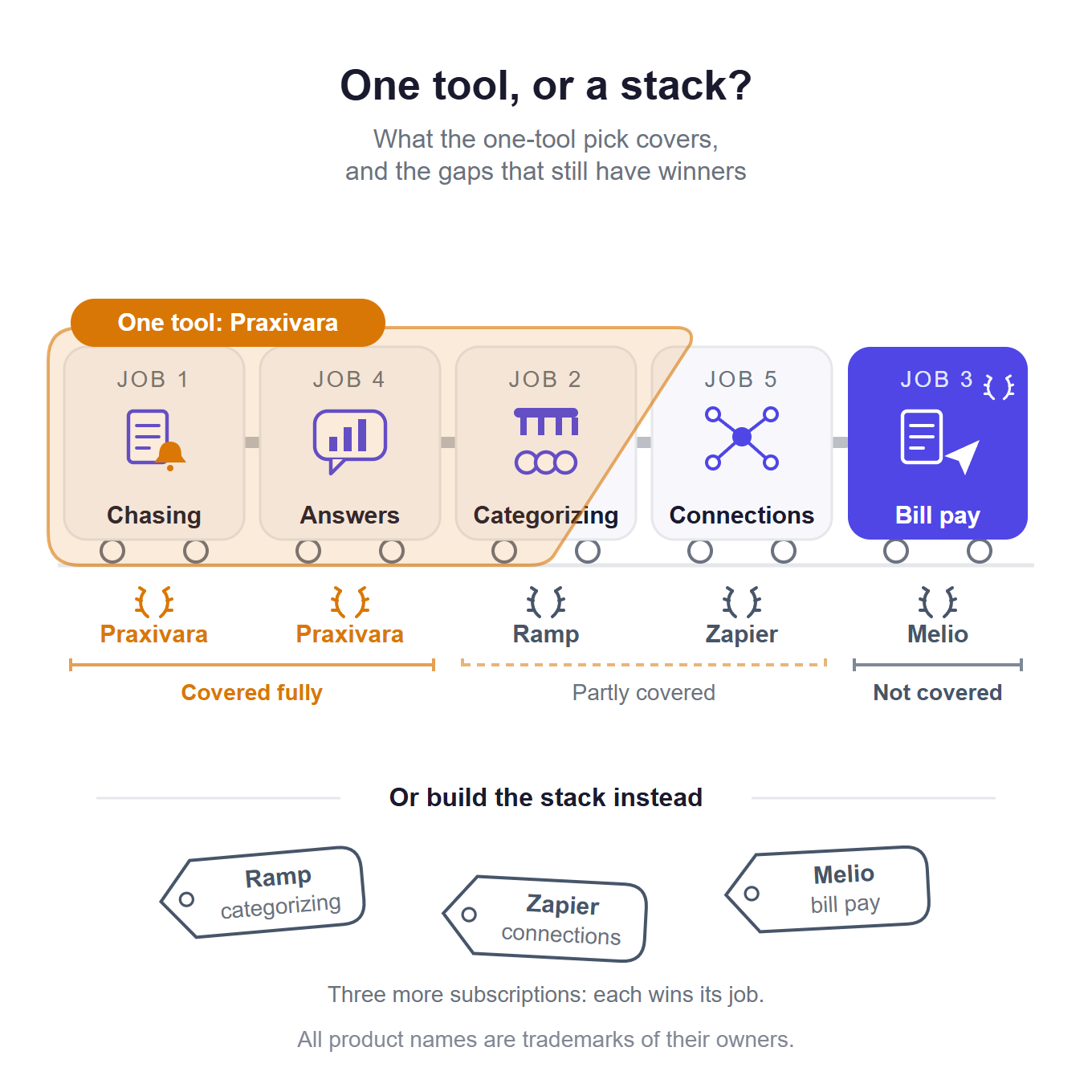
Read it honestly: our tool wins two of the five cells and loses three. The catch column is not fine print. It is the ranking. A winner whose catch you can't live with is not your winner, and the runner-up column is there for exactly that case.
Which job to hand off first is a separate decision, and this post won't re-make it. The Green-Light Grid scores any task in two questions.
One row is missing on purpose: payroll. None of the third-party tools on this list runs payroll inside QuickBooks Online, ours included; Intuit's own payroll products own that job.
Job 1: Sending invoices and chasing the money (winner: Praxivara)
Start with what this job costs when nobody does it. In QuickBooks' own 2026 late-payments report, businesses waiting on unpaid invoices were owed $17,700 on average, and 39% of owners said a single late payment made it hard to cover payroll or bills.
This is the first of two cells our own tool wins, so read the next paragraph knowing who wrote it.
Praxivara wins here because of a prebuilt agent called the Overdue Invoice Chaser. Every weekday morning it pulls every open and unpaid invoice from QuickBooks and sorts them into aging buckets. Then it sends the escalation email that matches each bucket: a friendly nudge for the newest, a final notice for the oldest, a statement attached once things get firm. It never chases the same invoice twice in one week, and it skips anything you've marked disputed or on a payment plan. It logs every touch, builds an A/R aging PDF, and texts you a summary of what got chased and what got paid overnight. In chat, the same connection drafts and sends invoices, records payments against the right invoice, and pulls the actual invoice PDF so a reminder carries the bill it's about.
Now the mechanics we owe you before taking the win. In chat, you choose when it checks with you first: before every write, only when it matters, or almost never. Reads run instantly. Agents work differently. You choose what an agent may touch when you build it, and whether it checks with you by message when it needs your OK or runs on its own. Set it to run on its own and scheduled runs go ahead without a per-invoice tap. If you want a human tap on every single send, have the agent draft instead of send, or don't run the agent. Two more limits while we're at it: Praxivara records payments, it does not process them, so no card charging and no money movement. And recurring invoices are guided by a skill that walks the setup with you, not a one-click switch.
Against the Junior Bookkeeper Test: it asks, because it raises judgment calls instead of guessing. It remembers, because a disputed invoice stays skipped until you say otherwise. And your accountant can read the log of every touch. The wobble is question 2 for agents, and we put it in the paragraph above instead of the fine print.
The runner-up is Intuit Intelligence, and for plenty of owners it is the sensible first stop: reminders inside QuickBooks with nothing extra to buy. At the Assist launch, Intuit's own numbers said overdue invoices were 10% more likely to be paid in full and got paid about five days sooner with its reminders. Those figures come from Intuit's launch announcement, not from us. Its limit for this job, per Intuit's own materials as of July 2026: the reminders live inside QuickBooks. It won't call anyone, and it won't work your email threads across other apps.
Skip automation for this job if you send a few invoices a month and your clients pay on time. The built-in reminders already cover you. Don't buy anything for this job.
One boundary before job 2. We ranked the tools that run the chase, not the human side of when to nudge and when to escalate. That craft is its own post, and the Escalation Clock walks it stop by stop.
Job 2: Categorizing transactions and cleaning up (winner: Ramp for card spend)
No third-party tool can clear QuickBooks' For Review queue for you. Intuit doesn't expose that screen through its public API — not to us, not to anyone on this list. So any tool that promises to work your bank feed for you is either inside Intuit or overpromising. Read every pitch on this row with that fact in hand. It also reframes the job. You can't hire outside software to shovel the feed. You can only stop the mess before it reaches the feed, or make answering the leftover questions cheaper.
If the mess is card spend, the winner is Ramp. Its base plan is $0 per user per month and includes the QuickBooks Online connection, per Ramp's pricing page in late July 2026. Card transactions arrive in your books already categorized, synced in real time with the receipt and memo attached. It also runs 3-way matching of purchase orders, receipts, and invoices, as laid out on Ramp's QuickBooks integration page. It also passes the cancel-tomorrow question of the Junior Bookkeeper Test cleanly: drop Ramp and your coded history stays in QuickBooks. The limits come from Ramp's own pages too. It automates Ramp-originated spend, not your whole ledger. The "AI coding for every field" feature sits on the paid Plus tier at $15 per user per month, while the free tier gets basic accounting rules. And it supports US and Canada QuickBooks Online companies only.
A different reader needs a different answer. If a bookkeeper runs your books and the real bottleneck is you answering their "what was this?" emails, don't shop this row at all. Start with QuickBooks' free bank rules for the charges that repeat, and ask the firm to route the leftovers through whatever handoff tooling it already uses. Firms have their own stack for exactly that question, and you shouldn't pay for a second one.
Praxivara loses this cell. It works at the transaction-record level: expenses, purchases, and deposits that already live in QuickBooks. On judgment calls it asks instead of guessing, so a $96.40 Sam's Club run gets a question about shop supplies versus groceries rather than a silent guess. Owner draws and other co-mingled charges get the same treatment. It reads receipts into coded entries and checks them for duplicates. It remembers your answers, so the same question doesn't come back next month. But it cannot touch the For Review queue any more than Ramp can. If bank-feed cleanup is your one pain, this cell isn't ours, and we'd rather tell you now than after you connect anything.
Skip the paid tools if your spending is regular. QuickBooks' bank rules are free and already installed. An evening spent writing ten good rules beats every paid tool on this row. Set them up first, then see what's left.
Job 3: Paying the bills (winner: Melio)
Melio wins because paying vendors is a payments job, and Melio is a payments company with a real two-way QuickBooks sync. Bills and bill payments flow in both directions automatically, so you pay in Melio and the books update themselves. Its AI captures incoming bills and codes them into QuickBooks with classes, locations, and line items, and it learns from your corrections. All of it is documented on Melio's QuickBooks page.
Pricing, from Melio's own pages as of July 2026, starts at free. The free plan includes 5 free ACH payments a month, and paid plans run $25 to $80 monthly. Past your allotment, each payment carries a fee: $0.50 for an ACH transfer, $1.50 for a paper check, and 2.9% if you pay by card.
One thing to check before you lean on the free tier: Melio's pricing page lists QuickBooks Online sync as a Core-plan feature. Confirm your plan actually syncs before you route real bills through it. QuickBooks Desktop sync sits on higher tiers.
The job deserves the attention. In QuickBooks' own 2026 late-payments survey, nearly 3 in 4 businesses said paying bills isn't fully automated for them, and a manual process was the top internal reason their own payments went out late.
The runner-up is BILL, the established pick when more than one person signs off before money leaves. It keeps your payables, receivables, card, and spend data in sync with QuickBooks, and it documents that sync at the object level. Customers, invoices, purchase orders, and classes flow in; vendors, bill payments, transfers, and credits flow back. It also covers QuickBooks Desktop (Pro, Premier, and Enterprise). Two blanks from BILL's QuickBooks integration page, checked in July 2026: the page ties no specific AI features to the QuickBooks integration, and it does not publish subscription pricing. "No extra integration fees" is the only cost language on it. That is not a knock; not disclosed is useful information. Ask for the number before the demo.
And if you adopted Ramp for job 2, check its bill pay before adding anything here. It may cover this job too: one tool fewer.
Praxivara loses this cell too, and not narrowly. It enters vendor bills with coded expense lines and catches duplicates by vendor, bill number, and amount. It runs the A/P aging report so you can see what's due and weigh pay-now against pay-later. What it does not do is move money: it records payments, and it never sends one. If the job is "pay 30 vendor bills a month without opening the bank," that cell belongs to Melio or BILL, not to us.
On the Junior Bookkeeper Test, the question that decides this row is the fifth. Melio passes it cleanly: cancel tomorrow and your bills and payments still live in QuickBooks, because the sync put them there. You lose a workflow, not your records.
Job 4: Getting answers out of your books (winner: Praxivara)
"Who owes me money right now?" You ask that from the truck at 9pm, and you want to text the question, not build a report. The job here is answers, not reporting.
The winner is Praxivara, because it treats that text as a question to answer, not a report to configure. It works from live QuickBooks data in plain English: an A/R aging for who owes you, an A/P aging for what's due out, a P&L detail that can set May next to April. A raw query action can pull from any QuickBooks entity, which covers the odd questions no canned report answers. The Financial Snapshot skill then turns the numbers into a short readable summary: prior-period comparison, key ratios, and a warning when the books are too far behind to trust. Ask for the A/R aging as a spreadsheet and you get a finished file built from your books, not a paragraph of chat. And because it lives in chat, the same question works over SMS or WhatsApp from the road, live on every account.
Answers come back as cards with an "Open in QuickBooks" button that jumps straight to the record. Checking its work is one tap. That's question 4 of the Junior Bookkeeper Test, answered in the interface instead of in a promise.
Praxivara ships 3 built-in reports: P&L detail, A/R aging, and A/P aging. Balance-sheet and cash-flow style answers come from the skill stitching queries together, not from a one-click report. That's usually fine for an owner's question. It is not a replacement for the close package your accountant builds. Reads run instantly, and you choose whether writes check with you first.
Runner-up: Intuit Intelligence. It's already inside QuickBooks, and per Intuit's help center in late July 2026, it's pointed at exactly this job: creating and customizing reports, understanding trends and anomalies. The catch for this job is the meter. Chat usage is metered, and owners who ask questions all day are the ones who'll feel it.
Skip AI for this job entirely if the monthly P&L is the only number you look at. QBO's standard reports already do that without AI, at no extra cost.
Job 5: Connecting QuickBooks to everything else (winner: Zapier)
For pure pipes between QuickBooks and the rest of your software, the winner is Zapier. Its QuickBooks Online integration exposes 26 triggers and more than 35 write actions, plus searches, and connects them to hundreds of other apps. Nothing else on this page comes close to that catalog. A closed deal in your CRM becomes a QuickBooks invoice; a new QuickBooks payment posts to your team chat. The free plan covers 100 tasks a month, enough to test the pipe you have in mind. The full list is on Zapier's QuickBooks integration page.
The limits are limits of shape, not quality, and they come from Zapier's own pages. A Zap does the same thing every time: this trigger fires, that action runs. The QuickBooks integration page markets no AI understanding of your books, because a Zap is plumbing, not an accounting brain. Watch the meter too. Per Zapier's pricing page in late July 2026, paid tiers start at $19.99 a month billed annually and climb into four figures at heavy task volumes. A busy ledger generates a lot of tasks.
One special case flips the cell. If you sell on Shopify, Amazon, Stripe, or Square, the glue job is really a reconciliation job, and that one belongs to Synder. It posts sales, fees, refunds, and taxes from more than 30 platforms into QuickBooks, either as per-transaction detail or as daily summary entries. Its AI matching engine flags discrepancies before month end. It meters on sales volume: as of July 2026, Synder's pricing page lists the Basic tier at $52 a month on yearly billing, capped at 500 sales transactions a month, with tiers climbing to 40,000. Its own site is clear about the scope. This is sales-data bookkeeping; it doesn't do bill pay or payroll, and it isn't an assistant.
Praxivara plays this job with a different shape rather than a bigger catalog. Its 61 QuickBooks triggers don't feed pipes; they launch agents. When an invoice gets paid, a bill arrives, an expense crosses a threshold you set, or stock runs low, an agent can wake up. It then works across your email, calendar, phone, and 200+ connected tools instead of moving a row from one app to another. But for sheer breadth of app-to-app plumbing, Zapier's catalog is bigger than ours, and this cell is Zapier's.
The Junior Bookkeeper Test reads strangely on this row, and the strangeness is the lesson. Pipes pass question 5 without trying: your ledger stays in QuickBooks, and you can shut any of this off tomorrow and lose nothing. But a pure pipe can't ask, so question 1 never comes up. That's why Zaps are safe. It's also why they can't do jobs 1 through 4.
If you only want one tool: the honest case for (and against) ours
Yes — we build the tool this section recommends, so read it with your guard up. Every vendor's ranking ends with the vendor's own product wearing the crown, and this page is no exception. What we can do is put the case against first.
Skip Praxivara if:
- An outside bookkeeper or firm runs your books. The firm's own stack and QuickBooks' bank rules fit that relationship better than anything owner-facing.
- You're on QuickBooks Desktop. Praxivara connects to QuickBooks Online only.
- Payroll is the job. Praxivara doesn't touch payroll, full stop.
- Your one pain is the For Review bank-feed queue. Nobody can automate that screen through the public API, so don't pay us hoping we can.
- You want software that moves money. Praxivara records payments and drafts bills, but it never pays anyone.
- You want a human tap on every action a scheduled agent takes. An agent checks with you only when it needs your OK, or almost never if you set it to run on its own.
Still reading? Then here's the case. If you run your own books in QuickBooks Online and your two pains are chasing money and getting answers, one assistant covers both jobs. It holds its own on receipts and expense entry. And it also answers the email, the calendar, and the phone that the books sit inside. The stack alternative is real, and the specialists above genuinely win their cells. It's also three or four subscriptions, each doing one job.
Connecting works like this. You get a secure managed OAuth connection to QuickBooks Online: you sign in at Intuit, and Praxivara never sees your password. Then comes one step pure-OAuth apps don't have. You paste your QuickBooks Company ID once; the product shows you where to find it and checks it live. That opens 35 QuickBooks actions, 61 triggers, 9 skills, and 2 prebuilt agents. If QuickBooks isn't connected yet, the assistant shows a Connect card instead of a dead end.
And the Junior Bookkeeper Test, run on ourselves:
- Ask or guess. It asks. The skills flag judgment calls instead of filing them quietly.
- Posting without you. In chat, you choose how often it checks with you before something posts, up to asking before every change. Reads run instantly either way. For agents, the honest answer is different: you decide at build time which tools the agent gets and whether it checks with you or runs on its own. That's the whole point of an agent, and it's also the part to think hardest about. The Delegation Ladder is how to pick that rung deliberately.
- Memory. A disputed invoice you skip stays skipped, and corrections stick.
- The accountant's view. Every result card deep-links to the QuickBooks record it touched, and agents log every touch.
- Cancel tomorrow. Your ledger doesn't notice. Everything lives in your QuickBooks file, so leaving costs you nothing but the subscription.
Two more lines for the record. Praxivara launched in 2026; the payments platforms above have longer track records, and that counts for something. On the other side, the permission wall is real: an agent can only use the tools you granted it, and that's enforced on the server, not just promised in a prompt.
If you're the skeptical kind, good. The QuickBooks docs article lists every action and trigger. Read it before you connect anything.
What this actually costs (and what each tool meters)
Every price below comes from each vendor's own pages, checked in late July 2026. The third column matters more than the second: what a tool meters predicts your bill better than its sticker.
| Tool | Starts at | What it meters | Free tier |
|---|---|---|---|
| Intuit Intelligence | Included in eligible US QBO plans | Chat prompts (add-ons purchasable) | Included usage; not on Solopreneur/Self-Employed |
| Praxivara | See pricing page | Credits (5,000–40,000/mo published) | No |
| Ramp | $0/user/mo | Users (Plus $15/user/mo) | Yes, incl. QBO sync |
| Melio | $0/mo | Payments ($0.50 ACH, $1.50 check, 2.9% card past allotments) | Yes, 5 ACH/mo |
| BILL | Not published on its QBO page | Subscription + payments | Not stated there |
| Zapier | $19.99/mo (annual) | Tasks (100 free/mo) | Yes, 100 tasks |
| Synder | $52/mo (yearly billing) | Sales transactions (500/mo on Basic) | 15-day trial |
Prices were checked on each vendor's own pages in late July 2026. Meters and allotments change, so recheck before you buy.
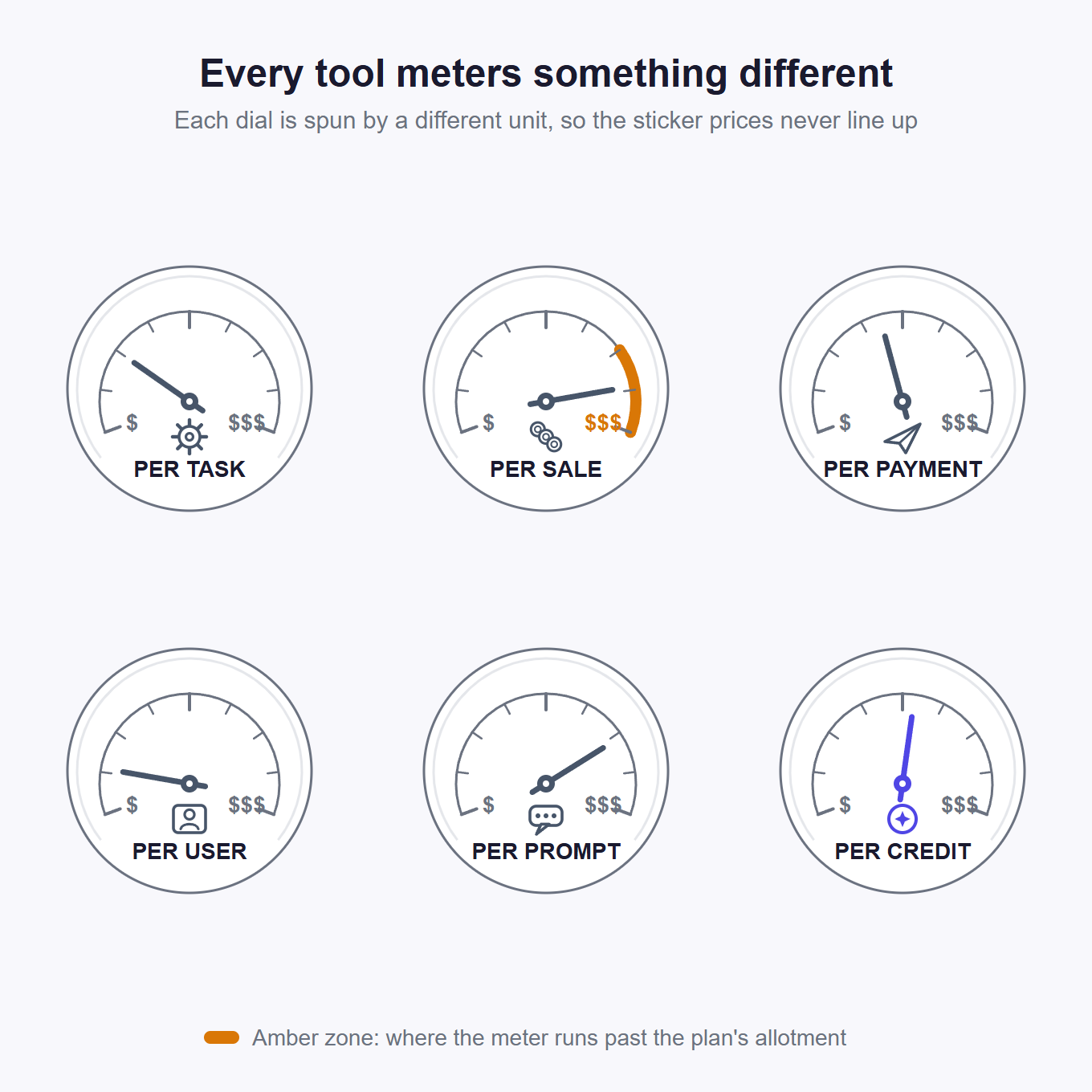
Run your own volume against that meter column. Zapier charges per task, Synder per sales transaction, and Melio per payment past its allotments. Ramp bills per user on a free base, Intuit Intelligence per chat prompt beyond what your plan includes, and Praxivara per credit. Match the meter to the shape of your volume. A 4,000-transaction Shopify month is cheap on Ramp's per-user meter and far past the 500-transaction cap on Synder's Basic tier. And if you ask your books questions all day, Intuit's prompt meter is the one you'll feel first.
The number that decides whether any of this is cheap is what your own time costs. BLS wage data from May 2025 puts the average US accountant at about $46 an hour and a bookkeeping clerk at about $26. Say a tool saves you three hours of books a month. At clerk rates, that is roughly $78 of your month back.
Two rows need one more sentence each. Praxivara is credit-metered: four plans, 5,000 to 40,000 monthly credits published, with dollar figures on the pricing page. We don't print prices here that we would have to update weekly. BILL's blank is information too: its QuickBooks integration page does not publish subscription pricing, so get the number before you sign anything.
Tools we cut, and why
None of these are bad tools. They're built for a different reader or a different setup, and a short honest list beats a longer one.
- Booke AI markets to bookkeeping firms and practices that manage many clients at once. If that describes your bookkeeper, they may already use it. It isn't owner-facing, so it isn't ranked here.
- Digits positions itself as an AI accounting platform in its own right, not a layer over your QuickBooks. This list is for tools that work inside the ledger you already keep.
- Dext has receipt capture as its lane. Between the capture already built into QuickBooks and the tools above, we couldn't find a cell it wins for this reader.
- Beam and Relevance AI aim at builders: their QuickBooks pages are galleries of agent templates you assemble yourself. If you're the kind of owner who wants to build your own agent from parts, they exist. This guide is for owners who want the job done.
- Books-done-for-you services got cut as a whole category. After one well-known service shut down right before a year-end, we only ranked tools that leave your ledger in your QuickBooks. That one rule removed every name in the category.
Questions owners actually ask
Does QuickBooks have built-in AI?
Yes. Intuit Intelligence is built into QuickBooks Online for US customers, and it absorbed what Intuit used to call Intuit Assist. It turns forwarded documents into invoice drafts and flags potential cash-flow gaps. It also answers questions about your books. As of July 2026, chat usage is metered, and it is not included with Solopreneur or Self-Employed. The Intuit Intelligence section earlier in this guide covers when it is enough on its own.
Can AI just do my bookkeeping for me?
No, and be suspicious of anything that says yes. The pattern that works is a junior bookkeeper, not an autopilot. It drafts the easy 80% and asks about the weird 20%. Nothing posts without you. Whatever you pick, run it through the five questions of the Junior Bookkeeper Test before you connect it.
Will AI replace my bookkeeper or accountant?
No. The tools that work make that relationship cheaper and calmer. You walk in with cleaner books and fewer "what was this charge?" emails, and everything the software touched carries a trail your CPA can follow. One practical move: show any tool on this page to your accountant before you connect it. A tool that survives that conversation is a keeper.
What's the difference between an AI assistant and an AI agent for QuickBooks?
An assistant answers when you ask, and you choose how often it checks with you before a write. An agent runs a job on a schedule or a trigger, like chasing overdue invoices every weekday morning, using permissions you granted when you built it. Our guide to Assistant vs. Agents: which to use walks through when each one fits.
The short version
Start with Intuit Intelligence, because you already have it. If your whole pain lives inside the books, it may be enough on its own, and you can stop there. For invoicing and chasing what you're owed, Praxivara. For categorization, Ramp if the mess is card spend, free bank rules before you pay anyone a dollar, and your firm's own stack if a bookkeeper runs your books. For paying bills, Melio, or BILL when you need approval chains. For answers out of your books, Praxivara again. For connecting QuickBooks to everything else, Zapier, or Synder if you sell on more than one channel.
If you'd rather run one tool than four, the call depends on where it hurts most. If your two pains are chasing money and getting answers out of the books, ours is the pick. If the pain is the bank-feed queue, payroll, or moving money itself, it isn't.
Whatever you pick, run it through the Junior Bookkeeper Test first, and lean hardest on the second question: "Does anything post without me?" Your accountant will ask you the same thing.
Connect QuickBooks to Praxivara and ask it one question: who owes you money right now?
See the QuickBooks integration