

The short answer
It is Tuesday morning. You ask an AI to write a payment reminder for the customer who is three weeks late. It writes a good one. Better than what you would have written standing up, eating lunch over the sink. You copy it, you mean to send it, and then the phone rings.
Tuesday night, that reminder is still sitting in a tab. The invoice is still unpaid. The AI did its part. The job did not move.
That gap is what this piece is about. A chatbot answers you. Agentic AI acts. One hands you words, and the other goes into your invoicing, your email, and your calendar to finish the job.
There are four stages between those two. A business usually sits at several of them at once. Stage 1 is the screen, where you open the app and every click is yours. Stage 2 is the chat box, where you ask, it answers, and you still go do the work. Stage 3 is the channel, where you ask from wherever you already are and the job gets done in your real systems. Stage 4 is the trigger, where nobody asks at all. Something happens, the work runs, and you get told.
A lot of software sold as agentic may still stop at stage 2, with a new label on it. You do not have to take our word for that either way. Each stage has a test, and you can settle most of them by watching a tool for about a minute.
One disclosure before we go further. We build one of these tools. Praxivara is ours, and there is a clearly marked section near the end about how it handles these four stages. Everything else here is sourced and dated, so you can check it without trusting us.
| A chatbot | Agentic AI | |
|---|---|---|
| Its main job | Answer you, or generate something | Get to an outcome you set |
| Tools | May read things or look them up | Uses tools to take actions |
| Steps | Usually one exchange at a time | Plans and runs several in a row |
| Your part | You direct the conversation | You set the goal and the boundaries |
| What starts it | Usually you, typing | You typing, a schedule, or an event |
| What you end up with | An answer or a draft | A changed record, or a finished job |
What agentic actually means, without the sales language
Strip the marketing off and the word is simple. Agentic AI is software that takes real actions in real systems, across several steps, toward a goal you set, without you driving each step.
The weight sits on the word actions. Not a summary of the actions. Not a suggestion of them. The actions themselves.
That is what separates it from the two things people mix it up with. A chatbot produces text. You ask, it writes back, and the writing is the entire product. Generative AI more broadly produces content: text, images, code, a slide deck. It is very good at that, and it is a different job. The difference between agentic AI and generative AI has little to do with how smart the model is. Generative AI makes something when you ask. Agentic AI goes after a result, planning, using tools, and adjusting as it learns. What you end up holding might be a changed record in your systems, or it might be a finished piece of work. The difference is in the pursuing, not only in what gets left behind.
There is a settled working definition, and it is not ours. Stanford's Institute for Human-Centered AI describes agentic AI as systems that can "set or interpret goals, plan and sequence actions, use tools (like web browsers, code, or APIs), make decisions based on feedback, and adapt over time to complete tasks."
Four things, and they run as a loop rather than a list.
- A goal, not a set of instructions. You say what should be true at the end. You do not name the clicks.
- A plan it works out itself. It decides which steps that goal needs, and in what order.
- Tools it can really use. Your inbox, your calendar, your invoicing, your customer list. If everything it touches lives inside its own chat window, it is a writing tool with good manners.
- Feedback it reacts to. The customer already paid. The page moved. The card was declined. It notices and changes course instead of finishing the plan it started with.
That last one is the line between an agent and an automation. A fixed chain is automation: ten steps, the same ten steps, whatever happens. An agent decides which steps the goal requires and adjusts when the result changes. The test is not how many steps there are. It is whether anything is being decided.
Notice what is not on that list. Nothing there says a person cannot be the one who starts it. You can type one sentence and set a real agent running. How the work begins is a separate question from whether the thing is an agent, and the next section is about that question, because for a business owner it turns out to be the more useful one.
Which happens a lot, and it has a name. Gartner, the analyst firm, coined the term "agent washing" in a press release dated June 25, 2025. It described the practice as rebranding something a vendor already sells, such as an assistant, a chatbot, or older automation software. The underlying product gains no real agentic ability. In the same release, Gartner estimated that only about 130 of the thousands of agentic AI vendors were real ones.
Two notes go with that number. It is an estimate by an analyst firm, using its own definition of real, and neither you nor we can reproduce it. It is also old. June 2025 was more than a year before this article, and a lot of real capability has shipped since. Treat it as evidence that the label was being stretched then, not as a scoreboard for today.
The shape of the problem has not changed. The word costs a vendor nothing. Bolting a chat box onto an existing product is cheap. Reaching into your actual systems is not. Nor is planning a job, running it without losing the thread, and noticing when the answer changes halfway. That part is slow and expensive to build. That gap is why the tests in the next section are worth more than a claim on a pricing page.
The Chat Box Exit: four stages, and how to tell which one you are at
Most arguments about AI at work are really three arguments wearing one coat. One is about how much the software is allowed to decide. Another is about how finished the thing it hands back is. The third is about where the work actually happens. This model covers only the third. Call it the Chat Box Exit. It tracks where the work happens and how it reaches you, and nothing else.
There are four stages. You can usually tell which one a tool is at in about a minute, with no trial and no demo call. Each stage below comes with the test.
Stage 1. The Screen
You open the app and drive it yourself. Every click is yours.
This is most of the software you already pay for. Your books, your calendar, your scheduling tool, your customer list. It stores things carefully and it waits. It is very good at remembering and completely uninterested in starting. The work happens in front of you, and you are the part that moves.
The test. If nothing happens unless you click, you are here.
Stage 2. The Chat Box
You type a question and read an answer. Then you go and do the work.
This is what most people mean when they say they use AI. You ask for a reply to an awkward email. You paste in a contract and ask what clause nine means. The answer comes back fast, and it is often good. It also comes back as text, in a tab, next to everything you still have to do.
The test. If you close the tab and the task is still on your list, you are here.
Stage 3. The Channel
You ask from wherever you already are, and it does the job in your real systems.
You are parked between two jobs. You send one message: send Dana the invoice for the Riverside work, due on the fifteenth. The interesting part is not the phone. It is how the sentence ends. Something changed in a place that is not a chat window. An invoice exists. A record moved. The screen went from required to optional.
The test. If one message from your phone ends with the job done, you are here.
Stage 4. The Trigger
Nobody asks. Something happens, the work runs, and you get told.
A form comes in at eleven at night. A payment fails. A due date passes with nothing paid against it. You did not open anything, because you were asleep, or on a roof, or standing in front of a customer. The work ran and left you a note. Your job on that task shrinks to reading the note and noticing when it looks wrong.
The test. If you found out because it told you, you are here.
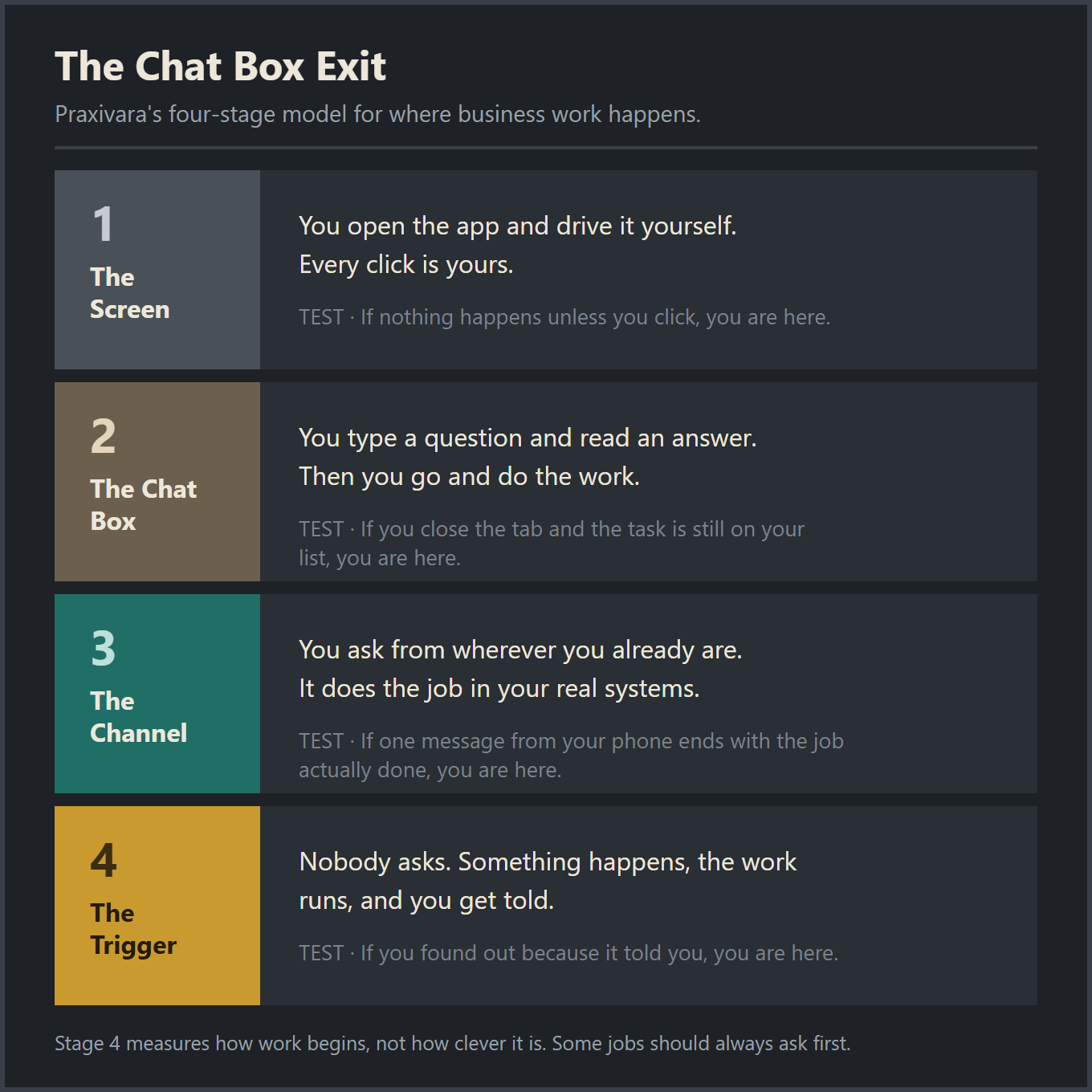
What this model is not. It is not a ranking of how clever the software is. A plain rule-based automation with no AI in it anywhere can sit at stage 4: an invoice goes overdue, a fixed email goes out, a row updates, you get a notification. A genuinely capable agent can sit at stage 3 for years because you decided, sensibly, that a person starts every run. Stage 4 measures how independently work begins. It does not measure intelligence, and reaching it does not make something agentic AI.
This is not the same question as trust or polish
Two other models on this blog own the other two arguments, and the three are worth keeping apart.
The Delegation Ladder is about authority. It asks how much you are willing to let something decide and do in your name. The Draft-to-Done Scale is about how finished the output is. The Chat Box Exit asks something narrower, which is where the work happens.
The three come apart in practice. A tool can reach stage 3, act inside your real systems, and still stop to hand you a draft. A tool can sit at stage 2 forever and deserve a lot of trust, because a good answer to a hard question is worth trusting. Blurring the three together is how people end up arguing past each other. One person says a tool is not a real agent. The other hears that it is no good.
Different jobs sit at different stages
A business is not at one stage. It is at several at once, and that is the normal shape rather than a problem to fix.
Your bookkeeping might sit at stage 1 because you want to look at it with your own eyes. Your writing might sit at stage 2 because thinking out loud with something is the entire point. Your invoice chasing might sit at stage 4 because it is the same five steps every time and nobody has ever enjoyed it. Hiring probably stays at stage 1 for a long while yet. None of that is a scoreboard, and none of it says anything about you.
Stage 4 is not the prize. Some work should always ask first, and some work should never leave your hands at all. What settles it is the shape of a job rather than its size, and that is a sorting question of its own.
Why the chat box feels like progress when it is not
Say you need to chase an overdue invoice. You open a chat box and ask for a polite second notice. Ten seconds later you have a good one. Firm without being rude, and exactly the right length. Writing it yourself would have taken fifteen minutes and three rewrites.
Now count what is left.
You still have to find the invoice and check what is still owed. You still have to open your email, paste it in, and send it. You still have to note somewhere that you sent it, so you do not send it twice. And three weeks from now you still have to remember that nothing came back, then do the whole thing again with a firmer tone.
Writing the email was never the hard part. That was fifteen minutes. The other four steps were the job.
A fast answer is not the same as work leaving your plate. The chat box got extremely good at the one part that was never the bottleneck.
This is not a stupid mistake, and it does not mean you were fooled. It is a reasonable reaction to what the screen is showing you.
The feedback is instant and it is visible. You typed something, a good thing appeared, and it appeared in under a minute. For as long as there have been screens, that has been the signal of productive work. You did something, and the screen changed. A chat box sets off that feeling perfectly. It just sets it off at the start of the work instead of the end.
There is also nothing to warn you. A chat box never says no. It never says it cannot reach that system, or that it needs your permission first, or that it has no idea whether the thing got sent. Every ask gets an answer, so the record looks perfect. Your task list at the end of the day is the only place the truth shows up, and by then you have stopped connecting the two.
There is a quick tell, and it is the clipboard. Watch what you do in the ten seconds after the answer appears. If you select it, copy it, switch windows, and paste it somewhere else, the software finished and you started. That copy is the seam where the work came back to you.
If you want to check that properly instead of by feel, there is a short set of questions for working out who really owns a step. Questions beat memory here. Memory rounds a fifteen-minute task down to nothing.
When the chat box is exactly the right tool
The chat box is a specific tool, not a bad one.
There is a whole class of work where the words are the deliverable. You need to understand a clause in a lease. You need to think out loud about whether you can afford another person. You need a first draft of a job posting, or a plain explanation of what your accountant just emailed you. In all of those, the answer is the work. Nothing got left behind, because there was nothing else on the list.
Thinking, drafting, and one-off questions are what a chat box is for, and it is good at them. Sitting at stage 2 for that kind of work is not a failure to upgrade. It is the right tool in the right place, and it will still be the right tool in five years.
The trap is narrower than the tool. It shows up when a recurring five-step job gets treated as a writing problem, because writing is the only step a chat box can see. The email keeps getting faster every year. The other four steps never move.
The same job at all four stages
Take a job almost every small business has. Invoice 1042 was due thirty days ago. The customer is not dodging you. Nobody has asked twice. Here is that one job at each of the four stages.
Stage 1, the screen. On a Sunday night you open the accounting tool, sort by due date, and find it. You copy the balance, write the email, send it, and make a note to check again next week. Every step was yours. The software held the numbers and waited.
Stage 2, the chat box. You paste the details in and ask for a polite reminder. A good one comes back in four seconds. Then you copy it, open your email, attach the invoice, send, and go back and log it. The writing got faster. The chasing did not move.
Stage 3, the channel. You are in the van between calls. You send one message: chase anything over thirty days. The reminder goes out from your own email with the invoice attached. The payment note gets logged. You get back a short list of what went where. You never opened the app. The job came back done, not drafted.
Stage 4, the trigger. Nobody asks. Day thirty arrives on invoice 1042 and the reminder goes out. You find out because a message tells you it happened. On Sunday night there is nothing waiting for you, because the thing that used to wait for Sunday night already ran.
The stages also change who notices when nothing happens. At stage 1, silence means you forgot. At stage 2, silence means you got a good draft and never sent it. At stage 3, silence means you did not ask. At stage 4, silence should mean nothing was due. That last one is the one to check, because a job that never runs looks exactly like a job with nothing to do.
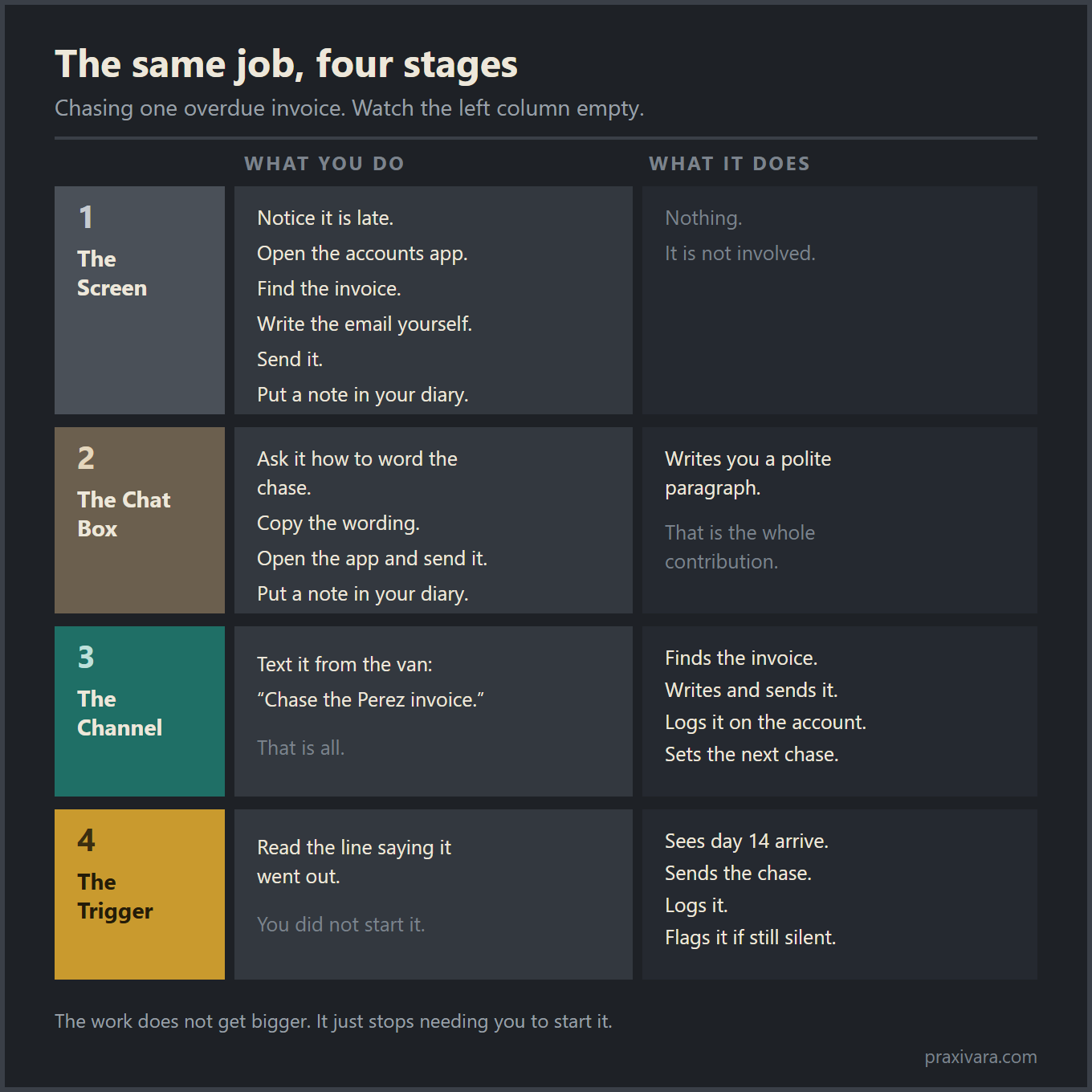
Notice what did not change. Same email, same balance, same customer. The invoice did not become easier to chase between stage 1 and stage 4. It stopped being something you had to hold in your head. That is the shift, and it is smaller and more boring than the ads suggest. What did change is who starts it: at stage 3 you still own that decision, and at stage 4 you handed it over, which is why the rule has to be right before you switch it on. What to say in a reminder, and when, is its own subject, and we covered chasing overdue invoices separately.
What still breaks
Start with the number. OSWorld 2.0 is a benchmark built from long, realistic computer tasks. The best model tested finished only 20.6% of them outright, at a 54.8% partial score. That is about one job in five carried all the way to done. The source is an arXiv preprint posted in June 2026 by the XLANG Lab and collaborators. That makes it research, not a peer reviewed result and not a product claim. The tasks are not toys either. The paper reports that a person takes a median of about 1.6 hours to finish one.
Then the authors say something no vendor blog would print. High accuracy on these benchmarks, they write, "overstates real progress" and hides how rarely agents complete end-to-end work. Keep that line next to every demo video you watch.
The shape of the failures is more useful than the score. The same paper found the models were not mostly tripping over clicking and typing. They lost track of constraints, missed information that arrived mid task, guessed instead of asking, and skipped verification. In a small business, that looks like this.
- Losing a constraint. You said never contact the Henderson account without checking first. Forty steps into a long job, that rule quietly stops applying.
- Missing what arrived mid task. The customer replies that they paid on Friday while the job is still running. The reminder goes out anyway.
- Guessing instead of asking. There are two customers called Dave. It picks one and keeps going.
- Skipping verification. It reports the reminder as sent. Nobody checked whether it actually left.
The paper adds that agents struggle most when a task depends on hidden state they have to recover. In plain terms, that is a record or a screen that changed while nobody was looking. This is where the stage matters. At stage 2, a wrong answer costs you a reread. At stages 3 and 4, a confident wrong action has already gone out under your name.
Now the other half. This is improving, and the improvement has been measured rather than guessed. A research preprint from Model Evaluation and Threat Research, or METR, was first posted in March 2025. It found that the length of task a frontier model can complete at a 50% success rate has roughly doubled every seven months since 2019. The current version of that paper puts frontier models near 110 minutes on those tasks. Two caveats belong in the same breath. A 50% success rate is a coin flip, not reliability. And METR hedges its own headline, saying the forecast holds "if these results generalize" to real software work. Software tasks are what it measured.
One failure has not been fixed at all. An agent that reads web pages, email, and documents can be given instructions by the things it reads. That is prompt injection. In December 2025, OpenAI called it "an open challenge for agent security" and said it expects to keep working on it for years. That is the company selling agents saying so, not a critic. Picture a supplier document with a line of text written for your assistant instead of for you.
Last, a reading habit. Most of the impressive numbers in this field come from the company selling the product. Even OpenAI's own GDPval page, from September 2025, notes that the evaluation is one-shot. So it never tests work where context has to be built up over several drafts. Benchmark numbers are fragile too. A separate arXiv preprint from May 2026, WildClawBench, found that switching the harness alone moved a single model by up to 18 points.
None of that makes the shift fake. It does mean you move one job at a time, and the jobs that can hurt you keep asking first.
What actually shipped, and what is still a demo
A lot of agentic AI is a roadmap slide. Some of it is a product you can buy this afternoon. Both get described with the same words, which is how an owner ends up paying for a demo. Here is a status check with dates on it. Every row points at the primary source: the company's own page, the standards body's own page, or the government project page. Where a company printed a status word, we used its word. Where it printed none, the second column says so in plain English. The source link shows what the page actually says.
Method: on September 9, 2026 we read each item's primary source. That was a vendor product page, help article, developer doc, press release, or the standards body's own page. The date column shows the date printed on that source. Where a page carries no date, it shows the date we read it.
| What it is | Status as of September 2026 | Date on the source | Source |
|---|---|---|---|
| Browser control inside your own Chrome, from Anthropic | Generally available on every paid Claude plan, and it now auto-approves actions it judges safe rather than asking before each click, with a classifier still checking every action. The same page says it does not run on other Chromium browsers or on mobile. | Aug 26, 2026 | Anthropic |
| Computer use for developers on Anthropic's platform | Generally available on the Claude Platform. The platform release notes also list the updated computer use and browser use toolsets as available on Google Cloud, and existing beta integrations keep working while you migrate. The newer browser tool reads page structure instead of clicking screen positions. | Aug 20, 2026 | Anthropic |
| Google's Gemini computer use model | Still preview. The docs say the capability may contain errors and security holes, and tell developers to supervise it closely. | Checked Sept 9, 2026 | Google developer docs |
| ChatGPT Atlas, OpenAI's agent browser | Deprecated, and now shut down. OpenAI said it is moving browser agent work into ChatGPT and Codex. It said Atlas was scheduled to stop working on August 9, 2026. | Page read Sept 9, 2026 | OpenAI Help Center |
| OpenAI Agent Builder, the Evals platform, and the original computer-use model | Two deprecated, one shut down. Developers were told about Agent Builder and Evals on June 3, 2026, with shutdown set for November 30, 2026. The original computer-use model shut down on July 23, 2026. | Announced June 3, 2026 (computer-use model: April 22, 2026) | OpenAI deprecations |
| Cloud browser in ChatGPT Work | Shipped, with no status word on the page. It runs a browser on a machine in the cloud. Paid plans in supported regions, not Free or Go. | Page read Sept 9, 2026 | OpenAI Help Center |
| OpenAI workspace agents | Two labels on one page. It carries a general availability banner at the top and a research preview line in the body. | Post dated Apr 22, 2026 | OpenAI |
| Model Context Protocol, the standard for plugging tools into an AI | Donated to the Linux Foundation's new Agentic AI Foundation. Platinum members include Amazon Web Services, Anthropic, Block, Bloomberg, Cloudflare, Google, Microsoft, and OpenAI. | Dec 9, 2025 | The Linux Foundation |
| Agent2Agent, the standard for agents talking to each other | First stable 1.0 release. The project described it as a cleanup of rough edges rather than new features. | Mar 12, 2026 | A2A Protocol project |
| Microsoft Agent 365 | Generally available. Read the description closely: it is a control plane for watching and governing agents, not an agent that does your work. | May 1, 2026 | Microsoft Security Blog |
| Salesforce Agentforce | Generally available, and the earliest general availability date in this table. | Oct 29, 2024 | Salesforce Newsroom |
| NIST security control overlays for AI agents | Planned, not published. The page says the project will develop the overlays, and lists single agent and multi agent uses as planned cases. | Checked Sept 9, 2026 | NIST |
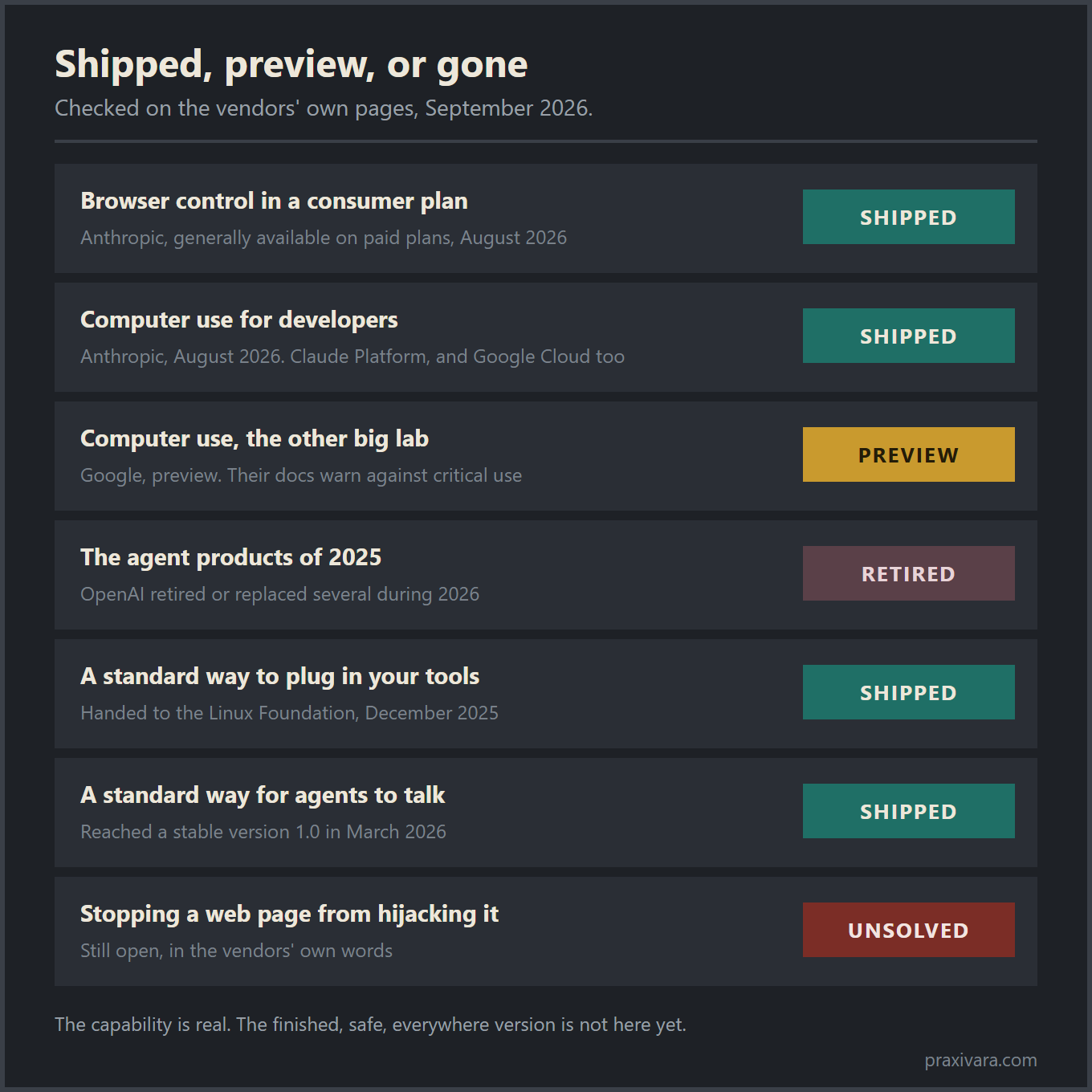
Read down that middle column and a few things stand out. The plumbing got less private. The main standard for connecting an AI to your tools now sits at the Linux Foundation, with rival companies as members. The agent-to-agent standard has a stable 1.0. For a small business, that matters for one plain reason. The connectors your work depends on are less likely to be one company's side project. Anthropic, which started that standard, said in December 2025 that there were more than 10,000 active public servers speaking it. That is the originator's own count, not an audit. The written rules are still moving too. The current spec revision is dated July 28, 2026.
The churn is real, and it is not small. In under six months, one vendor killed off an agent browser and its first computer-use model. It also scheduled a visual agent builder and an evals product for shutdown. Google folded Vertex AI into a new agent platform on April 22, 2026. It said Vertex services would from then on be delivered only through it. If you are choosing a tool this quarter, assume the name on the box can change. Ask what happens to your setup if it does.
Take the preview label literally. We read Google's own developer documentation on September 9, 2026. It tells developers to avoid using computer use for "tasks involving critical decisions, sensitive data, or actions where serious errors cannot be corrected." That is a vendor pointing you away from the work that matters most. Read it as the honest edge of the field rather than a knock on Google. The standards side has not caught up either. NIST lists agent security overlays as planned work, so there is no official checklist yet to hold any vendor to.
One caution about the words in that table. Generally available means a company decided to sell it and support it. It is a sales status, not a measurement that the thing works on your job. One of the pages we read carried a general availability banner up top and older preview wording further down. Check the date on the page, not just the badge.
One widely shared failure statistic is missing from this table on purpose. We could not find it published on the university's own site. It travels through news write-ups and a passed-around PDF instead. That does not make it evidence. It should not be the reason anyone approves or kills a project.
The part nobody sells you: your job changes
Almost every article on this shift sells it as pure gain. Work leaves your plate, you get your evening back. That is half of it. The other half is that a job you used to do becomes a job you have to check. Checking is new work, and it lands on a real calendar.
At stage 2 you are the person doing. At stages 3 and 4 your job changes shape. You start things, review them, approve some of them, and handle the one that went sideways, in whatever mix you chose when you set the thing up. Those are different jobs with different rhythms. Doing ends when the thing is done. Checking never quite ends, because there is another batch tomorrow.
Here is the shape of it on a normal Tuesday. You open a short log of what ran while you were not looking. Most of it is fine and you skim it. Two things are waiting on a yes or a no. One thing is odd: a customer replied something strange, or a number does not match the others. The two approvals take a minute. The odd one is the real job, and it is why those five minutes are not optional.
The exception hides inside the routine, which is what makes it hard. Ninety-nine correct lines train you to scroll. The wrong one is the line you are there to catch, and you only catch it by reading past the ninety-nine. Anyone who has signed off on a payroll run knows the feeling.
Approving also has to belong to a person and a time. In a business of six, work that belongs to everybody belongs to nobody. If no one owns the morning check, it does not happen, and you find out three weeks later from a customer.
There is a timing change nobody warns you about either. At stage 2, a job you have not got to is simply late. At stage 3, a job waiting on your yes is stopped, and everything behind it is stopped too. You become the slow part. That is fine when the check happens every morning. It is not fine when the yes sits somewhere you open on Fridays.
Then there is the thinking part. Something goes wrong once and that is noise. Twice is a rule you never wrote down. The skill is not fixing the one mistake. It is seeing the pattern and changing the instruction so it stops. A small amount of thought, done regularly, for as long as the job runs.
The first few weeks cost you more time, not less. You are watching software do a job you could have done yourself in the time the watching takes. It gets cheaper as the rules settle and you stop reading every line. It never gets free. Oversight does not reach zero, and you should be careful with anyone who sells it that way. The ongoing cost of oversight is the line most payback math leaves out.
Moving work up a stage is still worth doing. Move one job at a time, so the checking stays small enough that somebody does it.
Which actions should still require your approval
Stage 4 is not the finish line. Plenty of work should keep asking first, permanently, and not because you are nervous.
One thing to be clear about, because it is easy to blur. How a job starts and how much it may decide on its own are two separate dials. An approval gate does not drag a job back down to stage 3. A trigger can start a job at three in the morning, do most of it, and still stop dead in front of the action that spends money. A job you start yourself from a text message can run all the way to the end without asking you anything else. Set the two dials separately, and do not let a vendor tell you that turning one up means turning the other down.
Owners usually draw this line in the wrong place. They hand over the jobs they hate and keep the ones that are easy. Annoying and dangerous are not the same thing. Renaming two hundred files is miserable and completely harmless. Sending one short email to your largest customer takes nine seconds and can cost you the account.
Two better questions: how far does this action reach, and how hard is it to take back.
Reach is about who sees it. Some work never leaves your own records. Reading, sorting, tagging, drafting, pulling a number together. Nobody outside the business ever knows it happened. Other work goes out the door, to a customer, a supplier, a bank, a payment processor, a tax form. Once it is out, it is out.
Reversibility is about the next hour. Some mistakes you fix quietly in a minute. Others take a phone call and an apology, and sometimes money moving back the other way. A wrong draft costs nothing. A wrong payment costs a morning and some goodwill.
Put those two together and the same short list falls out every time.
Keep asking first for:
- anything that spends money, including anything that agrees to spend it later
- anything that goes to a customer under your name for the first time
- anything hard to undo: deleting, canceling, publishing, closing an account
- anything with a legal or tax consequence
Two details make that list usable. The words "for the first time" are doing real work in it. A reminder going to a brand new customer reaches further than the fourth one in a sequence whose wording you have already read twenty times. Familiarity changes the risk, so the line moves. Impatience does not change the risk, so it should not.
The other detail is that the line is drawn around an action, not around a job. One job usually contains several actions, and they do not all sit on the same side. Finding the overdue invoices, checking what was already paid, and writing the reminder can all happen without you. Sending it does not have to.
If you are unsure about a specific action, ask who has to be told when it goes wrong. If the answer is nobody, let it run. If the answer is a customer, it asks first.
The longer version of this thinking is in our report on where to put the approval line. It covers which permissions are worth handing over and which are not. A job sitting at stage 3 is not stuck. It already did the finding, the checking, and the writing. The only part it kept for you is the part that reaches somebody.
How to move one job up a stage this month
This part is smaller than people expect. You are not rebuilding how the business runs. You are picking one job and moving it one stage, and four weeks is enough time to know whether it worked.
- Pick the boring repeat, not the worst job. The right candidate is something you already do the same way every time, often enough that you are sick of it. Good test: could you explain it to a new hire in two minutes without saying "it depends"? If it depends, it is not ready.
- Write down three things before you open any software. What starts it. What finished looks like, in one sentence. And what must never happen. Most people write the first two and skip the third, and the third is the one that saves them. "Never message anyone whose account is on hold" is a line you want written down early. There is a fuller version of that short brief if you want the longer form.
- Move one stage, not three. If the job lives in a chat box today, the next stop is stage 3. You ask for it from wherever you already are, and it finishes in your real systems. Do not jump straight to a trigger. Triggers come after you have watched the thing work a few times and stopped being surprised by it.
- Run it beside the old way for two weeks. Same job, same week, both versions. You are not checking whether it works once, because anything works once. You are waiting for the case it did not expect, and that usually turns up in week two.
- Keep the first version boring. One start, one finish, no extras. The urge to add "and while it is in there, could it also" is how a small working thing becomes a big thing nobody trusts.
- Split it if the ending is the scary part. Most jobs are not one decision. The gathering, the checking, and the drafting can run on their own while the send still waits for you. Automating half a job is a real answer, not a consolation prize.
- Say where you want to hear about it. Work that finishes somewhere you never look has not really left your desk. Point it at the place you already check every day. If you have to remember to go and look, you will stop looking by the second week.
- Decide now what would make you switch it off. Pick the number before you need it. Two wrong messages in a month. One complaint. Whatever it is, write it down, because in the moment you will argue with yourself about whether it was really that bad.
Tell anyone else who touches that job before you start. If your bookkeeper finds a reminder they did not send, the surprise costs more trust than the job saved you. One sentence in a group chat covers it.
Then give it a month. Not because the software needs time to learn anything, but because you need enough ordinary days to know what ordinary looks like. A week does not contain enough exceptions to judge by.
One more thing. If a month goes by and you have moved exactly one job, that was a good month. Most small businesses do not have twenty jobs worth moving. They have three or four, and it is the same ones every year. The chase, the follow up, the weekly recap, and the thing that only gets done when somebody remembers. Moving one of those properly beats a wall of half-built automations that everyone quietly stopped trusting.
How this works in Praxivara
This is our own product, so read it as the worked example rather than as a review. It shows what stage 3 and stage 4 look like when they are built in from the beginning instead of added later.
Stage 3 is reach. You can reach your own assistant from the web dashboard, a text message, WhatsApp, iMessage, Telegram, an email, or a phone call where you just say what you want out loud. They all thread into one conversation, so a question started in the van does not have to be asked again at the desk. That is stage 3 in practice. The job gets done from wherever you already are, and the screen becomes optional. There is a longer piece on choosing the right channel for the moment.
One boundary is worth understanding, because it works in your favor. Those surfaces are for you and your team. Your customers are reached deliberately and separately, through the mail accounts you connect yourself and through a business phone number you rent inside the app, which an agent answers and can call out on. Keeping the two apart is what stops a stray instruction from ever putting a message in front of a customer. The difference between talking to your AI and having AI talk to customers is worth settling before you set anything up.
Stage 4 is triggers. There are more than a thousand triggers across more than 250 connected services, alongside schedules that run on the clock or the calendar. Something happens in a system you already use, and the job runs. Nobody types anything, and nobody has to remember.
You build an agent by describing the job in plain words. No canvas, no wiring, no flowchart to draw. You say what the job is, which tools it may touch, and what it must never do. The agent is built from that description, and you change it the same way.
Approval is enforced, not merely requested. When a run reaches an action you have gated, it stops before anything happens and waits for you. Nothing half completes while it waits. You can answer from the dashboard or reply straight from your phone. Approval gates are included on every plan rather than held back for an enterprise tier.
Finished work has somewhere to land. Invoices and estimates, vendors and bills, and a real double-entry ledger underneath them that will not post until the debits and credits agree. Financial statements come out as PDFs you can hand to an accountant. That is what turns month end into a lookup instead of a rebuild, and it is the part a layer sitting on top of your other software cannot give you.
For the jobs that have no integration and never will, the assistant can also open a real web browser and work the site for you while you watch it happen.
Questions owners actually ask
What is the difference between agentic AI and generative AI?
Generative AI produces something when you ask: text, an image, a draft, a block of code. Agentic AI pursues an outcome you set, planning the steps, using tools, and changing course when what it finds does not match what it expected. The plain test is whether anything is being decided along the way. A tool that writes a good reply to an unhappy customer is generative. A tool that decides which customers need replying to, writes them, sends them from your mailbox, and moves the awkward one to your desk instead is agentic. Almost every product on sale does the first half well. The second half is the half you are paying for.
How can I tell if a tool is really an agent or just a chatbot with extra steps?
Three questions settle it, and none of them need a trial. Can it reach a system that is not itself and change something there, not just read it? Can it take several steps in a row without you approving each one? When something unexpected turns up mid job, does it adapt, or does it finish the plan it started with and hand you the mess? A tool that fails the first question is a chat box with a better name. A tool that passes the first two and fails the third is an automation, which is often exactly what you want, as long as nobody charged you agent prices for it. Ask a salesperson to show you the third one live, on their own account. It is the hardest to fake in a demo.
Is agentic AI safe to let near my bank or my customers?
The useful question is not whether the model is careful. It is where the pause lives. A tool might promise to check with you before it spends money because its instructions say so. That promise is only as good as the text of the prompt. If the run physically stops and waits for a human answer before the action runs, that is a different kind of promise. Ask which one you are getting, and ask what happens to the half-finished job while it waits. OpenAI's own help pages, read in September 2026, say ChatGPT asks for confirmation before actions that create a financial, legal or account commitment. Anthropic's Chrome agent went the other way at general availability. It now automatically approves actions it judges to be safe instead of asking before each one, while a classifier still checks each action against what you asked for, and you can switch that back to approving manually. So the floor is not the same everywhere, and you have to check.
Do I need to replace the tools I already use?
No. Most of the value at stage 3 and stage 4 comes from software reaching into the tools you already run. Your mailbox, your calendar, your card processor, your task list. The connection is the point. What usually changes is not which tools you own. It is how often you open them. Some records are worth keeping in one place. A job can start as a message and end as a posted entry. That is easier to run when it does not cross a vendor boundary halfway. But nothing in the four stages requires you to rip anything out. A vendor who says it does is selling you a migration.
Is any of this actually working yet, honestly?
Partly. Narrow, repeatable jobs with a clear start and a clear finish run fine today, and event triggers are ordinary plumbing now. Long, open-ended work is not there. OSWorld 2.0 was published in June 2026, an academic preprint rather than a vendor test. It measured the best model completing about one in five realistic end-to-end computer tasks. So the interface has moved further than the reliability has. Pick jobs where a wrong answer is visible and cheap. Keep the ones that spend money asking first. Add the next job once the last one has become boring.
The chat box was never the whole product
The chat box was a demo. When a new capability shows up, the first thing anyone builds is the cheapest way to show it off. A box you type into is about as cheap as it gets. It worked, it spread everywhere, and a lot of people mistook the demo for the finished shape.
Watch where the work lands. If a good answer arrives and you still have to go and do the thing, the software moved information, not work. If the job is done in your real systems, and now and then done before you thought to ask, the interface has moved. That is what changed by 2026. It changed unevenly, and plenty of it still breaks.
None of this means chat is going away. It is still the best thing there is for thinking out loud, for drafting, and for questions you will only ask once. It is just becoming one interface among several instead of the only one. Start with one job, one stage, this month.
Put one recurring job through it and see where the work ends up. Every plan starts with a 7-day free trial, so you can watch a job finish before you pay for anything. Start your free trial and build your first agent.