

It's 7:40 on a Tuesday morning and you're already behind. Thirty-one unread emails. Two invoices have quietly slipped past due, and the lead who filled out your form on Friday afternoon still hasn't heard back from anyone. None of this is the work you started the business to do. It's the work that keeps you from doing it.
You're not imagining the drag, either. Microsoft's 2023 Work Trend Index measured where knowledge workers' hours actually go, and the split is not flattering to anyone's calendar.
57%
of the average knowledge worker's time in Microsoft 365 goes to communicating (email, meetings, chat), leaving 43% for actually creating anything. Source: Microsoft Work Trend Index, 2023
This guide covers the category built to claw that time back: what an AI executive assistant actually is (and isn't), what it can genuinely take off your plate, what it costs measured against hiring a person, and a framework we call the Delegation Ladder for handing over real work without losing control of any of it.
In short: an AI executive assistant plugs into the tools you already run (email, calendar, CRM, accounting, messaging) and does real work inside them, with your approval on anything that leaves the building. It suits repeatable digital administration; it should not replace human judgment in sensitive or relationship-driven work. Plans run $49.99–$199.99 a month, next to roughly $6,595 a month for a full-time human EA at the U.S. mean wage.
In this guide
- What is an AI executive assistant?
- What can an AI executive assistant actually do?
- Types of AI executive assistants
- How does an AI executive assistant work?
- AI executive assistant vs. human EA vs. VA vs. chatbot vs. RPA
- The Delegation Ladder: five levels from doing everything to owning outcomes
- What should you delegate first (and what you shouldn't)
- How much does an AI executive assistant cost?
- Is it safe to give an AI assistant access to your business?
- How to get started: your first week with an AI executive assistant
- FAQ: AI executive assistants
- The owner's job is changing, not shrinking
What is an AI executive assistant?
An AI executive assistant is software that takes real action in your business tools on your instruction: it reads and drafts email, books meetings, updates your CRM, chases invoices, and produces finished documents — working inside the apps you already use rather than living in a separate tab.
The word doing all the work in that definition is action. Plenty of products call themselves assistants because they can answer questions about your business. That isn't assistance. That's search. A human executive assistant earns the title by closing loops: the invoice goes out, the meeting lands on the calendar, the reply gets sent while you're on a call. The AI version should be held to exactly the same standard. A position you're welcome to argue with: if the "assistant" can't actually send, book, create, or update anything, it's a search box with manners.
Closing loops requires connections. An AI executive assistant plugs into the systems where your business already runs, so an instruction like "reply to the Hendricks quote and put a call on my calendar for Thursday" touches Gmail and Google Calendar directly, with nothing copied and pasted between tabs. The scale of those connections is what separates the current generation from the chatbots of two years ago: a platform like Praxivara exposes more than 1,000 actions across 200-plus connected applications. The count matters less than what it implies: software that can reach your inbox, your calendar, your CRM, and Stripe can take an instruction that spans all four.
Three terms people mix up: assistant, agent, chatbot
The category is young and the vocabulary is sloppy, so three different things get sold under one label. They are not the same product.
- An assistant is interactive. You direct each task in conversation: you ask, it acts, you approve what goes out the door.
- An agent is autonomous. You build it once; it then runs on a schedule or a trigger and reports back with finished work.
- A chatbot answers. It can tell you things; unless someone has wired it into your systems, it cannot do things.
Most owners eventually run both of the first two, starting with the assistant and promoting proven routines to agents. Keep the distinction in mind while shopping, because vendors blur it constantly.
What can an AI executive assistant actually do?
A capable one runs the recurring digital loops of your business: it triages email and drafts replies, books and reshuffles meetings, produces finished documents, watches the web for things you care about, and keeps your CRM and billing tools honest. The test for every task on this page is the same: did a loop actually close?
The range comes from what sits underneath. Praxivara connects 200-plus applications in one click over OAuth (Gmail, Outlook, Google Calendar, Slack, HubSpot, Salesforce, Stripe, QuickBooks, Shopify, DocuSign, Calendly, Todoist, and more), so the assistant works inside the tools you already pay for. No migrations, no new inbox to check.
Inbox and communication
Ask for a morning summary of everything that arrived overnight, with anything from a paying customer flagged at the top. Then have it draft replies to the five messages that need answers, in your tone, ready to send from Gmail or Outlook. When something actually goes out, it goes from your own address, and the send waits for your approval first.
Calendar and scheduling
"Find 45 minutes with these three people next week" becomes a real Google Calendar invite, not a list of suggested slots for you to shepherd. The assistant absorbs the tedious residue of scheduling too: the declines, the reschedules, the "actually, can we do Thursday?" follow-ups, the time-zone math. If you run bookings through Calendly, it works with that as well.
Documents and finished files
This is where the category earns its keep. The output is a file you can send: PDFs, Word documents, PowerPoint decks, Excel workbooks, and CSVs, plus generated images, dashboards, QR codes, and vCards when a task calls for one. "Turn last quarter's sales export into a five-slide deck for the bank" ends with an attachment, not an outline you still have to build yourself.
Research and monitoring
Underneath the assistant sits a dedicated research layer: a fleet of web scrapers that pull structured data from job boards, review sites, social platforms, and competitor pages, on demand or on a standing schedule.
The practical version reads like a standing order. Say "watch for new reviews of my product and send me a digest every Monday" and the digest arrives every Monday.
Operations, CRM, and money tasks
Pull the unpaid Stripe invoices more than 30 days old and draft a reminder to each customer. Log this afternoon's call notes into HubSpot and move the deal stage. Check QuickBooks for last month's spend by category, or answer a Shopify order question without opening the admin. These are the jobs owners defer for weeks because each one is ten boring minutes, and they are precisely what this software is for. Anything that touches money or a customer waits behind an approval, a mechanism the next section takes apart properly.
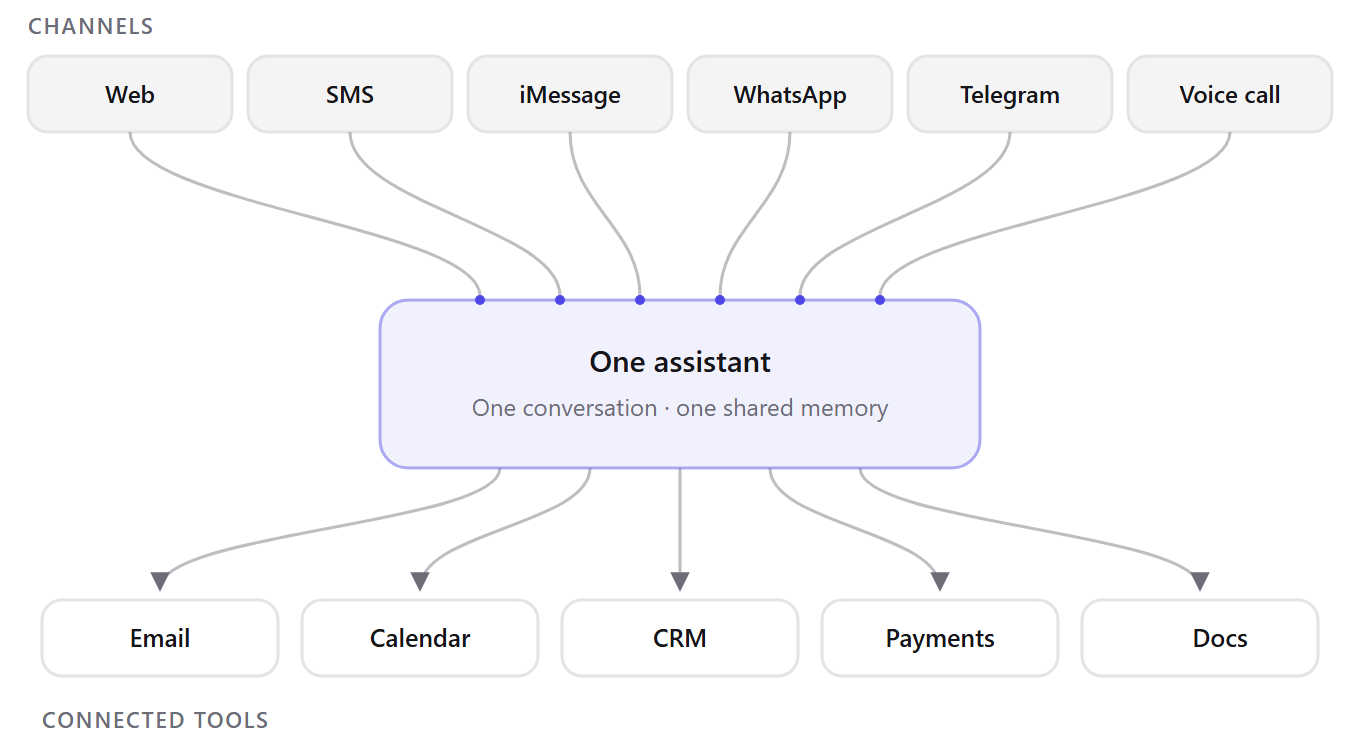
Still, the thing that changes daily behavior is not any single task. It is that the same assistant, with the same memory, answers on the web, over SMS, in real blue-bubble iMessage, on WhatsApp, on Telegram, and on voice calls. Draft an email over SMS from the parking lot, then finish it later at your desk; it is one conversation history throughout, and each phone channel takes a few minutes to set up. An assistant you can only reach at a desk is an assistant you use twice a week.
Types of AI executive assistants
The label covers at least six different products, and knowing which one you're being sold saves a demo call. The categories:
- General-purpose assistants act across many connected tools from one conversation: inbox, calendar, CRM, billing, files.
- Email-first assistants live in your inbox and do triage, drafting, and follow-ups very well, and little else.
- Scheduling specialists exist to put meetings on calendars: the slot negotiation, the reschedules, the buffers.
- Workflow-automation platforms hand you the parts; you wire the triggers and actions into automations yourself.
- Vertical assistants are built for one industry, real estate or law or medicine, with that field's documents and vocabulary baked in.
- Human-plus-AI services pair the software with a person who reviews its output, at a correspondingly higher price.
Choosing comes down to breadth versus depth. A specialist beats a generalist inside its one lane and loses everywhere outside it, so buy by where your admin hours actually go: if it's all email, buy the email tool; if it's spread across five systems, you want one assistant that reaches all five. Praxivara sits in the first camp, a general-purpose assistant connected to 200-plus applications, with agents for the work that recurs.
Whichever type you pick, the same question follows: how does any of this happen without the software free-wheeling through your accounts?
How does an AI executive assistant work?
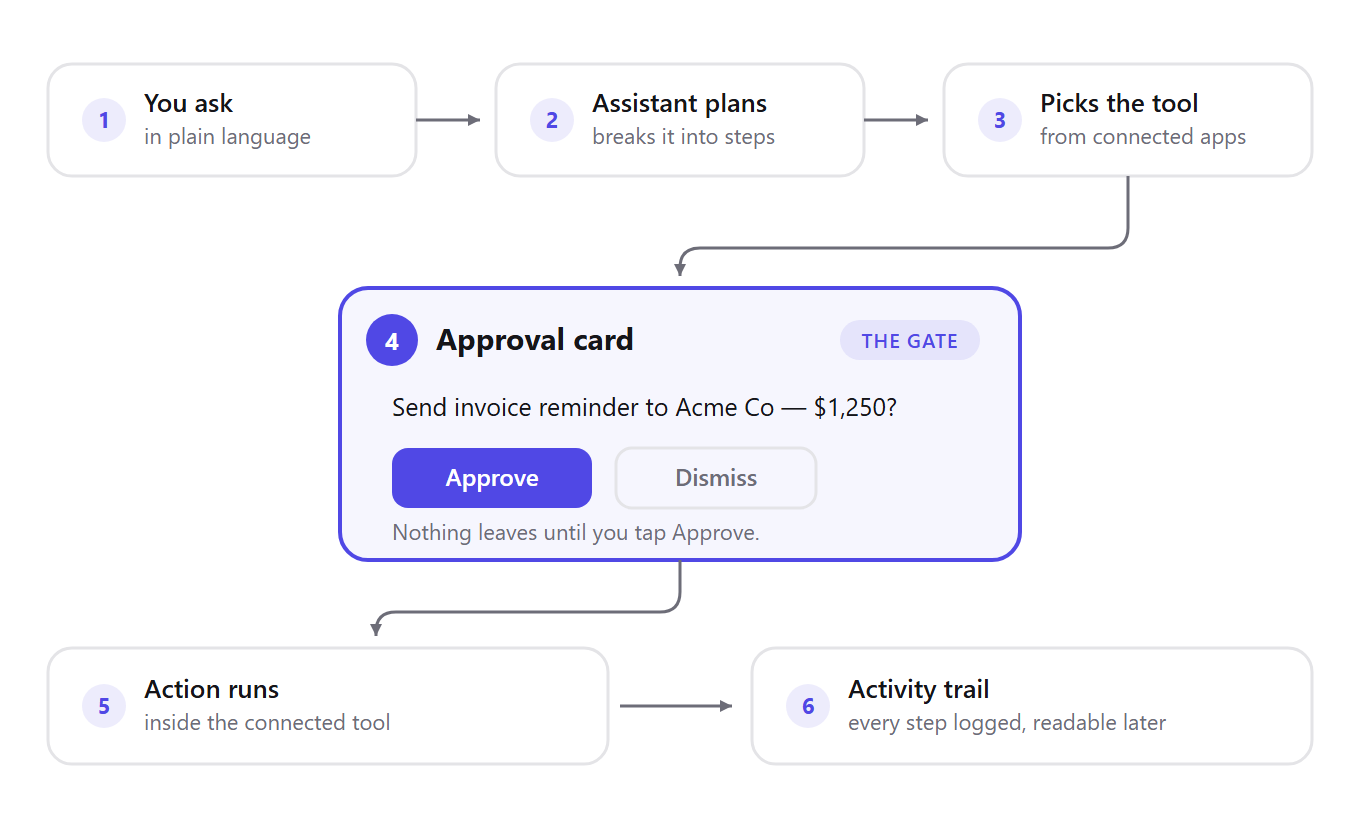
Four moving parts: OAuth connections into the tools you already use, a large library of tool actions the AI picks from on demand, an approval gate on anything consequential, and a memory that carries your preferences across every channel. You write instructions in plain language. The assistant does the rest inside your apps, and logs every step.
That's the whole architecture. Each part deserves a closer look, because each one answers a different worry an owner should have before handing over real work.
Connecting your tools (and why OAuth matters)
When you connect Gmail or Stripe, you never type a password into the assistant. You click Connect, your provider (Google, Stripe, whoever) shows its own consent screen, and it hands the platform a scoped token. That's OAuth. The platform never receives your password; what it receives is a scoped authorization token — itself sensitive, which is why it must be stored encrypted — and the permissions stop at whatever that token grants. You can also revoke access at any moment, from either side. On Praxivara, tokens are encrypted at rest, refreshed and rotated automatically, and a revoked connection dies immediately.
From there, the three-step flow is deliberately boring: connect your tools, ask in plain language, watch it get done with a full activity trail. If a vendor's setup is more complicated than that, ask why.
Tools, actions, and triggers
Under the hood, everything the assistant can do is a discrete, registered capability. An action is a single verb the assistant can perform, like sending an email or creating an invoice. A trigger is an event that starts work without you asking, like a new lead or an incoming payment.
1,000+
actions the assistant can take across 200-plus connected applications, with event triggers (a new email, a new lead, a payment) that can start work without being asked. Source: the Praxivara integrations catalog.
No model holds a catalog that size in its head at once. Instead, the assistant searches the catalog on demand: it looks up the right tool for the request in front of it, and the search ranks apps you've actually connected ahead of everything else. So "chase the unpaid invoices" resolves to your QuickBooks, not somebody's abstract billing concept.
The approval card: how you stay in control
Here's the part that makes delegation tolerable. Anything consequential, which means a send, a payment, or anything a customer will see, surfaces first as a confirmation card showing exactly what's about to happen. Nothing leaves until you tap Approve. Think of the approval card as the door between drafting and the outside world: the assistant can prepare anything it wants inside the house, but it knocks before stepping out. A precheck layer sits in front of that, refusing plainly bad actions before a card is ever shown.
Every approved action then lands in an activity trail, timestamped, so you can always read back exactly what was done, when, and by which agent. This matters beyond peace of mind. The failures that fester longest are the ones nobody can reconstruct after the fact — and a complete, timestamped record is exactly what closes that gap.
Memory that follows you across channels
The last piece is continuity. The assistant keeps a memory of your preferences, rules, facts, and tone, and that memory persists across every channel in your workspace. Tell it once, over SMS, that invoices get a seven-day grace period before a reminder, and the web app knows it too. And the memory is yours: you can read it, edit it, and delete any entry.
One more mechanic worth two sentences. The platform runs three model tiers, Frontier for hard reasoning, Balanced for everyday work, and Fast for routine tasks, and routes each request to the right one automatically, with a manual override if you disagree. You never pick a model to get good answers; you just notice the hard questions take a beat longer.
So that's the machinery. Next: how it stacks up against the alternatives you were already weighing, starting with the person you might have hired instead.
AI executive assistant vs. human EA vs. VA vs. chatbot vs. RPA
Five options get lumped together here, and they are not close substitutes. An AI executive assistant takes real action in your connected tools for a flat monthly fee. A human EA brings judgment no software matches, at a full-time salary. An offshore VA sits between the two. A chatbot only talks. Classic RPA repeats a recorded procedure; it breaks when the screen changes and it does not read intent.
Vendors in all five categories describe themselves with the same words. The table shows how each actually behaves on a Tuesday.
The comparison at a glance
| Factor | AI executive assistant | Human EA | Offshore VA | Chatbot | RPA |
|---|---|---|---|---|---|
| What it is | Software acting inside your connected business tools | Full-time employee managing your calendar, inbox, priorities | Remote contractor working from your task list | Widget answering questions from a knowledge base | Scripted bots replaying one fixed workflow |
| Autonomy level | Per-task direction; agents run on schedules and triggers | High; anticipates without being asked | Medium; stalls on undocumented tasks | None; responds, never initiates | Total but blind; same steps every time |
| Availability | 24/7, including the 2am invoice chase | ~40 hours/week, one time zone | Agreed hours, often 8–12 time zones away | 24/7 | 24/7, until a UI change breaks the script |
| Channels | Web, SMS, iMessage, WhatsApp, Telegram, voice calls; one shared history | Every channel, plus in person | Email, chat, project-management tools | One chat bubble on one website | None |
| Judgment and relationships | Good within a written instruction; no institutional relationships | The category's whole advantage: reads rooms, builds trust | Grows with tenure; limited by distance | None | None |
| Cost model | $49.99–$199.99/mo, 7-day free trial | Full salary plus benefits (compare Praxivara pricing plans) | Hourly rate or monthly retainer | Low monthly SaaS fee | Licenses plus consultant fees to build and fix |
| Oversight required | Approval cards plus a readable audit trail | Low once trained; a weekly one-to-one | SOPs, spot checks, rework on misfires | Reviewing fumbled escalations | Constant; it fails silently |
| Best-fit tasks | Recurring digital loops: triage, scheduling, invoice chasing, CRM hygiene, reports | Judgment, sensitive conversations, the physical world | Defined, repeatable projects with forgiving deadlines | Deflecting the same 20 support questions | High-volume entry between unchanging systems |
| Worst-fit tasks | Negotiation, grief, personal accountability | 2am work and volume drudgery | Real-time work needing deep context | Anything requiring action | Anything that changes, ever |
One wrinkle the table flattens: on Praxivara, the first column is really two working modes, an interactive assistant you direct and autonomous agents that run without you. The line is roughly this: the assistant handles what you ask for today, agents handle what recurs.
This was never either/or. The AI takes the twenty recurring loops that eat your week; the human, if you have one, moves up to the judgment work that justified the salary.
When a human assistant still wins
Concede it fully; it is true. A person wins at reading a room, sensing a client is annoyed before they say so. A person wins at negotiating with a difficult vendor, where the winning concession was never in any brief. A person wins with a grieving client or an offended partner, and carries institutional relationships that took years: the printer who bumps your job to the front, the back channel that gets fifteen minutes with someone officially unreachable. And a person can drive to the courthouse. Nothing else on this page gets a document notarized.
There is also accountability. When a human signs off, a human answers for it. An approval card gives you control and an audit trail gives you replay, but neither gives your bank or biggest customer a person to call.
One exception: if your current assistant's value is mostly relational (knowing which vendor picks up on the first ring, which client needs a call instead of an email), do not replace that person with software. Give them the software and let it absorb their triage hours.
The table cannot settle the rope problem: once the software takes the loops, you still have to decide how much autonomy to give it, and how fast. We think of it as a ladder with five rungs.
The Delegation Ladder: five levels from doing everything to owning outcomes
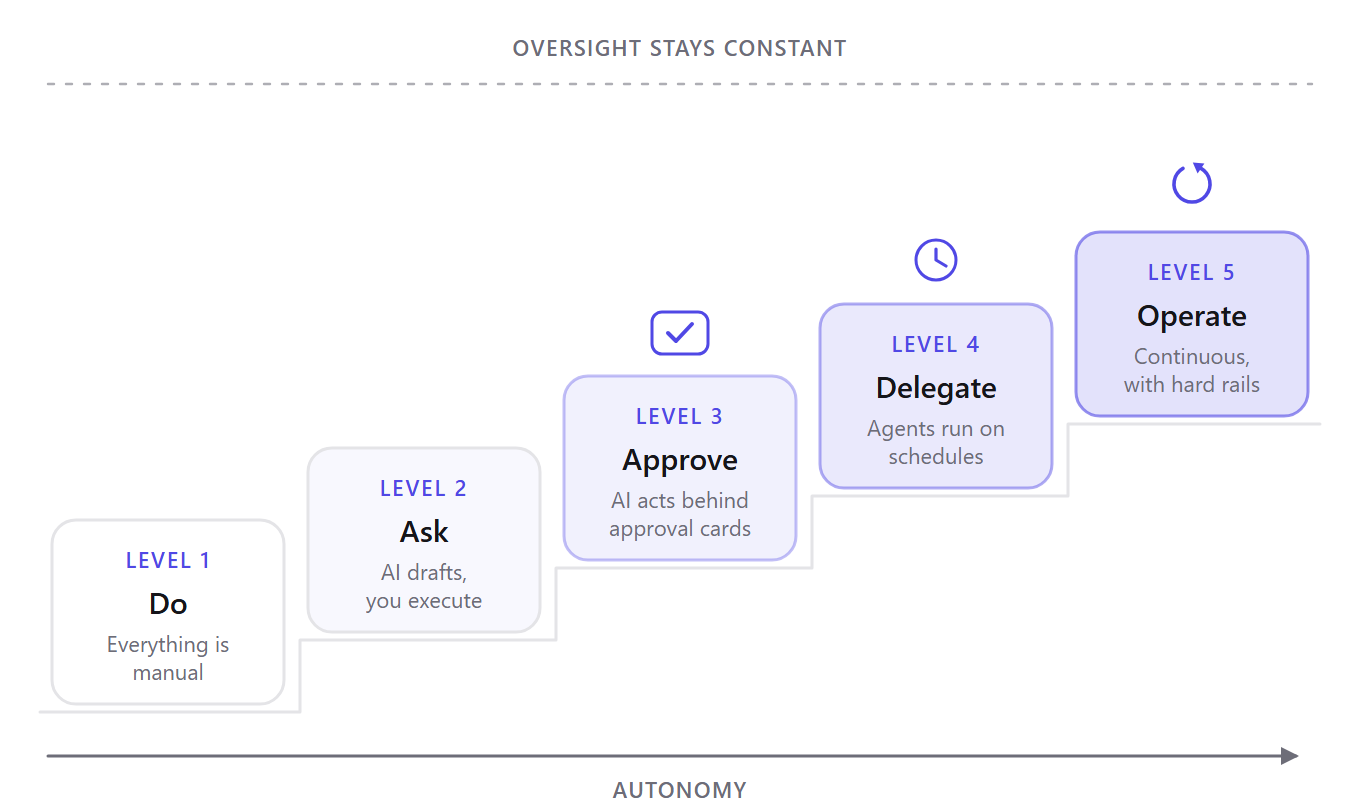
Owners get the rope question wrong in both directions. Some never let the assistant send a single email and end up paying for a very expensive drafting tool. Others wire up autonomous agents in week one, skip the trust-building, and get burned by a mistake they never reviewed. What's missing is a gradient, so we built one. We call it the Delegation Ladder: five levels of autonomy, where the control mechanism changes at every rung but never disappears.
Level 1: Do
Everything is manual. You write every email, chase every invoice, and update the CRM after every call. More honestly, you don't, and the CRM rots. The control mechanism is you, which is also the bottleneck. The tell that you're ready to climb: you catch yourself doing the same digital task for the third time in one week.
Level 2: Ask
The AI drafts; you execute. "Summarize this thread and write a reply in my tone," then you read it, tweak it, and hit send yourself. Nothing is sent automatically, so the operational risk is close to nil and the calibration value is high: you're learning where the assistant's judgment matches yours, one draft at a time. You're ready for Level 3 the day you notice you've stopped editing the drafts.
Level 3: Approve
The AI executes, behind approval cards. Ask it to chase your overdue invoices and it pulls them from Stripe, drafts a reminder to each customer, and queues the sends, but nothing goes out until you tap Approve on each card, and every step lands in the activity trail. This is where an assistant stops being a faster keyboard and starts being staff. The tell here cuts the other way: when you find yourself approving cards without reading them, the review has become theater, and theater is worse than delegation.
Level 4: Delegate
Work now starts without you. This is the rung where agents enter: build-once autonomous workers that run on a schedule or fire on a trigger such as a new email, lead, or payment. On Praxivara you build an agent in plain English: describe the role, and the builder picks the tools, writes the instructions, sets the schedule, and shows you a visual blueprint to review before anything runs. Templates like Collections, Inbox Triage, Lead Qualifier, and Report Builder skip even that step. Control shifts from per-action approval to per-run review, because every run's output lands as a typed deliverable in the agent's Deliveries tab. Ready for Level 5 when a month of deliveries has needed no corrections.
Level 5: Operate
Continuous agents with hard rails. In continuous mode an agent loops until a stated goal is met (never faster than every 5 minutes), then stops itself. A collections agent, say, that keeps working the ledger until it's clean. At this altitude, tap-to-approve alone is not enough control, so the rails are structural: per-tool daily call caps, per-day spend caps so a stuck agent can't burn your credit balance overnight, tools that can be blocked from agents entirely, run logs with timestamped steps, version history with rollback, and an instant pause button. Source: Praxivara.
Now the placement advice, and it's a position we'll defend: most businesses should live at Levels 3 and 4 for months. Level 5 is real and useful. It is also where automation horror stories come from when someone climbs to it in week one, because a looping agent amplifies whatever instruction quality you gave it, good or bad. The rungs exist so you can read a month of run logs before you hand over the keys.
Where it goes wrong
Every failure mode on this ladder is boring, which is good news, because boring failures have boring fixes. Approval fatigue comes first: after fifty clean cards you stop reading them, and the fifty-first is the one that mattered. The fix is the Level 3 discipline — the day you catch yourself rubber-stamping, drop a rung. Stale CRM data produces confident, wrong drafts: an assistant writing from a contact record nobody updated will address the old buyer at the old company. Keep the data fresh, or delegate the hygiene before the outreach. Duplicate sends happen when a human and an agent chase the same invoice in the same week; the rule is one owner per loop, never two. A badly framed goal can send a continuous agent in circles, which is exactly what the spend caps and the pause button exist for. And a provider rate limit can stall a run mid-batch: the run log shows where it stopped, so read it before you fire the run again.
Which rung you stand on matters less than what you put on it first. That choice turns out to be more mechanical than most owners expect.
What should you delegate first (and what you shouldn't)
Picking a first task is where most owners stall, usually because they start with the hardest, most personal work instead of the most repetitive. Start boring. The best first delegations are the tasks you resent, not the tasks you love.
The first five tasks to hand over
- Inbox triage and first-draft replies. This is the classic starter for a reason: the volume is high, the stakes per message are low, and the Inbox Triage template already exists. Every reply still waits behind an approval card, so nothing goes out in a voice that isn't yours.
- Meeting scheduling and reschedules. Connected to Google Calendar or Calendly, the assistant proposes times, sends invites, and handles the "can we push to Thursday?" back-and-forth that eats twenty minutes a day in four-minute bites.
- Invoice chasing. A collections agent — the Collections template is the starting point — pulls overdue invoices from Stripe or QuickBooks and drafts a reminder for each customer. Chasing money is the task owners defer longest and the one software does most cheerfully.
- CRM hygiene after calls. Dictate what happened; the assistant updates HubSpot or Salesforce. A CRM that reflects reality is worth more than any dashboard built on one that doesn't.
- Recurring reports and monitoring digests. The Report Builder template turns "what happened this week?" into a scheduled deliverable instead of a Friday-afternoon scramble.
These five map cleanly onto how sales, finance, and support teams use Praxivara day to day: sales qualifies inbound and follows up the moment a lead goes cold, support triages the queue and escalates only what needs a person. Same pattern, different desk.
Keep these on your desk
Some work should not be delegated at any price. Hiring and firing conversations. Pricing decisions. Anything with legal exposure. First contact with a whale client, where the relationship is the product. And the catch-all rule that filters everything else: any task you can't yet describe precisely stays with you, because if you can't write the instruction, you can't delegate the task to anyone, silicon or human.
The counterargument: "I'll delegate it once I've figured out the process" is usually a stall, but sometimes it's correct. If a task changes shape every single time you do it, it isn't a process yet. Do it manually five more times, write down what you did, and delegate the written version.
When you're unsure about a specific task, score it.
The Task Delegation Audit
- Does the task recur weekly or more often?
- Does it start and end in software (email, CRM, spreadsheet)?
- Could you write the instructions in ten sentences or fewer?
- Is there a clear definition of done?
- Would a mistake be reversible within an hour?
- Does it follow the same steps at least 80% of the time?
- Could a competent temp do it on day one from your notes?
- Do you put it off more than once a week?
- Can you check the result from a log or output, without watching it happen?
- Would you pay $20 this month to never do it again?
Score 1 point per yes. 7+ means delegate it this week. 4–6 means delegate the drafting and keep the sending. 3 or fewer: it's yours for now.
Run the audit on your ugliest recurring task tonight.
How much does an AI executive assistant cost?
Dedicated AI executive assistant platforms run roughly $50 to $200 a month. Praxivara's four plans go from Plus at $49.99 (5,000 credits, 10 agents, 50 GB of storage) to Elite at $199.99 (40,000 credits, unlimited agents, 200 GB), every one of them starting with a 7-day free trial and no contract.
Those numbers sound abstract until you set them next to the thing you were actually pricing.
The pricing math against hiring
The U.S. Bureau of Labor Statistics puts the mean annual wage for executive secretaries and executive administrative assistants at $79,140 in its May 2025 figures. Divide by twelve and the human option costs $6,595 a month, and that's wages only. Payroll taxes, benefits, and paid leave sit on top.
$79,140
mean annual wage for a U.S. executive administrative assistant, May 2025 — about $6,595 a month before taxes and benefits. Source: BLS OEWS 43-6011
The full grid is below; you can compare Plus, Pro, Premium and Elite line by line, and annual billing takes 10% off any of them.
| Option | Monthly cost | Credits / mo | AI agents | Storage | Email inboxes | Support |
|---|---|---|---|---|---|---|
| Plus | $49.99 | 5,000 | 10 | 50 GB | 2 | Email, 3-day response |
| Pro | $99.99 | 15,000 | 25 | 100 GB | 3 | Email, 1-day response |
| Premium | $149.99 | 25,000 | 50 | 150 GB | 5 | Live chat + email, 6-hour response |
| Elite | $199.99 | 40,000 | Unlimited | 200 GB | 7 | Live chat + email, 3-hour response |
| Human EA (BLS mean) | $6,595 wages only | n/a | One person | A filing cabinet | Theirs and yours | 40 hrs/week, in person |
The comparison is lopsided by design, and it proves less than it seems. The human row buys judgment and accountability that no plan tier includes at any price; a dedicated full-time executive assistant and a software subscription are not equivalent labor. What the table actually shows is that the entry price of partial delegation collapsed: a full-time U.S. executive assistant runs about $6,595 a month at the BLS mean wage, while a subscription that absorbs the recurring loops starts under $50. Elite, the most expensive rung, costs about 3% of the mean human wage.
How credits actually work
One balance pays for everything the assistant and your agents do. There is no separate meter for documents or another for research. Two rules worth knowing before you pick a plan: monthly plan credits are spent before any credit packs you buy, and packs never expire while your subscription is active. Voice calls bill by the minute. If the balance ever hits zero, work pauses until credits refresh or you top up. Nothing is lost, and auto top-up exists for people who never want to see the pause.
When it isn't worth it
Some businesses should keep their money. If your entire admin load is under about two hours a week, the arithmetic does not favor a subscription. Same if your work is mostly physical and in person, or your operation runs on pen and paper, because software that acts inside your tools needs tools to act inside.
Honest caveat: a $49.99 subscription you don't use is worse than no subscription. If you're under two hours of weekly admin, do it by hand and revisit in six months when the load grows.
Price, for most owners, turns out to be the easy objection. Access is harder: this thing can touch your inbox, your calendar, and your Stripe account, so what stops it from doing something you'd regret?
Is it safe to give an AI assistant access to your business?
It can be, but only if the vendor earns it, and "we take security seriously" on a homepage earns nothing. The things worth checking are specific: OAuth-only connections, encryption applied before data is written, approval cards on anything outbound, a complete audit trail, real two-factor authentication, and a written commitment not to train models on your data.
What a serious security posture looks like
Every item on that list is verifiable in an afternoon, and a vendor that dodges any of them has answered your question for you. The demand list below uses security at Praxivara as the worked example for each line. Hold any candidate platform to the same standard.
The security demand list
- OAuth-only connections. The platform never receives your password — it holds a scoped authorization token, itself sensitive and stored encrypted; tokens rotate automatically, and a revoked connection is invalidated immediately.
- Encryption before the write. Praxivara applies application-layer Fernet encryption (AES-128-CBC + HMAC) to chat, notes, memory, and secrets before anything touches the database, with TLS and HSTS covering data in transit.
- Approval cards on consequential actions. Sends, payments, and anything customer-facing wait behind a confirmation card. Nothing leaves until you tap Approve.
- A full audit trail. You can always read back exactly what was done, when, and by which agent.
- Real 2FA. Authenticator apps with one-time backup codes. A code emailed to the inbox the assistant already reads does not count.
- Rate limits. Runaway automation gets throttled automatically, on web and phone channels alike.
The six things a vendor should never do
The security page publishes six explicit non-practices, and they make a useful template for interrogating anyone else. The vendor will never sell or rent your data. Never train AI models on your private conversations. Never store your third-party account passwords. Never take a sensitive action without your approval. Never share data between separate accounts. Never hide what the assistant did.
The model-training line deserves a second look, because it is where vague vendors hide. Praxivara names its model providers, Anthropic, OpenAI, and Google, and each one is contractually restricted from training on your data. Only the data needed for the task is ever sent.
Code is walled off too. When an agent crunches numbers or parses a file, it runs inside the zero-network code sandbox: the code cannot reach any website, API, or database, and the environment starts fresh on every run.
On the compliance side, data access, export, and deletion work in line with GDPR and CCPA, and the security program is designed around SOC 2 principles. The full commitments are published in the Trust Center rather than buried in a PDF you have to request.
Twelve questions to ask any vendor
Take this list into the sales call and notice which questions get a straight answer on the spot, and which get a follow-up email that never comes.
The vendor-selection checklist
- Which applications do you support today, exactly?
- Can permissions be scoped per integration?
- Which actions require approval, and can I tune those rules?
- How are OAuth tokens stored, and who can read them?
- Is customer data ever used to train models?
- Are all actions logged, and can I export the log?
- What happens when the model is uncertain?
- Can I pause every agent instantly?
- What usage caps stop a runaway agent?
- When I delete data, what actually happens to it?
- Do you run a public status page?
- What is your written breach-notification commitment?
None of this makes the risk zero. It makes the risk legible, which is the most any tool or any employee can honestly offer. The other half of staying safe is pacing yourself, and that comes down to what you do in the first seven days.
How to get started: your first week with an AI executive assistant
Once the security bar clears, what's left is sequencing. The common failure mode is connecting everything on day one, asking for something enormous, getting a mediocre result, and quietly giving up. A better ramp spreads trust over seven days, one deliberate step at a time.
- Day 1: Connect email and calendar. One click each over OAuth; the assistant never sees your passwords, and you can revoke either connection whenever you like. Then make a single request: "summarize today's unread email." Watch the result arrive, with every step recorded in the activity trail.
- Day 2: Ten small asks. Summaries and draft replies only. Nothing sends yet; you are learning how it writes and where it stumbles. This is Level 2 on the Delegation Ladder, and there is no prize for rushing off it.
- Day 3: First real actions. Send one drafted reply and book one genuine meeting. Both wait behind approval cards, so you read exactly what will leave before you tap Approve.
- Day 4: Add a phone channel. Pick SMS, WhatsApp, Telegram, or iMessage. Each takes a few minutes to set up via a short verification code, and whatever you start from your phone stays in the same conversation on the web.
- Day 5: Teach memory. Tell it your tone and your standing rules ("never book Fridays before 10am"). Memory follows you across every channel, and you can edit or delete any of it later.
- Day 6: Build your first agent. Start from a template; Inbox Triage is the classic first hire. Adjust it in plain English and review the blueprint before anything runs.
- Day 7: Read the record. Skim the activity trail and the Deliveries tab, then decide which of the week's tasks earns a promotion to Level 4.
Seven days is enough to know whether this deserves a permanent seat in your business. That is exactly what the trial window is for, and finding out costs nothing.
Every Praxivara plan starts with a 7-day free trial — nothing is charged until the trial ends, and you can cancel anytime.
FAQ: AI executive assistants
Short answers to the questions owners ask before they hand anything over. Each one links back to the fuller treatment above where there is one.
What's the difference between an AI executive assistant and an AI agent?
The assistant is interactive: you ask, it acts, you approve, in one shared conversation that follows you across web, SMS, iMessage, WhatsApp, Telegram, and voice calls. An agent is a worker you build once by describing the role in plain English; it then runs on its own schedule or trigger and reports back with deliverables. The comparison above walks through which to use when.
Can an AI assistant send emails and messages on my behalf?
Yes, and on a serious platform this is exactly where the guardrails sit. Sends, payments, and anything customer-facing surface as an approval card first; nothing leaves until you tap Approve. Every action then lands in an activity trail, so there is a record of exactly what went out, and when. That approval flow is Level 3 on the Delegation Ladder.
Is my business data used to train AI models?
Not on Praxivara. Private conversations and business data are never used to train public AI models, and every model provider we use (Anthropic, OpenAI, Google) is contractually restricted from training on your data. Connections are OAuth-only, and data is encrypted at rest and in transit. The full commitments are covered in the security section above.
How much does an AI executive assistant cost?
Praxivara runs $49.99 to $199.99 per month, spanning 5,000 to 40,000 monthly credits and 10 agents up to unlimited, with a 7-day free trial, a 10% annual discount, and no contracts. For scale: the BLS May 2025 mean wage for a human executive assistant is $79,140 a year, roughly $6,595 a month before benefits. The cost section has the full math.
Will an AI assistant replace my human assistant?
Honest answer: no. It takes the recurring digital loops, the inbox triage, scheduling, invoice chasing, and CRM hygiene that eat a person's week, so a human assistant (if you have one) moves up to judgment work: relationships, negotiation, reading a room, and anything that needs a person's accountability. Owners who treat it as a replacement usually rediscover why they hired a person.
How long does setup take?
Minutes, not weeks. Tools connect in one click over OAuth, each phone channel takes a few minutes to verify with a short code, and your first agent can be built the same day from a plain-English description of the job (Inbox Triage is the usual starter template). The 7-day plan above covers the full ramp from first connection to your first running agent.
The owner's job is changing, not shrinking
Whether software can do your admin stopped being an open question somewhere in the last two years. It demonstrably can. What's left to decide is which rung of the Delegation Ladder you're willing to stand on, and how fast you're willing to climb it.
Owners are quietly splitting into two groups. One is learning to write precise instructions and read audit trails, the way a previous generation learned to read a P&L. That skill compounds: every agent you build keeps working while you build the next one. The other group is still clearing its own inbox at 7:40 in the morning, paying itself executive-assistant wages to do executive-assistant work.
Where the ladder tops out is genuinely open. Maybe Level 5 stays a niche for the operationally brave; maybe it becomes the normal way a ten-person company runs by 2028. Nobody selling you software knows either. The near-term move is smaller: pick one recurring, reversible task this week, the invoice chase or the inbox triage, and hand it over behind approval cards. Read the record for seven days. Expand when the log earns it.
If you want somewhere to run that first week, you can try Praxivara free for 7 days.
Platform figures in this guide — 200-plus connected applications and more than 1,000 available actions — reflect the public Praxivara catalog as of July 2026 and grow as integrations are added. External statistics are linked to their primary sources where cited.