

It's 11:40 on a Tuesday night. You're pasting line items into an invoice. Three weekend leads sit unanswered in your inbox, getting colder by the hour. That's when most owners type "best AI assistant for small business" into Google. This guide was written for that moment.
Page one is a mess. Every product now calls itself an AI assistant — whether it drafts emails you still have to send, or runs workflows you wire up yourself. A tool that only guards your calendar wears the same label as a chatbot that can't touch it. And of the ten posts ranking for this exact search, eight were written by a vendor that put its own product first.
Most best-AI-assistant lists are ads. Including, partly, this one. Praxivara is our product; it's in here, and we'll tell you exactly when not to buy it.
You're not early to this question. 58% of US small businesses now use generative AI, up from 40% a year earlier, according to the U.S. Chamber of Commerce and Teneo Research (August 2025). The tools work. Page one just won't tell you which kind of tool you need.
The short answer
For most small-business owners the honest answer is boring: start with ChatGPT Plus at $20 a month. Move up to a Delegate-class assistant once copying its output into your real tools has become your job. We rank every tool on the Draft-to-Done Scale: five classes, by how much of a task gets done without you.
The eight-tool shortlist, prices as of July 2026:
- ChatGPT ($20/mo Plus): the cheapest all-purpose brain
- Microsoft 365 Copilot ($18–21/user add-on): your whole day is Office
- Google Gemini (bundled in Workspace from $14/user): your business runs on Google
- Reclaim (free tier): your only problem is the calendar
- Motion ($19/seat): tasks auto-planned into your day
- Fyxer ($30/user): email triage that drafts but never sends
- Zapier Agents ($400/year, about $33/mo): you enjoy building automations
- Praxivara ($49.99/mo): our own product. One assistant that finishes tasks across 200+ tools. Reviewed below, downsides included
Short lines like these leave out the downsides. The rest of this guide covers them, in order.
What's in this guide
- How we judged these tools (and yes, we make one of them)
- What counts as an AI assistant for a small business?
- The Draft-to-Done Scale: five classes of AI assistant
- Every tool compared: pricing, class, and what it actually finishes
- Drafters: is ChatGPT enough for a small business?
- Copilots: Microsoft 365 Copilot vs Google Gemini
- Specialists: Motion, Reclaim, and Fyxer
- Automators: Zapier Agents and the build-it-yourself path
- Delegates: Praxivara, reviewed as honestly as we can manage
- Can AI replace a virtual assistant?
- How much does an AI assistant cost compared with hiring help?
- Seven security questions to ask any vendor
- The 7-day evaluation plan
- FAQ
- Pick the class first
How we judged these tools (and yes, we make one of them)
We scored all eight tools, plus a human-VA baseline, on one weighted scorecard: how much work gets finished (30%), true monthly cost at real-world usage (20%), how many of your tools it connects to (20%), time from signup to first useful task (15%), and data handling and controls (15%). Praxivara went through the same scorecard as everyone else. It did not score a perfect anything.
Vendor comparisons all pull the same trick: the vendor gives itself 100 out of 100, lists six strengths and one polite trade-off, and calls that objective. We tried to do the opposite. Praxivara's Skip-it-if list runs at least as long as its Choose-it-if list, and we cut every brag from its section.
The weights bake in a belief you're free to argue with: for a small business, a tool that finishes 70% of a task beats one that drafts 100% of it. That's why finishing and cost together make up half the score, and raw model smarts count for none of it directly.
| Criterion | Weight | What we measured |
|---|---|---|
| Work finished | 30% | How much of a real task ends up done, not just drafted for you to finish |
| True monthly cost | 20% | Price at the usage a 2-10 person business actually hits, metered credits and add-on math included |
| Integration reach | 20% | Whether it can touch the tools you already run, not the tools it wishes you ran |
| Setup speed | 15% | Minutes from signup to one finished piece of work; anything over 20 minutes gets flagged |
| Data handling | 15% | Training defaults, login permissions, approval steps, and audit trails |
The scorecard is yours to copy. Run it with your own weights and the shortlist above may reshuffle. That's the point of publishing it.
On prices: we checked every figure against the vendor's own pricing page on July 21, 2026. Where we couldn't confirm something, the entry says so instead of rounding past it. Reclaim's official page, for one, showed its monthly and annual figures swapped on the day we checked. Its annual price appears here with that mix-up flagged, not smoothed over.
What counts as an AI assistant for a small business?
An AI assistant for a small business is software that uses large language models to do real work (answering email, scheduling, chasing invoices, updating your CRM) from plain-English instructions. The line that matters is completion, not smarts: does the tool draft work for you, or finish work with your approval?
At least three kinds of software wear that label, and the differences decide what you'll pay and how much of the job stays on your desk. The names blur on purpose — every vendor wants to sound like the most capable kind. Three quick contrasts clear up most of the confusion.
Assistant vs. agent. An assistant works on demand: you ask, it works, you're there the whole time. An agent runs on a schedule or a trigger with nobody watching. Ask an assistant to chase one overdue invoice today; set an agent to chase every overdue invoice at 9am each Monday. Vendors now draw the same assistant vs agents line in their own docs, so learn it before a sales page blurs it.
Copilot vs. assistant. A copilot works inside one vendor's suite and stops at the suite's edge. Microsoft 365 Copilot will draft your reply in Outlook and recap the call in Teams, but the invoice in your accounting app and the deal in your CRM are out of its reach. An assistant, as this guide uses the word, is expected to cross apps.
Assistant vs. chatbot. A chatbot answers; an assistant acts. The widget on your website can tell a customer how to reschedule a booking. An assistant reschedules it, emails the customer, and lets you see exactly what went out.
For a buyer, the three labels boil down to one question: how much of a task gets finished without you touching it? For everything past that — what these tools do day to day, how to hand one real work safely — the complete guide to AI executive assistants goes deeper. This post stays a buying guide.
The Draft-to-Done Scale: five classes of AI assistant
The Draft-to-Done Scale sorts AI assistants by how far they take a task toward done: Drafters produce text, Copilots act inside one app suite, Specialists finish one job, Automators run workflows you build, and Delegates complete whole tasks across your tools with your approval. We coined the name because the buying language didn't exist. Ranking posts throw chatbots, schedulers, note-takers, and agent platforms into one flat list, as if a tool that writes an email and a tool that sends one were the same purchase. They aren't. The class you buy predicts your monthly bill and how many hours of copy-paste stay on your plate.
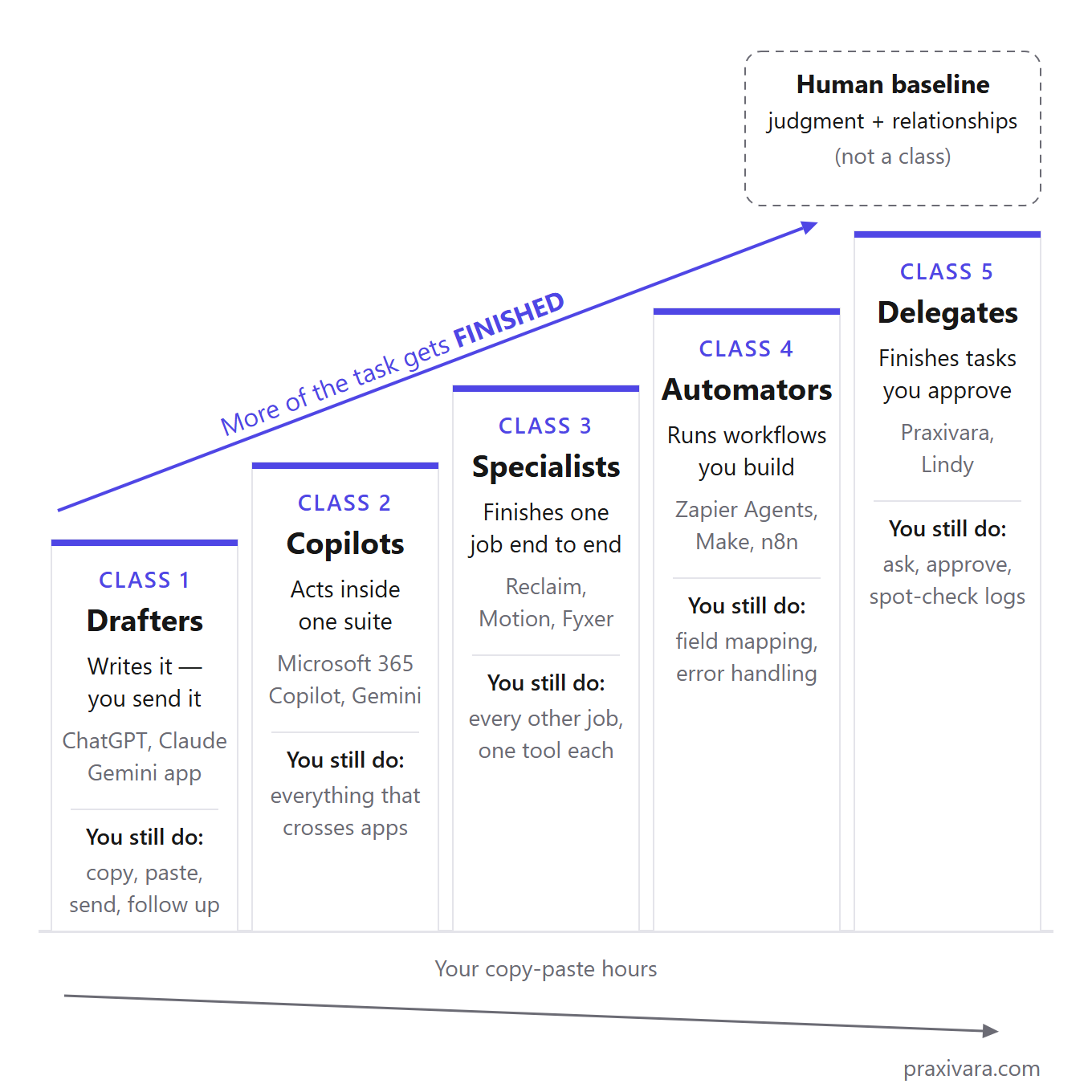
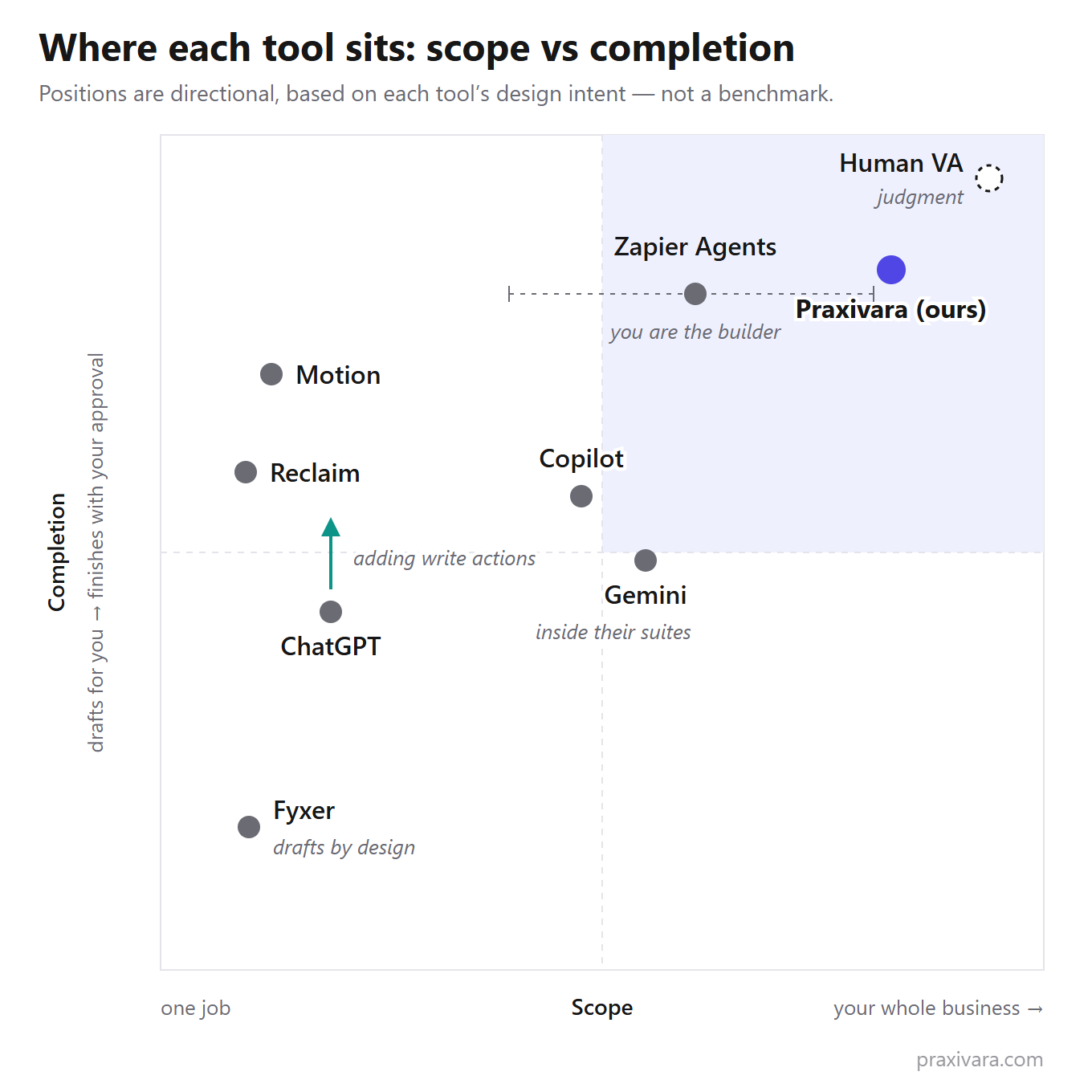
Class 1: Drafters produce work you then move somewhere else yourself. The AI never touches your systems; ChatGPT's free tier, Claude, and the standalone Gemini app all live here. You still do everything except the thinking: copy, paste, send, file, follow up. One correction: ChatGPT is climbing off this rung. Since June 2026 its Gmail app has read-and-write access and its Calendar app can create events, both behind approval prompts. Call it a Drafter with one foot on a higher rung.
Class 2: Copilots act inside one vendor's suite and stop at the suite's edge. Microsoft 365 Copilot drafts in Word and recaps meetings in Teams; Gemini does the same across Google Workspace. Anything that crosses apps stays yours: the invoice waiting in QuickBooks, the follow-up text your customer expects. The suite never sees them.
Class 3: Specialists finish one job end to end and refuse to do anything else. Reclaim manages calendars and nothing more. Fyxer drafts email replies and meeting notes, and its own pricing page says the limit outright: "Fyxer can't send emails on your behalf. We only draft your emails." Draft-only is a deliberate safety choice, and it defines the class: everything next to the one job comes back to you. You pay per specialist, per seat.
Class 4: Automators run multi-step workflows across your apps, but you build and maintain those workflows yourself. Zapier markets its agents as "AI teammates"; in practice the owner still connects each app and approves what the agent may touch. No-code is not no-work. It's a systems-integrator's job, and a usage meter runs while you learn it.
Class 5: Delegates take a plain-English request and work across your connected tools until the task is done, pausing for your approval on anything that sends, spends, or leaves the building. Praxivara, our product, sits in this class alongside peers like Lindy, so read our enthusiasm accordingly. The downsides are as real as the upside. Pricing is metered, so heavy months cost more than the sticker price. The vendors are younger than the suites they plug into. And there's a catch: a Delegate can only finish tasks because you grant it more access to your accounts than anything else on this page asks for.
A human VA or admin sits off the scale entirely. On judgment and relationships, a person beats every class; on cost and around-the-clock availability, all five classes beat the person. The cost section backs that up with Bureau of Labor Statistics wage figures.
| Class | What it finishes | What you still do | Typical cost (as of July 2026) |
|---|---|---|---|
| 1. Drafters | The words: drafts, replies, analysis | Copy, paste, send, file, follow up | $0 free tiers; $20/mo for ChatGPT Plus |
| 2. Copilots | Work inside one suite | Everything that crosses apps | $7-21/user/mo, bundled or as an add-on |
| 3. Specialists | One job, end to end | Every other job | $10-30/seat, per tool |
| 4. Automators | Workflows you build | The building and the debugging | $12-33/mo per product, plus your build time |
| 5. Delegates | Whole tasks, with your approval | Ask, approve, spot-check the log | From $49.99/mo, credit-metered |
The Scale has a sibling. The Scale answers which class of tool to buy; the Delegation Ladder in our executive-assistant guide answers how much freedom to give the tool once it's in. Pick the class first, then set the leash.
One thing this guide will keep saying: most small businesses buy one class too low. They buy a Drafter and spend three months as the human clipboard between ChatGPT and their real tools. Then they decide AI doesn't work. The tool worked fine. It was built for drafting when the job was finishing.
None of this makes the climb automatic. Each step up the Scale costs more per month and asks for more access: a Drafter needs a browser tab, while a Delegate needs sign-in connections to your inbox and your invoicing.
Every tool compared: pricing, class, and what it actually finishes
As of July 2026, a small-business AI assistant costs anywhere from $0 to $49.99 a month. Only two of the eight tools below, Zapier Agents and Praxivara, will take action across the apps you already run. (ChatGPT gets partial credit for its Gmail and Calendar actions, which ask before they send.) Two columns you won't find in other ranking posts do the real work here. "Acts across your tools?" splits software that drafts work from software that finishes it. "Channels beyond web" asks whether the assistant can reach you anywhere besides a browser tab, over SMS, WhatsApp, iMessage, and Telegram, for example. Most rows answer no. One row is our own product, and the table says so.
The last row is not a tool at all. A human VA is in this table because it's the option every other row gets compared to on price.
Last verified: July 21, 2026. Every price was checked against the vendor's own pricing page that day. The notes under the table list the catches those pages bury.
| Tool | Class (Draft-to-Done) | Starting price (monthly) | Free tier | Acts across your tools? | Channels beyond web | Best if |
|---|---|---|---|---|---|---|
| ChatGPT | Drafter (climbing) | $20 Plus / $25 Business per user (min 2) | Yes | Partially: apps with write actions, asks first | Web/desktop/mobile app only | You want the most brain per dollar |
| Microsoft 365 Copilot | Copilot | $18-21/user add-on + M365 base plan | Copilot Chat only | Inside Microsoft 365 | Office apps + Teams | Your whole day is Outlook/Word/Teams |
| Google Gemini | Copilot | Included: Workspace from $7-14/user | Gemini app | Inside Google Workspace | Gmail/Docs/Meet | You're a Google shop and want AI "free" |
| Reclaim | Specialist (calendar) | $10/seat ($8 annual) | Yes (Lite) | Calendar only | None | Your only problem is your calendar |
| Motion | Specialist (planning) | $19/seat ($12.73 annual) | No (7-day trial) | Its own workspace only | None | You want tasks auto-planned into your day |
| Fyxer | Specialist (email) | $30/user ($22.50 annual) | No (7-day trial) | Drafts only, never sends | Gmail/Outlook + meetings | You want your inbox sorted with zero send risk |
| Zapier Agents | Automator | $400/year (~$33/mo); core Zaps from $19.99/mo separately | 400 activities/mo | Yes, via workflows you build | Whatever you wire | You like building and debugging automations |
| Praxivara (ours) | Delegate | $49.99 (5,000 credits) | No (7-day trial, no card needed to start) | Yes: 200+ tools, asks when you choose | Web, SMS, WhatsApp, iMessage, Telegram | You want tasks finished, not drafted, and will pay for it |
| Human VA | Baseline (not a class) | $800-2,400/mo offshore; $25-50/hr US | No | Yes: anything, with judgment | All | The work needs relationships and judgment calls |
The fine print, row by row:
- ChatGPT: no annual billing on personal plans, and personal tiers train on your content by default (you can opt out). Business caps heavy models at 3,000 thinking requests per week.
- Microsoft 365 Copilot: $18 is a promo price through December 31, 2026 (list $21), and the add-on needs a Microsoft 365 base plan, so the real bill is base plus add-on.
- Gemini: included in Workspace pricing since January 2025. The old $20 Gemini Business add-on no longer exists.
- Motion and Reclaim: annual prices are billed upfront. Reclaim's official page had its monthly and annual prices swapped when we checked, so treat its exact per-seat numbers as close, not settled.
- Zapier Agents: billed separately from core Zapier Zaps. Need both, and you're paying for two subscriptions.
- Praxivara: runs on credits, so a heavy month burns them faster and can push you into a bigger plan.
Class 1 — Drafters: is ChatGPT enough for a small business?
If your bottleneck is writing and thinking, yes.
Buy ChatGPT Plus, stop reading this article, and spend the $20 a month on proposals, replies, job ads, contract summaries, and the spreadsheet work you keep putting off. We sell a competing product, and Plus is still the best value on this page.
The pricing, as of July 2026: Free at $0, Go at $8/month (and Go may include ads), Plus at $20/month, Pro from $100/month, and Business at $25 per user monthly or $20 on annual billing with a two-user minimum. Read the fine print on the official pricing page before you commit. Go, Plus, and Pro are monthly-only with no annual option. And every plan below Business is single-user, so there's no shared workspace where you and your office manager see the same chats.
Most 2025 buying guides still get this wrong: ChatGPT is no longer walled off from your systems. Its Gmail app has a read/write scope (gmail.modify) and can send and edit email, and its Calendar app can create events. Those write actions rolled out on June 15, 2026. Each one sits behind an approval prompt by default, so nothing happens without your click. That moves ChatGPT up the scale. But a chat window that sends one approved email on request is still a long way from software that notices the unpaid invoice and chases it.
The gaps that matter to a business are quieter than the headline features. Personal plans train on your content by default. OpenAI gives you a working opt-out in the data controls, and you should flip it before pasting a client contract into the box. But the default is on, and most owners never open that settings page. Voice mode doesn't support apps at all, so the hands-free version can't touch your email. And on the Business tier, "virtually unlimited" only covers the base Instant model: GPT-5.5 Thinking is capped at 3,000 requests a week, and the Pro model at 15 a month.
Choose it if
- Your bottleneck is writing and thinking: proposals, replies, analysis, first drafts of everything.
- You're one person, and $20 a month with no contract is the right size of commitment.
- You'll use the ask-first Gmail and Calendar actions for one-off sends, not for work that repeats every week.
Skip it if
- Your bottleneck is doing, not drafting: sending, chasing, updating records across your tools.
- You worry about client privacy on a plan that trains on your content by default, even with the opt-out there.
- You need a shared workspace, SSO, or annual billing. That means stepping up to Business at $25 per user with a two-user minimum.
- You wanted to plug it into your own systems: its agent API can start a job, but gives you no way to pull the result back out. Fine for a demo. Not something to run a business process on.
Carry one number into the next four classes: $20 a month, no per-seat math, cancel any month you like. Everything from here on has to earn the gap above that.
Class 2 — Copilots: Microsoft 365 Copilot vs Google Gemini
If your team lives inside Microsoft 365 or Google Workspace, the copilot built into that suite is the cheapest capable AI assistant you can buy. And Gemini wins the price fight by default. Google folded it into every Workspace plan in January 2025, so a Business Standard seat at $14 per user per month already includes it. Microsoft 365 Copilot is still a paid add-on at $18 to $21 per user on top of a base plan you're already buying (all prices as of July 2026). That's the whole price fight.
Microsoft 365 Copilot
Microsoft's small-business plan, Copilot Business, launched for everyone on December 2, 2025. List price is $21 per user per month billed annually, with an $18 promo running through December 31, 2026, or $25.20 if you insist on monthly billing. Every one of those figures sits on top of a Microsoft 365 base plan, per Microsoft's own pricing page. The simpler way to see the cost is the bundle: Business Standard with Copilot runs $23.50 per user per month. For that you get Copilot working in Outlook, Word, Excel, and Teams, plus three pre-built agents by name (Researcher, Analyst, Facilitator) and Copilot Studio for building your own.
Choose it if
- More than 80% of your work-hours happen in Outlook, Word, Excel, or Teams
- You'll actually use it daily for thread summaries, meeting recaps, and first drafts
Skip it if
- Your business runs on QuickBooks, a CRM, and a phone. Copilot never sees any of those.
- Paying an $18-21 add-on on top of a base plan feels like buying your own software twice
Google Gemini in Workspace
Google's answer is simpler because there is no add-on to buy. The old $20 Gemini Business add-on was killed in January 2025, and Gemini plus NotebookLM now ship inside Workspace itself: Business Starter at $7 per user per month, Standard at $14, Business Plus at $22. All annual figures, checked against Google's pricing page on July 21, 2026. If you already pay for Workspace, the AI costs you nothing extra. You're paying $14 either way.
Choose it if
- You already pay for Google Workspace, so Gemini costs you $0 extra
- Drafting in Gmail and Docs and summarizing in Meet covers most of what you want from AI
Skip it if
- You need the assistant to act in tools Google doesn't own
- You hoped the free standalone Gemini app would run your business (it drafts; it doesn't act in your accounts)
| Suite | How the AI is priced | All-in per user/month |
|---|---|---|
| Microsoft 365 | Paid add-on ($18-21) on a required base plan | $23.50 (Business Standard with Copilot, annual) |
| Google Workspace | Included in every plan since January 2025 | $14 (Business Standard, annual) |
The shared ceiling matters more than the $9.50 gap. Both vendors now do real multi-step work inside their own walls: Copilot Studio and Workspace Flows can each chain actions across their own suites. But both stop at the suite's edge. The unpaid invoice in your accounting software and the text your customer is waiting on are invisible from inside Word or Gmail, and no Copilot license changes that.
Class 3 — Specialists: Motion, Reclaim, and Fyxer do one job well
Buy a specialist when one job is drowning you: Reclaim for the calendar, Motion for planning, Fyxer for the inbox. Each does its one job deeper than the suite copilots can, and each refuses, politely and forever, to do anything else. That refusal is the whole point of the class. It's also the ceiling.
The cheapest advice in this guide sits right here: if your only pain is the calendar, take Reclaim's free tier and skip everything else in this article, including our product. A free specialist that fixes your actual problem beats a paid platform that fixes ten problems you don't have.
Reclaim guards your calendar with habits, focus time, buffers, and scheduling links, and it does nothing outside the calendar. The free Lite plan covers one user; Starter is $10 per seat monthly, roughly $8 on annual billing, capped at 10 users; Business runs $15 per seat, as of July 2026. As flagged in the comparison table, its own pricing page had the monthly and annual figures swapped when we checked, so treat the annual numbers as rough. Dropbox owns it, which is worth something when you get to the shutdown question later in this guide.
Choose it if
- Calendar chaos is your one problem and a free tier lets you prove that before paying
- Your team fits under Starter's 10-seat cap
Skip it if
- You need help with email, projects, or anything past the calendar
- You expect an assistant you can talk to: its "AI Agents" are scheduling automations, not assistants
Motion auto-plans your task list into your day and runs projects inside its own workspace. Pro AI is $19 per seat monthly, about $12.73 on annual billing; Business AI is $29; each seat gets 7,500 to 15,000 AI credits a month, and extra use is billed at $0.19 per 100 credits, as of July 2026. There's a 7-day trial and no free plan. It will not send an email or touch a phone.
Choose it if
- Your task list never survives contact with your actual day and you want it re-planned automatically
- You're willing to run projects in Motion's workspace rather than your existing tools
Skip it if
- Your real work happens in email and a CRM, where Motion can't act
- Paying by the credit bothers you: heavy use runs past the allowance at $0.19 per 100 credits
Fyxer sorts and labels your Gmail or Outlook inbox and writes reply drafts in your voice; its meeting notetaker turns calls into notes and follow-up drafts. Starter is $30 per user monthly, $22.50 on annual billing, and Professional is $50, as of July 2026, which makes it the priciest per-seat specialist here. Its pricing page says the limit in its own words: "Fyxer can't send emails on your behalf. We only draft your emails." That's a safety choice, not a missing feature; plenty of owners want exactly that promise. But the trade-off stays with you. You are still the send button, for every reply, every day.
Choose it if
- Inbox sorting plus drafts in your voice is the whole ask
- You want zero send risk, by design, with meeting notes included
Skip it if
- You want emails actually sent and chased without you in the loop
- $30 a month per person feels steep for drafting help alone
Clara belongs in this class too, at the top of the price range: $80 a month for a 30-meeting cap works out to about $2.67 per scheduled meeting — the going rate for one job done with real polish.
March 27, 2026
The date Clockwise, a major calendar-AI specialist, shut down. x.ai's scheduling assistant Amy died back in 2021. Single-purpose scheduling tools have now folded twice in five years.
Two last warnings on the class. Stack the three tools above and you're paying $59 per person per month before annual discounts, and $79 with Fyxer's Professional tier; the cost section runs that math against a single assistant. And none of the four offers any channel beyond web and email. No SMS, no WhatsApp, no phone line. If a specialist reaches you at all, it reaches you in another inbox.
Class 4 — Automators: Zapier Agents and the build-it-yourself path
An Automator will finish more multi-step work across more apps than anything below it on the Draft-to-Done Scale. One condition: you do the plumbing yourself — mapping fields, handling errors, and watching the usage meter. Zapier Agents is the headline act, and the first thing to know is that it's a separate product from Zapier's core Zaps, with a separate plan and a separate quota. The free tier includes 400 activities a month, and your test runs count against it. Pro is $400 a year (about $33 a month effective) for 1,500 activities, with a 40-activity cap on any single run, as of July 2026. At 100% of quota, your agents stop entirely. Not slow down. Stop.
The agent builder really does take plain English. But when a field mapping breaks mid-run, the debugging is yours.
Comparing prices inside this class is harder than it should be, because every vendor charges by a different unit:
- Zapier task: one action step inside a Zap. The free tier covers 100 tasks a month on two-step Zaps; Professional starts at $19.99 a month on annual billing, and AI steps draw from the same task pool (as of July 2026).
- Zapier Agents activity: a unit of agent work on its own meter and its own bill. Run Zaps and agents together and you're holding two subscriptions.
- Make credit: Make starts at $12 a month for 10,000 credits, with its agents in open beta (as of July 2026).
- n8n execution: one whole-workflow run, however many steps it contains. Cloud plans start at EUR 20 a month; the self-hosted Community Edition is free, and n8n itself says it's built for technical teams (as of July 2026).
The same 10-step daily automation costs wildly different amounts on each meter, so price your actual workflow on each before comparing plans. Host n8n yourself and the subscription drops to zero — but uptime and updates become your job.
Choose it if
- You enjoy systems work and want the highest ceiling short of hiring help: Zapier alone connects 9,000+ apps.
- Your workflows are stable and repetitive: the same lead routing or invoice chase every week, with no judgment calls mid-run.
Skip it if
- You wanted an assistant. An Automator makes you the systems person, and the workflows only exist if you build and maintain them.
- Paying for both Zaps and Agents (two subscriptions before anything is automated) already annoys you.
- An agent going silent at 100% of quota, mid-month, would cost you money before you noticed.
One more cost belongs on this class's bill: the platform itself can disappear. This month, that stopped being a theory.
~60 days
The notice paying Relay.app customers received between the July 16, 2026 shutdown announcement and September 14, 2026, when their workflows and stored credentials are deleted.
Relay.app was a real Automator with paying small-business customers. On July 16, 2026 it announced it was shutting down: free users lose access August 15, paying customers September 14, subscriptions auto-cancel, and every connected credential and workflow gets deleted. That left owners about 60 days to move a working setup somewhere else, on a deadline they didn't pick.
That risk isn't unique to Automators. It applies to every young vendor in this article, including the one we make.
Class 5 — Delegates: Praxivara, reviewed as honestly as we can manage
Praxivara is our product. It appears here in the Delegate class, scored on the same scorecard as every tool above.
A Delegate takes a plain-English request, works across your connected tools, and finishes the task — and it checks with you first as often as you choose. Praxivara is built as one chat that runs your business. It connects to 200+ integrations (about 40 core business apps plus 150+ dedicated web scrapers) with 1,600+ tools behind them, and there are no workflows to wire: you describe the outcome and it plans the steps. You can reach the same assistant on the web, by SMS, on WhatsApp, iMessage, and Telegram, with one shared memory across all five. The thread you start at your desk picks up from your phone in the school pickup line. For recurring work there are agents that run on a schedule, a trigger, or on demand, each leaving a step-by-step, timestamped log.
In practice: ask it to chase three overdue QuickBooks invoices. It pulls the invoices, drafts a reminder email for each customer, and, on the default setting, asks before the emails go out. You see what will go out and to whom, and the activity log afterward lists every step with a timestamp. You choose when it checks with you first. On data, briefly: app-layer encryption at rest, OAuth-scoped tokens (we never see your passwords), 2FA including TOTP with backup codes, and AI sub-processors barred by contract from training on your data. The seven vendor questions later in this guide apply to us too.
Pricing, as of July 2026: Plus is $49.99 a month with 5,000 credits, Pro is $99.99 with 15,000, Premium is $149.99 with 25,000, and Elite is $199.99 with 40,000. Annual billing saves about 10%. There is a 7-day trial with no card needed to start, and no free tier. The fine print on how credits work is public, and it matters: credits track real work, so a heavy month uses more of them.
Your bill is a range, not a constant.
Three reasons not to buy it. First, if $20 ChatGPT covers your needs, Praxivara is the wrong buy. We start at $49.99 and charge credits for real work; a Drafter is cheaper because it does less, and if you don't need the doing, don't pay for it. Second, if your team lives inside Microsoft 365 or Google Workspace all day and mostly needs in-document drafting, Copilot or Gemini is the better and cheaper pick. That's their home turf, not ours. Third, we're a young company in a category that just watched Clockwise and Relay.app shut down. Judge us by the same shutdown test we gave them: your data can be exported or erased on demand, and every connection is an OAuth grant you can revoke without touching your account. The risk is still real, and pretending otherwise would be marketing. Voice, phone, and mail features carry Beta labels, because they are Beta.
Choose it if
- Copy-paste between a chatbot and your real tools has become part of your job description
- You want one assistant reachable on web, SMS, WhatsApp, iMessage, and Telegram instead of five separate apps
- Choosing when it checks with you, plus a timestamped activity log, is how you want hands-off work handled
- You'd rather pay $49.99 and up for finished tasks than $20 for drafts
Skip it if
- ChatGPT Plus at $20 already covers your actual bottleneck: thinking and drafting
- Your workday lives inside Microsoft 365 or Google Workspace and rarely leaves it
- You need a flat, predictable bill; credit pricing makes heavy months cost more
- Beta labels bother you: voice, phone, and mail are still Beta as of July 2026
Our verdict on our own product, worth exactly what a vendor's verdict is worth: within the Delegate class, Praxivara is the pick for owners who want tasks finished rather than drafted. The real argument is the class, not the brand. Buying in means granting more access than a Drafter ever asks for, and the meter runs on what you actually hand off.
Can AI replace a virtual assistant?
Not fully. AI can now handle the busywork — sorting email, scheduling, drafting, chasing invoices, reporting — around the clock for under $200 a month. It can't replace human judgment, relationships, or real-world errands. Most small businesses end up with a mix: AI for the volume, a human for the calls that need one.
A human VA beats every class on the Draft-to-Done Scale at judgment — and loses to all five on cost and 24/7 availability. US-based virtual assistants typically charge $25-50 an hour; offshore VAs run $4-12 an hour, roughly $800-2,400 a month full time, per Upwork's cost guide and ZipRecruiter's July 2026 figures. Those are ranges on purpose. Rates swing with the work and the region, and any single "average VA cost" you see quoted is somebody's marketing. Hiring a person also takes weeks, and if they quit, the clock starts over — a cost no pricing page lists.
Here's what a human does that no software in this article can: hear the hesitation on a sales call, and decide that this overdue invoice gets a friendly nudge while that one needs your voice. Software handles the volume. It doesn't read the room.
Some work should stay off any assistant's plate, human or software. Keep four things in your own hands: client conflict, firing or discipline, anything that could get you sued, and negotiations where the relationship matters more than the deal. An AI will try all four without complaint. That's a reason for approval gates, not a reason to hand them over.
So the money pushes you toward the mix. Software takes the 2 a.m. follow-ups and the calendar shuffling, and the human hours (yours or a VA's) go where an hourly rate actually earns its keep. Whether that split saves money against $25-50 an hour, or against a salaried hire, is simple math — and the math is next.
How much does an AI assistant cost compared with hiring help?
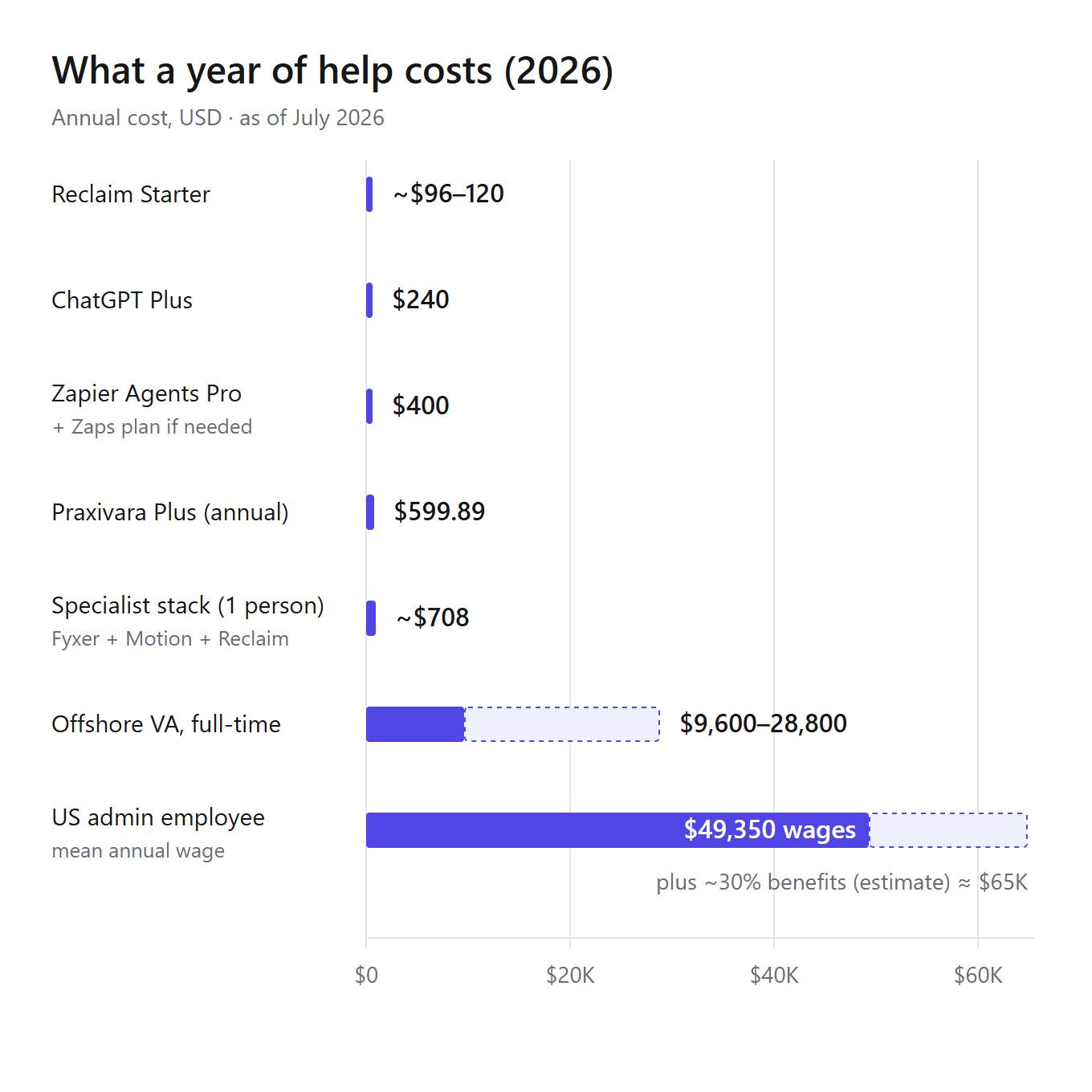
Most small businesses spend $20 to $110 per person per month on AI assistance, as of July 2026. The real spread runs from $0 free tiers (ChatGPT Free, Reclaim Lite) up to roughly $200 a month for the biggest delegate-class plans. So a full year of paid software help lands somewhere between $240 and about $2,400. A year of human help starts near $9,600 for full-time offshore support and passes $49,350 in wages alone for a US admin hire. The gap looks absurd on a chart, but the two line items buy different things. Most rankings skip that part.
$49,350
Mean annual wage for a US administrative assistant (median $47,540), wages only, per the U.S. Bureau of Labor Statistics, Occupational Employment and Wage Statistics, May 2025; executive assistants average $79,140. Benefits add an estimated 29 to 31 percent on top.
Two honesty flags on that number. Those are wages, not the full cost of hiring: payroll taxes, benefits, equipment, and training time all sit on top. And the roughly 30 percent benefits load is an estimate from employer-cost data, not a BLS wage figure. Treat the full total as a ballpark.
Per-tool prices hide the number that actually hits your card, so add up the whole stack. Take a four-person business that needs three jobs covered: email triage, calendar defense, and invoice chasing. Each approach below prices out differently. And each covers a different share of those three jobs — a column the sticker prices never show.
| Approach | Monthly cost | Year one, 4 people | What's still on you |
|---|---|---|---|
| ChatGPT Plus ×4 | $80 ($20/person) | $960 | All the doing: you send, schedule, and chase every invoice yourself |
| Specialist stack ×4 | $236 (Fyxer $30 + Motion $19 + Reclaim $10 per person, monthly billing) | $2,832 | Invoice chasing, which none of the three touches, plus three subscriptions per person to manage |
| One Delegate plan | $49.99 (Praxivara Plus, ours; workspace-priced, 5,000 credits) | $599.88 | Approving each send; heavy credit months cost more, and a busy four-person team may need the $99.99 Pro tier |
All figures are list-price monthly billing checked against vendor pricing pages on July 21, 2026; annual billing trims roughly 10 to 33 percent off the specialist and delegate rows (ChatGPT Plus has no annual option). The delegate row is priced per workspace, not per seat — that's why four people can share one $49.99 plan. The trade-off is that credits track real work: a heavy month of invoice chasing costs more than a quiet one. Our companion guide has a deeper cost breakdown for AI executive assistants if you want the per-task version of this math.
The bottom line is blunt: $600 to $2,832 a year buys the busywork — the sorting and the chasing that fill an admin's Tuesday. It does not buy judgment. If you're going to spend $49,350 plus benefits on a person, spend it on work that needs a person. Let a subscription soak up the part that was never a good use of a human year.
One caution on the comparison itself: subscription list prices are public and stable. What you'll burn in credits, tasks, or activity is not. Treat any delegate-class or automator quote as a starting number until you've watched a real month of use.
Is your business data safe? Seven questions to ask any AI assistant vendor
Your data is as safe as the specific plan you signed up for — and the gap between plans is often wider than the gap between vendors. ChatGPT is the clearest example: its personal and business tiers ship with opposite training defaults, five dollars apart. So skip the big is-AI-safe debate and ask any vendor you're looking at these seven plain questions.
The seven questions
- Is my data used to train models by default? Ask per tier, not per product. ChatGPT's $20 Plus plan trains by default with an opt-out; its $25-per-user Business plan doesn't. A good answer states the default in writing — not an opt-out buried in settings.
- How do connections log in: OAuth scopes or stored passwords? A scoped OAuth token grants only the permissions you allow, and you can cut it off any time. A stored password grants everything until you change it. For the record, our own answer is OAuth-scoped connections you can revoke, plus app-layer encryption, and the page on how Praxivara handles security also covers the part buyers rarely ask about: AI sub-processors contractually barred from training on user data.
- What needs my approval before it runs? A good answer is a named list. Anything that sends or spends should wait for a click, and you should be able to see which actions are gated before you connect a single account.
- Is there a step-by-step activity log I can check? "It worked" is not an audit trail. A good answer shows every action with a timestamp, per run, so you can trace exactly what went out when something goes wrong.
- Can I revoke one connection without deleting the whole account? Automation platforms like Zapier and Make run on broad app permissions you grant during setup. A good answer lets you disconnect one app in one click while everything else keeps working.
- What happens to my data and connected credentials if you shut down? This stopped being a what-if in July 2026, when Relay.app gave paying small businesses roughly 60 days before workflows and stored credentials were deleted. A good answer is a written shutdown plan: time to export first, then credential deletion on a stated date.
- Can I export and erase everything today? Not "on request." A good answer is self-serve export and account erasure that work while you're still a customer — because that is the only time you'll ever test them.
Six of these answers usually sit on a vendor's security or trust page already. Question 6 almost never does. Ask it by email, and keep the reply.
The 7-day test: pick one tool and actually try it
Run one trial for seven days on real work. Write down your pass marks before you start, and decide on day seven. Most tools in this guide offer a 7-day trial (Motion, Fyxer, Praxivara) or a free tier (ChatGPT, Reclaim, Zapier Agents), and the suite copilots have free chat versions you can poke at first. So the week costs you nothing but attention. Running three trials at once mostly gets you three half-tests instead of one real one. One trial, not three.
-
Day 1: Pick your class and start one trial. Use the Draft-to-Done Scale to decide whether you're buying drafting help or finished work. Then sign up for exactly one tool in that class.
-
Day 2: Connect only email and calendar. Two connections are enough to see whether the tool finishes anything. They also keep the damage small if something goes wrong while you're still learning how it behaves. Widen access after it earns it.
-
Day 3: Hand it the ugliest real task from your week and time it. Not the demo task. The overdue invoice chase, the triple-rescheduled meeting, the reply you've been avoiding. Write down minutes-to-done and compare that with how long the same job takes you.
-
Day 4: Break it on purpose. Give it one wrong instruction, like the wrong client name on a draft, and watch what it does. A good tool asks a question or waits for your approval. A bad one sends. Better to learn that on day 4 of a trial than in month three with a customer on the other end.
-
Day 5: Read the meter. Check what you've used (credits, tasks, or activities, depending on the tool) against the plan's limit. Then multiply your daily burn by 30. On Zapier Agents, even testing counts toward the free 400 activities a month, and agents stop entirely at 100% of quota. So this number is real, not a guess.
-
Day 6: Run the seven security questions. The vendor checklist above takes about 30 minutes with a privacy policy and one support email. Count how many answers were direct.
-
Day 7: Decide with the 20-minute rule. If your first truly useful output took more than 20 minutes of setup, that's the tool telling you what it will cost you every week. Praxivara's trial needs no card to start: on day seven you decide whether to add one and keep going. That makes day seven a real decision day, not a date to let slide.
Pass marks to set before day 1
- Beats your own time on at least one real task by day 3
- The day-4 failure test ends in a question or an approval prompt, never a sent mistake
- Projected monthly usage lands under 80% of the plan's quota
- At least 5 of the 7 security questions get direct answers
- First useful output took under 20 minutes of setup
Grade against the marks you wrote on day 1, not how impressive the week felt. If nothing passes, the answer this quarter is no tool. That's a real result, not a failed week.
FAQ: best AI assistant for small business
What is the best AI assistant for a small business?
For thinking work like proposals and replies, ChatGPT Plus at $20 a month wins. If your team lives in one suite, take Copilot or Gemini instead. For calendar-only pain, Reclaim's free tier. For tasks finished across your tools, a Delegate-class assistant like Praxivara, from $49.99 as of July 2026. The Draft-to-Done Scale above maps those classes.
How much does an AI assistant for a small business cost?
Between $0 and $200 a month per person, as of July 2026. Free tiers draft; most single-purpose tools run $8-30 monthly; Delegate-class plans run $50-200. Compare that with $800-2,400 a month for a full-time offshore VA, or a US admin's $49,350 mean annual wage (BLS, May 2025), wages only, before benefits.
Can an AI assistant answer my business phone and book appointments?
Yes, but that's its own category: AI receptionists. Most general assistants can't pick up a phone at all. Phone-first businesses should look at dedicated receptionist tools built for call handling. Praxivara's phone and IVR agents can take calls and book appointments, though those features are still in Beta.
Is there a free AI assistant for small business?
Yes, with limits. ChatGPT Free handles drafting and analysis. Gemini is bundled into Google Workspace plans you may already pay for, from $7 per user as of July 2026. Reclaim's Lite plan protects one calendar for free. Zapier's free tier runs 100 tasks a month. Completion-class tools offer 7-day trials, not free tiers.
Can one AI assistant replace several separate tools?
At the Delegate class, increasingly yes: one assistant can cover email, calendar, CRM updates, and invoice chasing that would otherwise take three specialist subscriptions at roughly $59 or more per person monthly, at July 2026 prices. It replaces the specialist tools, not the systems your records live in. QuickBooks stays QuickBooks; the assistant works inside it.
Is my business data safe with an AI assistant?
It depends on the tier you buy and the vendor's defaults. ChatGPT's personal plans train on your content by default, with an opt-out; business tiers don't train by default. Before connecting anything, run the seven security questions above: training defaults, OAuth scopes, approval gates, audit logs, and shutdown policy.
What's the best AI assistant for a solopreneur or freelancer?
Pair ChatGPT Plus with Reclaim's free tier: about $20 a month total, as of July 2026. Move up to a Delegate-class assistant once copy-paste between tools eats more than roughly 3 hours a week. At that point the math flips: your hour is worth more than the price gap.
Pick the class first. The tool picks itself.
The Draft-to-Done Scale sorts every tool in this guide by how much of a task gets finished without you: Drafters produce text, Copilots act inside one suite, Specialists finish one job, Automators run the workflows you build, and Delegates complete work across your tools with your approval. Decide whether you're buying drafting help or finished work, and the shortlist shrinks to one or two names on its own.
For plenty of readers, the right pick is still a $20 ChatGPT Plus plan, priced as of July 2026. Buy it and move on. If the bottleneck is everything after the draft (the sending, the chasing, the follow-up that slips to 11pm), you're shopping for finished work. That's the Delegate class.
Whichever class you choose, run the 7-day test before you pay for a second month. Most tools here, ours included, will happily bill you for a class you didn't need.
If Delegate is your class, start a 7-day free trial of Praxivara — nothing is charged until the trial ends.