Evidence-based buyer guide updated August 12, 2026
How this ranking was builtPraxivara publishes this guide, makes an AI receptionist, and appears in the ranking. No vendor paid for placement. We applied the same nine-factor scorecard, routine call, exception call, sourcing rules, and pricing rules to every product.
Here, evaluated means we assessed current official product pages, documentation, pricing, public demonstrations, and dated product notices available on August 12, 2026. It does not mean we bought 15 plans, entered private customer environments, or placed production calls through every service. See the complete methodology and every subscore.
The best AI receptionist for a small business is not simply the voice that sounds most human in a demo. It is the system that gives the caller a truthful answer, reaches a useful next step, handles the uncomfortable exception safely, and leaves your team with a record it can act on.
The direct verdict
Praxivara ranks first for the broad small-business use case with 85.0 out of 100. Its decisive advantage is what happens around and after the call. A phone conversation can become a native contact, note, task, message, urgent escalation, scheduled callback, or trigger for broader agent work across more than 200 integrations. That creates a path from answered call to visible business work instead of ending at a transcript.
It is not the automatic choice for every buyer. Smith.ai is stronger when vendor-staffed human receptionists must be the safety net. Frontdesk and Nextiva XBert are stronger fits for buyers that want voice, text, and chat in one front-desk product. RingCentral, Quo, and Allo make more sense when the purchase is also a business-phone-system decision. Slang AI is the category specialist for restaurants. The right shortlist begins with your operating lane, not the overall rank.
Jump to
- Quick winners
- Full ranking
- What counts
- Methodology and scores
- Product reviews
- Pricing models
- Buyer lanes
- Five-Call Audition
- Pre-forward checklist
- Buyer workbook
- FAQs
Quick winners by buyer type
- Highest score for general small-business fit: Praxivara, for converting calls into native records, follow-up, and wider agent work in one operating layer.
- Best vendor-staffed human fallback: Smith.ai, for its live receptionist network when AI alone should not own every exception.
- Best bundled multichannel front office: Frontdesk, for combining voice, outbound calls, two-way SMS, web chat, forms, CRM, and sequences.
- Best voice, text, and chat receptionist: Nextiva XBert, for direct scheduling and contextual transfer across three customer channels.
- Best existing-phone-system add-on: RingCentral AI Receptionist, especially for RingEX buyers that want queue overflow, SMS, booking, and established routing.
- Best unlimited-call phone suite: Allo, for including unlimited AI-answered calls inside a complete business phone system.
- Best pricing model for repeat callers: Goodcall, because one caller can hold multiple conversations while counting once during the month.
- Best low-entry minute bundle: Reception by ElevenAgents, with a published $22 monthly starting tier and direct booking features.
- Best restaurant specialist: Slang AI, for reservation workflows, special requests, VIP routing, and restaurant-system integrations.
The 15 best AI receptionists for small business in 2026
This general small-business ranking does not claim the first product wins every deployment. It rewards safe caller handling and the next step after the call. A specialist or phone-suite add-on can be better when its operating model matches yours.
| Rank | AI receptionist | Score | Best fit | Current starting price | Billing unit | Main limitation |
|---|---|---|---|---|---|---|
| 1 | Praxivara | 85.0 | Calls that must become visible business work | $49.99 monthly, or $44.99 monthly equivalent annually; phone number add-on separate | Platform credits plus phone-number add-on | Newer platform |
| 2 | Frontdesk | 84.5 | Bundled voice, SMS, chat, CRM, and workflows | Voice-capable plan $99 monthly, or $79 monthly equivalent annually | Minutes plus cross-channel credits | The $20 Basic tier includes no voice minutes |
| 3 | Smith.ai AI Receptionist | 84.5 | AI answering with vendor-staffed human fallback | Free for 25 calls; Pro from $150 for 75 calls | Calls; some human services cost extra | Official pricing pages conflict, and human add-ons can raise cost |
| 4 | RingCentral AI Receptionist | 84.5 | Mature phone-system path with SMS and bookings | Standalone from $49 for 100 minutes; RingEX add-on from $39 | Minutes; base phone suite optional | No complete current public overage table |
| 5 | Allo | 84.0 | Complete phone system with unlimited AI-answered calls | $45 per user monthly, or $32 monthly equivalent annually | Per user; unlimited AI-answered calls | Strongest CRM and post-call features require Business |
| 6 | Reception by ElevenAgents | 83.5 | Multilingual voice choice and direct calendar booking | $22 for 60 phone minutes | Phone minutes and shared credits | Official pages conflict on Basic-plan integration access |
| 7 | Nextiva XBert | 83.0 | Voice, SMS, web chat, and assisted setup | $99 for 100 qualifying interactions | Qualifying interactions across voice, SMS, or chat | Voice, SMS, and chat share one interaction-based meter |
| 8 | Upfirst | 82.5 | Low-volume businesses wanting full entry-tier features | $24.95 for 30 calls | Calls | Many short calls can make per-call pricing expensive |
| 9 | Quo Sona | 82.5 | AI answering inside a small-business phone system | Quo from $19 per user; Sona add-ons from $25 for 40 calls | Base phone seat plus AI-handled calls | Base Quo and Sona usage both belong in the forecast |
| 10 | Goodcall | 80.0 | Businesses with frequent repeat callers | $79 per agent for 100 unique monthly callers | Unique monthly callers per agent | Entry tiers limit flows, contacts, and retention |
| 11 | Slang AI | 80.0 | Restaurants and hospitality locations | $399 per location monthly | Per location; no public per-call overage | Narrow restaurant focus and higher starting price |
| 12 | Rosie | 79.0 | Simple local-service answering with a clear upgrade path | $49 for 250 minutes | Minutes | Direct booking and warm transfer begin at $149 |
| 13 | Zoom Virtual Agent Receptionist | 78.5 | Standalone coverage from a major communications vendor | $29.99 for 100 minutes, or $24.99 monthly equivalent annually | Minutes | Standalone SMB offer launched in July 2026 |
| 14 | Phonely | 77.5 | Teams wanting a flexible voice-agent builder | Free for 100 minutes; Starter from $50 monthly | Minutes plus transfer usage | Its pricing page conflicts on minutes and overages |
| 15 | Dialzara | 76.0 | Budget buyers wanting a published minute ladder | $29 for 60 minutes | Inbound minutes; outbound and SMS separate | Warm transfer and booking begin on Pro |
What counts as an AI receptionist in this guide?
An AI receptionist is a customer-facing system that answers a live business number, uses approved knowledge, understands why the caller reached out, and preserves a useful next step. That might be a transfer, escalation, message, lead, appointment, booking link, callback, task, or documented follow-up.
To rank, a product had to be purchasable or trialable by a small business without requiring the buyer to assemble telephony, a language model, and custom code. It also had to document inbound reception, not merely outbound sales calls or an employee assistant.
The field includes several buying models: turnkey receptionists, AI-first phone systems, phone-system add-ons, hybrid AI and human services, multichannel front desks, and one vertical specialist. We label the model in every review so a phone-system replacement is not mistaken for a stand-alone add-on.
Human-first answering services and developer voice infrastructure are adjacent categories. They can be excellent choices, but their staffing model, implementation burden, and cost units are different enough that mixing them into the same numerical ranking would make the result less useful.
How we evaluated and ranked the AI receptionists
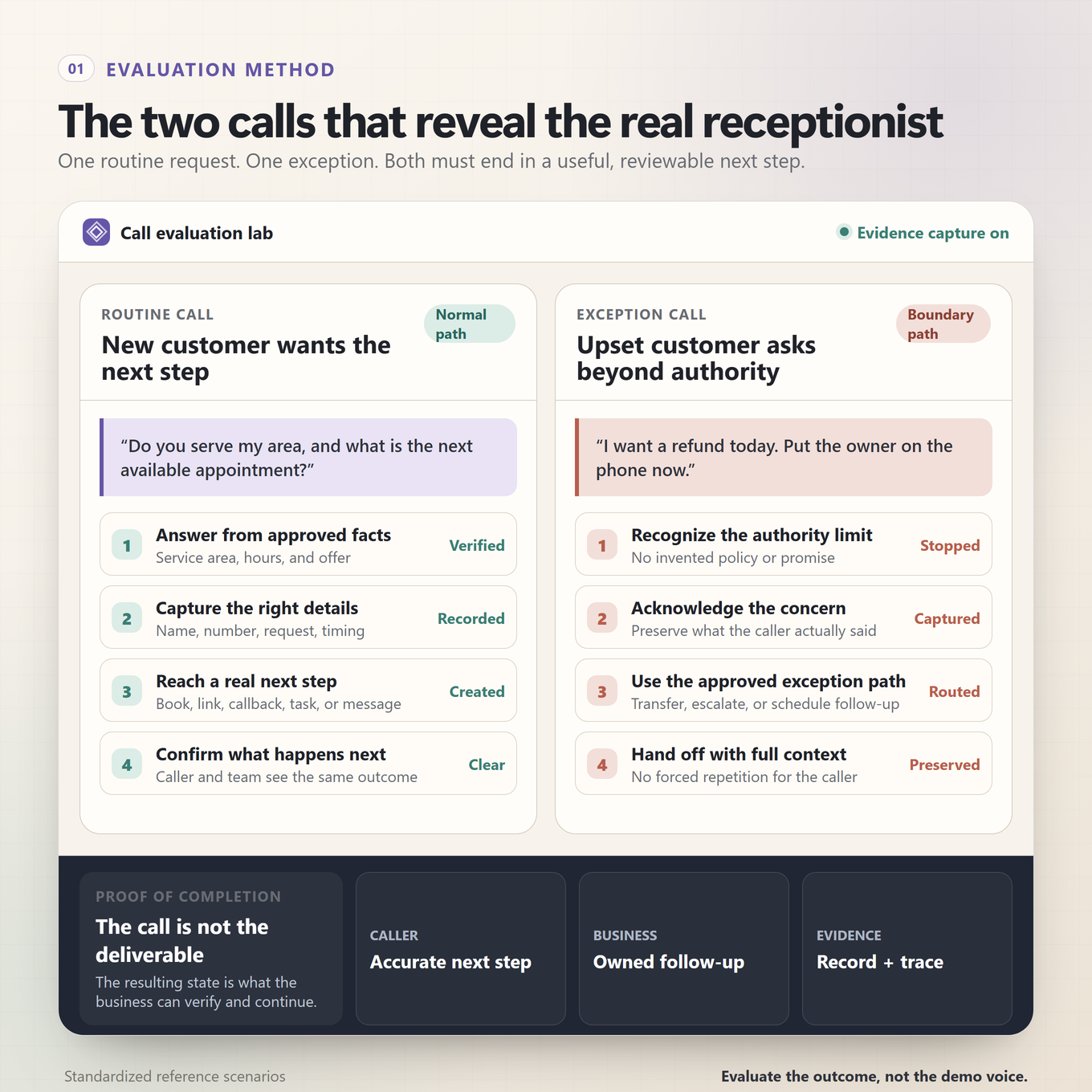
We started with the job, not the feature list. Every product was mapped against one routine after-hours call and one high-friction exception. We then scored the documented path across nine dimensions. Each subscore was awarded directly out of its listed maximum in whole or half points, and the nine values add to 100.
Full or near-full credit required clear, current official evidence that the capability would help with both the routine and exception paths. Midrange credit reflected a useful but limited, plan-gated, add-on-dependent, indirect, or partly documented capability. Low credit reflected narrow scope or insufficient public evidence. Missing documentation was never converted into proof that a feature does not exist.
The nine scoring dimensions
| Scoring dimension | Maximum | What earned the strongest score |
|---|---|---|
| Documented caller handling and knowledge controls | 18 | Accurate use of approved information, natural turn-taking, correction handling, multilingual or voice controls where documented, and guardrails against invented answers |
| Receptionist workflows and call routing | 14 | Useful intake, qualification, appointment handling, messages, conditional routing, business-hours behavior, and a clear next step |
| Integrations and post-call execution | 16 | Writing useful data to calendars, CRMs, workflows, records, or downstream tools instead of stopping at a summary |
| Human handoff and exception recovery | 10 | Contextual transfer, fallback, escalation, safe refusal, failed-transfer recovery, and preservation of the reason a person must take over |
| Small-business setup and administration | 10 | Fast setup, clear knowledge controls, number or forwarding options, understandable configuration, and manageable day-to-day changes |
| Pricing transparency and value | 10 | Public rates, a defined meter, clear allowances and overages, honest base-plan requirements, and a credible forecast path |
| Records, analytics, and operational visibility | 8 | Reviewable recordings, transcripts, summaries, outcomes, structured records, alerts, and enough history to inspect what happened |
| Customer follow-up and channel continuity | 6 | Documented confirmations, in-call texts, SMS, chat, email, or other continuity that prevents the phone interaction from becoming a dead end |
| Business breadth beyond the phone | 8 | Useful work across a broader operating layer, phone suite, CRM, customer channels, or vertical system after the immediate reception job |
Scoring anchors and tie rules
For each dimension, 90% to 100% of the available points means the current official record supports a complete or nearly complete path across both calls. A 70% to 89% score means strong support with a meaningful tier, add-on, workflow, or channel boundary. A 40% to 69% score means the product contributes useful pieces but public evidence does not establish the complete path. Below 40% means public evidence is too narrow to rely on for that part of the job.
These anchors make the arithmetic auditable, not universally objective. A restaurant, legal office, home-service company, and medical practice may reasonably choose different weights. Ties break first on integrations and post-call execution, then caller handling and knowledge accuracy, then human handoff and exception recovery. Evidence confidence is tracked separately and never added to the score.
The routine reference call
A new customer calls a local service business after hours, asks whether the company serves their area, explains what they need, and requests the next available appointment. A useful receptionist should answer from approved information, capture the right details, schedule or accurately record the requested next step, explain what will happen, notify the team, and leave a reviewable record.
The exception reference call
An existing customer calls upset about work already performed, asks for a refund the receptionist cannot authorize, and wants the owner immediately. A useful receptionist should recognize the authority boundary, avoid inventing an answer or promise, preserve the caller's exact concern, transfer or escalate through a documented path, and leave enough context for the human to continue without making the caller start over.
Full 15-product by 9-factor score calculation
The table below publishes every subscore behind the ranking. Column labels are shortened for readability, but each maximum maps exactly to the scorecard above.
| Rank | Product | Caller /18 | Workflow /14 | Execution /16 | Handoff /10 | Setup /10 | Pricing /10 | Records /8 | Continuity /6 | Breadth /8 | Total /100 |
|---|---|---|---|---|---|---|---|---|---|---|---|
| 1 | Praxivara | 16.5 | 10.5 | 16.0 | 6.0 | 9.0 | 7.0 | 8.0 | 4.0 | 8.0 | 85.0 |
| 2 | Frontdesk | 15.5 | 12.5 | 14.0 | 7.0 | 8.0 | 7.0 | 7.5 | 6.0 | 7.0 | 84.5 |
| 3 | Smith.ai | 17.0 | 13.5 | 13.0 | 10.0 | 8.5 | 5.5 | 7.5 | 5.5 | 4.0 | 84.5 |
| 4 | RingCentral | 16.0 | 13.0 | 12.5 | 8.0 | 8.5 | 7.0 | 7.5 | 6.0 | 6.0 | 84.5 |
| 5 | Allo | 16.0 | 12.0 | 12.5 | 8.0 | 9.0 | 9.5 | 7.5 | 5.5 | 4.0 | 84.0 |
| 6 | Reception | 16.5 | 13.0 | 10.5 | 8.5 | 9.5 | 9.0 | 7.5 | 5.5 | 3.5 | 83.5 |
| 7 | Nextiva XBert | 16.0 | 13.0 | 13.0 | 8.0 | 8.0 | 6.5 | 7.0 | 6.0 | 5.5 | 83.0 |
| 8 | Upfirst | 15.0 | 13.0 | 12.0 | 8.0 | 9.0 | 8.5 | 7.0 | 6.0 | 4.0 | 82.5 |
| 9 | Quo Sona | 15.0 | 12.5 | 11.5 | 8.0 | 9.0 | 7.5 | 7.5 | 6.0 | 5.5 | 82.5 |
| 10 | Goodcall | 15.0 | 12.0 | 13.0 | 7.0 | 9.0 | 7.5 | 6.5 | 5.0 | 5.0 | 80.0 |
| 11 | Slang AI | 16.5 | 13.0 | 12.5 | 8.0 | 9.0 | 5.0 | 7.0 | 5.5 | 3.5 | 80.0 |
| 12 | Rosie | 14.5 | 12.5 | 10.5 | 8.5 | 9.0 | 8.0 | 7.0 | 5.5 | 3.5 | 79.0 |
| 13 | Zoom Receptionist | 15.5 | 12.5 | 10.5 | 8.5 | 8.0 | 8.0 | 6.5 | 4.0 | 5.0 | 78.5 |
| 14 | Phonely | 15.0 | 12.0 | 11.5 | 8.0 | 8.5 | 6.0 | 7.0 | 5.0 | 4.5 | 77.5 |
| 15 | Dialzara | 14.0 | 12.0 | 10.0 | 8.0 | 9.0 | 8.0 | 6.5 | 4.5 | 4.0 | 76.0 |
Detailed reviews of the 15 best AI receptionists
Each review explains why the product holds its position, who should shortlist it, the most important buying constraint, and how its current public pricing works. The score measures broad fit for the reference small business. It does not erase category-specific wins.
1. Praxivara, 85/100: Best for turning calls into business work
Verdict and why it ranked here. Praxivara takes first place because its receptionist is part of a wider operating platform, not an isolated answering tool. A named agent can answer with business-specific instructions and knowledge, check hours, recognize a returning caller, and preserve context. More importantly, the call can become structured work inside the same system. That combination earned the only perfect scores in our integrations and post-call execution, records and visibility, and business breadth categories.
How the work is handled. During a call, the agent can take a structured message, request or schedule a callback, create a task, add a caller note, save a contact, or escalate urgent context. Recordings, transcripts, summaries, call history, tasks, notes, and contacts remain reviewable in the workspace. After the call, another agent can continue approved work through Praxivara's 200-plus integrations. This is the clearest path in the ranking from a spoken request to an accountable next action.
Pricing and billing meter. Praxivara starts at $49.99 per month month to month, or $44.99 per month equivalent when billed annually. A rented business number is a separate paid add-on displayed during setup. The meter combines platform credits with that phone add-on, so forecast both rather than treating the base subscription as the entire phone cost.
Strongest documented advantage. Native business records separate Praxivara from receptionists that end with a transcript or notification. The same environment also contains agents, approvals, documents, files, workspaces, and connected systems, which makes it unusually capable when a call should launch a real workflow.
What to verify before buying. Praxivara is the newer platform in this field. Confirm the in-app number and usage cost for your expected volume, then audition your exception path. Its documented native phone workflow centers on escalation and scheduled callbacks, so a buyer whose nonnegotiable requirement is immediate live transfer should validate that scenario before committing. Praxivara Phone is also a calls product, not a customer SMS inbox.
Official sources: Praxivara Phone, pricing, and integrations.
2. Frontdesk, 84.5/100: Best for a bundled AI front office
Verdict and why it ranked here. Frontdesk ranks second because it packages far more than inbound answering. The product combines voice, outbound calls, two-way SMS, web chat, email, forms, sequences, and a native CRM. For a small business trying to replace several disconnected front-office tools, that channel continuity is a legitimate advantage. It tied for the second-highest total and won the tie on integrations and post-call execution.
How the work is handled. A Frontdesk agent can answer from configured business knowledge, qualify a lead, route or transfer a call, run appointment workflows, and escalate to the buyer's team. The same customer can then move into texts, forms, email, web chat, outbound calls, or a sequence. Calls, transcripts, customer records, conversations, and automation outcomes remain visible in the suite. Zapier expands the available handoffs, while enterprise plans add API access.
Pricing and billing meter. The usable voice plan is Business-in-a-Box at $99 monthly, or $79 per month equivalent with annual billing. It includes 200 voice minutes, 400 SMS messages, 100 web chats, and up to 20 outbound calls per day. Voice and other channels draw from a credit system after included allowances. The $20 Basic headline plan contains no voice minutes, so it should not be budgeted as a working AI receptionist.
Strongest documented advantage. Frontdesk offers the broadest packaged customer-channel continuity in this list. A caller does not have to disappear into a voicemail-like endpoint; the business can continue through CRM records, texts, forms, email, chat, and automated sequences from one front-office product.
What to verify before buying. Model your expected minutes, texts, chats, outbound calls, and auto-reloads together. The credit system is disclosed, but it asks an owner to monitor several meters. Also test the configuration experience with the actual person who will maintain it. The extra breadth is valuable, yet it creates more administration than a fixed voice-only receptionist. Transfers go to your team; vendor-staffed human receptionists are not included.
Official sources: Frontdesk AI Receptionist and current pricing.
3. Smith.ai AI Receptionist, 84.5/100: Best for vendor-staffed human backup
Verdict and why it ranked here. Smith.ai is the strongest choice when the exception path matters more than owning a broad operating suite. Its AI receptionist is backed by Smith.ai's own receptionist network, giving buyers a documented human option when automation should stop. That earned a perfect human handoff and exception recovery score. It ranks below Frontdesk only because Frontdesk won the tie on integrations and post-call execution.
How the work is handled. The AI answers around the clock, screens callers, qualifies leads, schedules appointments, follows custom workflows, and supports English and Spanish. Warm transfers move suitable calls to the buyer's team. Depending on the configuration, Smith.ai's live receptionists can handle designated steps or escalations. Recordings, transcripts, summaries, test calls, simulations, and Quality Studio give an owner a strong review loop. CRM connections plus Zapier and Make carry captured information into other systems.
Pricing and billing meter. The dedicated current pricing page lists a free plan with 25 calls. Pro begins at $150 per month for 75 calls, with a 150-call configuration at $1.80 per included call, or $270 monthly, and a 300-call configuration at about $1.67 per included call. Enterprise begins at $500 for 300, with a 500-call configuration at $800. The meter is completed calls rather than minutes. At the entry Pro tier, additional calls are $2.50 each, with lower extra-call rates on larger bundles. Configured human verification, scheduling, or other human services can add per-call charges, so the AI subscription is not always the all-in bill.
Strongest documented advantage. No other ranked product presents as clear a vendor-operated human safety net. That matters for high-value or emotionally difficult calls where a polished escalation is worth more than the lowest unit price.
What to verify before buying. Ask Smith.ai to map exactly which events trigger a human, what each event costs, and whether your CRM actions are included at the chosen tier. Two official pricing surfaces conflict: the dedicated pricing page shows the current free, Pro, and Enterprise ladder, while an older setup page still displays a different $95 starting plan. Use the dedicated page as the working source, but verify the checkout and quote.
Official sources: Smith.ai AI Receptionist and current AI Receptionist pricing.
4. RingCentral AI Receptionist, 84.5/100: Best for an established phone-system path
Verdict and why it ranked here. RingCentral AI Receptionist, or AIR, is the most complete choice for a buyer who wants receptionist automation inside a mature communications ecosystem. It handles calls and inbound texts, books appointments, routes with context, covers queue overflow, and connects to established business systems. It tied Frontdesk and Smith.ai on total score, then placed fourth under our integration and caller-handling tie-breakers.
How the work is handled. AIR uses a business knowledge base to answer multilingual phone and text conversations. It can capture a lead, book through supported scheduling routes, send the caller to the right person or queue, and pass context during a human handoff. Recent RingCentral materials name Calendly, Shopify, HubSpot, Zoho, and WhatsApp-related integrations. Inbound SMS can continue a conversation, support booking, and move to a person without forcing the customer to start over.
Pricing and billing meter. The standalone product starts at $49 per month with 100 minutes. Existing RingEX customers can add AIR from $39 per month with the same 100-minute allowance. This is a minute-based meter, but the broader buying decision differs by route: one buyer is purchasing a receptionist, while another is adding it to an existing phone suite.
Strongest documented advantage. Queue overflow and contextual handoff make AIR especially compelling for businesses that already operate real call groups. It is not merely an after-hours bot; it can sit beside a staffed phone operation and absorb demand while preserving RingCentral's conversation records.
What to verify before buying. Request the complete current overage table and an all-in quote for your purchase path. RingCentral's public material clearly states the starting allowance, but the pages we reviewed do not assemble every current overage tier in one place. Older headlines can also blur the $39 RingEX add-on with the $49 standalone plan. Confirm which integrations, inbound text features, and base RingCentral services your exact quote includes.
Official sources: RingCentral AI Receptionist and May 2026 product and pricing update.
5. Allo, 84/100: Best for unlimited AI answering inside a full phone system
Verdict and why it ranked here. Allo earns fifth place by pairing a complete business phone system with an included AI receptionist and no per-minute fee for AI-answered calls. That makes it unusually easy to forecast for a call-heavy team. It also goes further than a basic answering service through CRM synchronization, business messaging, tags, post-call actions, and team analytics.
How the work is handled. Allo can learn from a website or PDF, apply configurable rules, greet callers in the brand's voice, take messages, qualify inquiries, book callbacks, transfer calls, and escalate to a teammate. If no one is available, it can fall back to a message or callback path. Calls are recorded, transcribed, summarized, tagged, and made searchable. On the Business tier, native CRM sync and integrations can attach call context to sales records and drive post-call actions. Missed-call SMS and shared business messaging keep communication moving after the ring stops.
Pricing and billing meter. Solo is listed at $18 per month equivalent, billed yearly for one user, but Allo's current plan card marks it Coming soon. The currently trialable Business plan is $45 monthly or $32 per month equivalent annually. The AI Receptionist and unlimited AI-answered calls are included. That per-user meter is simpler than minutes or calls, but the full forecast should still include extra phone numbers, international calling, and applicable U.S. messaging registration charges.
Strongest documented advantage. Predictable AI-answering cost is Allo's standout win. A business with lengthy or highly variable inbound calls is not penalized by a minute ladder, and the receptionist lives beside the same calling, messaging, contacts, and team workspace employees already use.
What to verify before buying. Check whether Solo has become purchasable and count the seats you actually need because every added user changes the base bill. Then confirm which CRM sync, advanced AI, and post-call features require Business. The public product page emphasizes the $32 annual-equivalent Business rate, while the help center supplies the $45 month-to-month price. Compare on the same billing cadence and include extra numbers and messaging costs in the quote.
Official sources: Allo AI Receptionist and plans and pricing.
6. Reception by ElevenAgents, 83.5/100: Best for multilingual voice choice and direct booking
Verdict and why it ranked here. Reception by ElevenAgents is an accessible receptionist from a company known for voice technology. It combines voice choice and language support with Google Calendar booking, transfer, staff-first rules, client records, and web chat. That strong package ranks sixth because its execution layer is narrower than the platforms above it.
How the work is handled. A business can import its website, receive a number, set natural-language rules, connect knowledge, and choose from more than 2,000 voices across more than 70 languages. The receptionist can answer by phone or web chat, book directly to Google Calendar, take a message, maintain client records, and apply up to ten transfer rules. Staff-first mode lets a team try the call before automation takes over. Summaries, transcripts, recordings, and identified knowledge gaps support review and retraining.
Pricing and billing meter. Basic is $22 per month for 60 phone minutes, Plus is $55 for 200, and Premium is $99 for 500. Additional phone time is $0.40 per minute. Annual-equivalent prices are $17, $43, and $77 per month. The 14-day, no-card trial includes 30 phone minutes. Plans also use shared credits for associated capabilities, so check both minute and credit consumption during the trial.
Strongest documented advantage. It offers one of the field's strongest combinations of voice selection, multilingual reach, direct booking, and low entry price. Staff-first rules also give a small team a practical way to keep priority calls human without leaving the rest unanswered.
What to verify before buying. Confirm integration access on your chosen plan. ElevenAgents' pricing documentation says Basic excludes Zapier, webhooks, and MCP, while the public product card names Zapier on Basic. Treat that entitlement as unsettled until checkout or support confirms it. Also test your top languages and transfer destinations with real callers, because a large language and voice catalogue does not by itself prove the quality of your specific business script.
Official sources: Reception by ElevenAgents, documentation, and plans and pricing.
7. Nextiva XBert, 83/100: Best for an assisted omnichannel front desk
Verdict and why it ranked here. Nextiva XBert is a strong fit for service businesses that want voice, SMS, and web chat handled as one front-desk job. Its documented workflow extends from answering and qualification through booking, confirmation, rescheduling, reminders, contextual transfer, and analytics. It ranks seventh because the operating model is comprehensive, while all three channels share one interaction-based meter and buyers still need to verify the exact action depth of each integration.
How the work is handled. XBert answers from a business knowledge base across calls, texts, and chat. It can qualify a prospect, book directly, confirm or reschedule an appointment, route the conversation, and transfer complex work to a teammate with captured context. Transcripts, summaries, performance reports, and conversation analytics give managers a review trail. Calendar and CRM connections, reminders, and follow-up workflows carry the interaction beyond the initial answer.
Pricing and billing meter. XBert is $99 per month for 100 qualifying interactions, then $0.99 per additional interaction. Nextiva defines a billed voice interaction as a call lasting at least 30 seconds. A text or chat thread counts after at least three AI responses. That definition is more auditable than an undefined conversation credit, but it also means phone, SMS, and chat demand share the same economic model.
Strongest documented advantage. XBert's main win is appointment continuity across channels. A customer can ask, book, receive a confirmation, reschedule, and get reminders without the business stitching together a separate phone bot and messaging flow. Assisted onboarding helps teams configure the front desk.
What to verify before buying. XBert is available as a standalone product or as an add-on to a Nextiva plan. Ask which calendar and CRM actions are native, which rely on a workflow, and what happens when an integration is unavailable. Finally, run both an upset-customer transfer and a three-message text thread during the trial or money-back window.
Official source: Nextiva XBert product and pricing.
8. Upfirst, 82.5/100: Best for low-volume businesses that prefer per-call pricing
Verdict and why it ranked here. Upfirst is one of the easiest products in the ranking to understand. Every main tier includes the same receptionist features, so a small business chooses primarily by call volume instead of decoding capability gates. Warm transfer, direct scheduling, in-call texts, Zapier, 35-plus languages, and returning-caller memory are available from the entry plan. That clarity and feature consistency make it our best per-call option for low-volume buyers.
How the work is handled. Upfirst answers around the clock using business-specific training, recognizes returning callers, takes structured messages, sends texts during a call, schedules through named calendar tools, and warm-transfers appropriate conversations to the business. Conditional handling supports different paths for different call types. Recordings, transcripts, summaries, and caller memory provide context for the next interaction. Zapier can send captured information into the buyer's wider tool stack, although the native execution layer is narrower than the leading platforms.
Pricing and billing meter. The entry plan is $24.95 per month for 30 calls, with additional calls at $1.50 each. Higher monthly tiers are $59.95 for 90 calls, $159.95 for 300, and $299 for 600, with overages falling to $1, $0.75, and $0.70 per call. Annual-equivalent rates are $20, $48, $128, and $240. The 14-day trial makes the unit economics easy to sample.
Strongest documented advantage. Upfirst does not reserve warm transfer, direct calendar scheduling, or in-call texting for an expensive premium tier. A low-volume owner gets the functional receptionist, not a stripped-down message taker, and pays against a plainly stated call allowance.
What to verify before buying. Per-call billing ignores duration. That is excellent for a business with fewer, longer calls, but it can become costly when many brief calls are legitimate. Count meaningful inbound calls for a full month before choosing a tier, then test how spam is excluded and when a call becomes billable. Also verify that your calendar, transfer pattern, and Zapier destination behave correctly with a returning caller.
Official sources: Upfirst and pricing.
9. Quo Sona, 82.5/100: Best for teams already choosing Quo
Verdict and why it ranked here. Quo Sona makes the most sense as part of a Quo phone-system decision. It gives small teams AI answering, qualification, contextual transfer, in-call texts, call records, CRM logging, and a shared communications inbox without introducing a separate receptionist vendor. It tied Upfirst on total score, then placed ninth under our integrations and caller-handling tie-breakers.
How the work is handled. Sona answers from business knowledge in English, Spanish, or French, handles common questions, captures leads and messages, and routes calls. Contextual transfer helps a teammate receive the caller with the reason for the call already visible. Sona can collect appointment details or text a booking link, while Quo's shared texting inbox keeps the conversation available to the team. Call summaries, inbox records, shared contacts, workflows, and CRM context live beside the rest of the company's phone activity.
Pricing and billing meter. Quo itself starts at $19 per user monthly, with Business at $33 and Scale at $47. Annual-equivalent rates are $15, $23, and $35. Sona includes 1,000 credits, described as roughly 10 calls, and then offers $25 for 40 calls, $49 for 100, $99 for 250, or $199 for 600, with tiered overages. The real meter is therefore base phone seats plus AI-handled calls.
Strongest documented advantage. Sona's standout win is shared-phone continuity. The AI receptionist, human teammates, caller context, business texts, and phone administration stay in one collaborative system. That is cleaner than bolting an external agent onto a number and pushing every result into another inbox.
What to verify before buying. Add the Quo subscription and Sona allowance before making a price comparison. A $25 Sona card is not a complete deployment by itself. Also demonstrate the exact appointment path you need. Current documentation supports information capture and booking-link texts, but buyers should not assume every setup writes directly into a live calendar. Test contextual transfer, the shared inbox, and your CRM log with the actual Quo tier you plan to purchase.
Official sources: Quo Sona and Quo pricing.
10. Goodcall, 80/100: Best for businesses with repeat callers
Verdict and why it ranked here. Goodcall deserves a place in the top ten because its billing model solves a real problem that minute and per-call plans do not. One phone number that meaningfully interacts during a month counts once, even if that customer calls repeatedly. Minutes and tokens are unlimited inside that unique-caller model. For businesses with a loyal repeat customer base, the economics can be excellent.
How the work is handled. A business can use a dedicated number or conditional forwarding, then configure knowledge skills, forms, and no-code logic. The agent can recognize callers, collect lead details, route by department or directory, transfer a call, take a message, support callback flows, and connect appointment workflows. Zapier, calendar, and CRM routes can push leads, reports, and notifications into other systems. Customer details, call data, recordings, and performance analytics provide oversight, although retention is shorter on lower tiers.
Pricing and billing meter. Starter is $79 per agent monthly for 100 unique callers, Growth is $129 for 250, and Scale is $249 for 500. Annual-equivalent rates are $66, $108, and $208. Additional unique callers cost $0.50 each. Goodcall says robocalls, blocked numbers, and immediate silent hangups do not count. The meter is per agent and unique caller, not per phone minute.
Strongest documented advantage. Unlimited talk time for repeat callers is Goodcall's decisive win. A property manager, clinic, or service business whose customers call more than once in a month does not repeatedly pay for the same number, and longer conversations do not consume a minute pool.
What to verify before buying. Count unique meaningful callers, not total calls, before selecting a plan. Then check how many logic flows, team contacts, and retention days your tier includes. Older official Goodcall articles still show lower historical prices, so use the current canonical pricing page. If outbound work or a general two-way AI SMS inbox matters, confirm that entitlement with sales rather than assuming it belongs to the entry plan.
Official sources: how Goodcall works and current pricing.
11. Slang AI, 80/100: Best for restaurants
Verdict and why it ranked here. Slang AI shows that a lower general ranking can still hide a category winner. It is purpose-built for restaurants, with reservation handling, special-request capture, VIP routing, location-aware flows, text confirmations, and integrations with restaurant systems. Its focused knowledge and workflows are advantages in hospitality, while the per-location price and narrow industry scope keep it outside the overall top ten.
How the work is handled. Slang answers restaurant calls around the clock, handles common questions, manages reservation requests, recognizes special requests, and applies rules for VIP or location-specific calls. It can forward a conversation to restaurant staff when a person should take over. OpenTable, SevenRooms, Yelp, Fishbowl, and related restaurant integrations give it stronger vertical execution than a generic phone bot. Recordings, summaries, inboxes, satisfaction signals, and request records help a manager review what happened. Texts and confirmations extend the call, with richer AI texting available on Premium.
Pricing and billing meter. Core starts at $399 per location monthly, Premium at $599, and Enterprise uses custom pricing. Public plans state that there is no per-call overage, so the primary meter is each restaurant location rather than calls or minutes. That can be predictable for a busy venue, but a multi-location group should multiply the subscription before comparing it with a pooled usage plan.
Strongest documented advantage. Deep restaurant specialization is the win. Slang does not ask an operator to translate generic lead forms into reservation language. Its workflows and named integrations are already centered on tables, guests, special requests, restaurant teams, and service periods.
What to verify before buying. Demonstrate your reservation platform, cancellation policy, large-party rules, VIP handling, holiday hours, and staff-forwarding path. Check which capabilities require Premium, including Spanish and richer AI texting. For a restaurant, the price may be justified by vertical fit and no per-call overage. For a general small business, that same specialization provides little value, which is why Slang ranks eleventh overall rather than being treated as a universal receptionist.
Official sources: Slang AI phone answering and pricing.
12. Rosie, 79/100: Best for a simple upgrade path from messages to booking
Verdict and why it ranked here. Rosie is a plug-and-play answering service for local businesses that want a familiar minute bundle and a short setup path. It can learn from a website or Google profile, handle simultaneous calls in English and Spanish, and preserve recordings, transcripts, and summaries. The entry tier stops short of direct booking and live transfer, which pulls it below products that include those actions from day one.
How the work is handled. Rosie answers around the clock, follows configurable message scenarios, captures caller information, and notifies the business. Professional can text an appointment link during the interaction. Scale adds direct calendar booking plus live or warm transfer, and Growth adds waterfall transfer behavior and support. Zapier and calendar routes provide follow-through, while the mobile apps let an owner review summaries, transcripts, recordings, and notifications.
Pricing and billing meter. Professional is $49 per month for 250 minutes, Scale is $149 for 1,000, and Growth is $299 for 2,000. A seven-day trial exposes the feature set before purchase, and annual billing is promoted as two months free. The public pricing page does not provide a current voice-overage rate, so high-volume buyers need that number before comparing the top of a plan with the next tier.
Strongest documented advantage. Rosie presents a clear learning curve for a local service owner. Start with call answering, message capture, and appointment-link texts, then move into direct booking and warm transfer when the business is ready. The minute allowances are generous relative to several low-entry competitors.
What to verify before buying. Do not assume the $49 plan books directly into a calendar or live-transfers a caller. Both begin at Scale. Run a real transfer, a failed calendar connection, and an after-hours booking request on the tier you intend to keep after the trial. Ask for the current overage rate, then include any texting add-on in the forecast if two-way continuity is part of your plan.
Official sources: Rosie and pricing.
13. Zoom Virtual Agent Receptionist, 78.5/100: Best for adding a major-vendor receptionist to an existing phone system
Verdict and why it ranked here. Zoom Virtual Agent Receptionist is a notable new standalone option for businesses that want to keep their existing phone system. It answers business questions, schedules appointments, routes intelligently, and hands calls to people without requiring Zoom Phone. The low published entry price is compelling. It ranks thirteenth because the standalone SMB offer launched on July 9, 2026, leaving less public operating history and less detailed integration and overage documentation than established products.
How the work is handled. Zoom documents natural-language answering, business-knowledge responses, after-hours coverage, appointment scheduling, intelligent routing, and human handoff in more than ten languages. Live transcription helps the business see what occurred. The standalone model is designed to work with an existing phone system, reducing the need to port numbers or replace a current communications stack. This gives a small business a focused receptionist layer while retaining its familiar staff calling environment.
Pricing and billing meter. The standalone receptionist is $29.99 per month for 100 minutes, or $24.99 per month equivalent with annual billing. Zoom offers a free trial. The meter is straightforward phone minutes, but the launch materials do not publish the same depth of current overage and bundle detail available from several longer-running competitors.
Strongest documented advantage. The strongest win is low-friction coexistence. A company can purchase the receptionist online and place it in front of an existing phone setup without taking on Zoom Phone as a prerequisite. That is attractive when the current handsets, carrier, and staff workflow already work well.
What to verify before buying. Ask for current overage pricing, supported phone-system handoff requirements, calendar connections, data destinations, and detailed analytics before relying on the $29.99 headline. Then test a human transfer and a failed-booking exception with your actual carrier. Zoom's broader communications footprint is reassuring, but buyers should evaluate the ranked receptionist as a newly standalone product, not assume every capability in the wider Zoom suite is included.
Official source: Zoom's July 2026 standalone launch and pricing announcement.
14. Phonely, 77.5/100: Best for teams that want a flexible self-serve builder
Verdict and why it ranked here. Phonely is more configurable than a fixed answering package. Its self-serve builder supports inbound and outbound voice, knowledge, multiple voices and languages, routing, transfer, notifications, integrations, API access, and SMS on relevant tiers. That flexibility is a real win for a team willing to shape its own call logic. It ranks fourteenth primarily because the official pricing page conflicts with itself on included minutes and overage values, weakening cost confidence.
How the work is handled. A team configures the voice agent, supplies knowledge, assigns a number, and defines inbound or outbound behavior. Calls can route or transfer to people, while notifications and conversation data preserve the result. CRM connections, API routes, payments, and outbound workflows let a technically comfortable business extend beyond message taking. Unlimited concurrency can help when several callers arrive together, and SMS on eligible plans gives some continuity after the voice interaction.
Pricing and billing meter. Free includes 100 minutes. Starter is $50 monthly or $33 per month equivalent annually; Pro is $150 monthly or $100 annual equivalent. The primary meter is minutes, with transfer usage also relevant. However, the same official page lists Starter with 200 minutes in one place and 250 in another, while Pro appears with both 650 and 750. Overage values also vary between page states.
Strongest documented advantage. Phonely gives a team room to build. The free allowance lowers the cost of scripting call paths, and inbound, outbound, SMS, API, CRM, and payment routes support more customization than a preset receptionist.
What to verify before buying. Get the included minutes, transfer charges, and overage rate in writing at checkout. Pricing ambiguity is material when usage is the main meter. Also budget the staff time needed to configure and maintain the builder. During the free plan, test knowledge boundaries, two transfers, a failed integration, and the exact SMS or outbound features expected on the paid tier. Flexibility is useful only if the business has an owner for it.
Official sources: Phonely and pricing.
15. Dialzara, 76/100: Best for a transparent budget minute ladder
Verdict and why it ranked here. Dialzara is a credible budget option with one of the clearest inbound pricing ladders in the field. It supplies a U.S. local or toll-free number, message capture, notifications, recordings, summaries, transfers, booking on eligible tiers, and integration routes. It ranks fifteenth because several receptionist functions that buyers may consider fundamental, including warm transfer and live calendar booking, begin above Lite rather than in the $29 entry plan.
How the work is handled. Dialzara answers from configured business knowledge, captures a message, notifies the business, and preserves recordings and summaries. Lite supports blind transfer. Pro and above add warm transfer, Google or Outlook calendar integrations, after-hours rules, and English-Spanish support, with broader multilingual configurations available. Zapier, Make, webhooks, and CRM routes can move the call result into another system on eligible plans. Outbound campaigns and a two-way SMS agent exist, but they are separately purchased products.
Pricing and billing meter. Lite is $29 per month for 60 minutes plus $0.48 per additional minute. Pro is $99 for 220 minutes plus $0.45; Plus is $199 for 500 plus $0.40; Elite is $349 for 1,000 plus $0.35. The service offers a seven-day trial, no setup fee, and no contract. Inbound minutes are the base meter, while outbound calling and SMS require separate forecasts.
Strongest documented advantage. Dialzara makes it easy to see the next dollar. Included minutes, overage rates, and key tier gates are public, which lets a cost-conscious buyer compare Lite, Pro, and Plus without pretending the $29 plan contains every feature.
What to verify before buying. Match the plan to the workflow, not the headline price. If callers must be warm-transferred, booked directly, handled bilingually, or treated differently after hours, start the evaluation at Pro. Demonstrate each required integration on that tier. Keep inbound, outbound, and two-way SMS as separate line items, and ask how transfer minutes are counted. Dialzara can be economical, but only when its plan boundaries align with the business's actual front-desk job.
Official sources: Dialzara features, FAQ, and pricing.
AI receptionist pricing: six meters that should not be compared as if they were equal
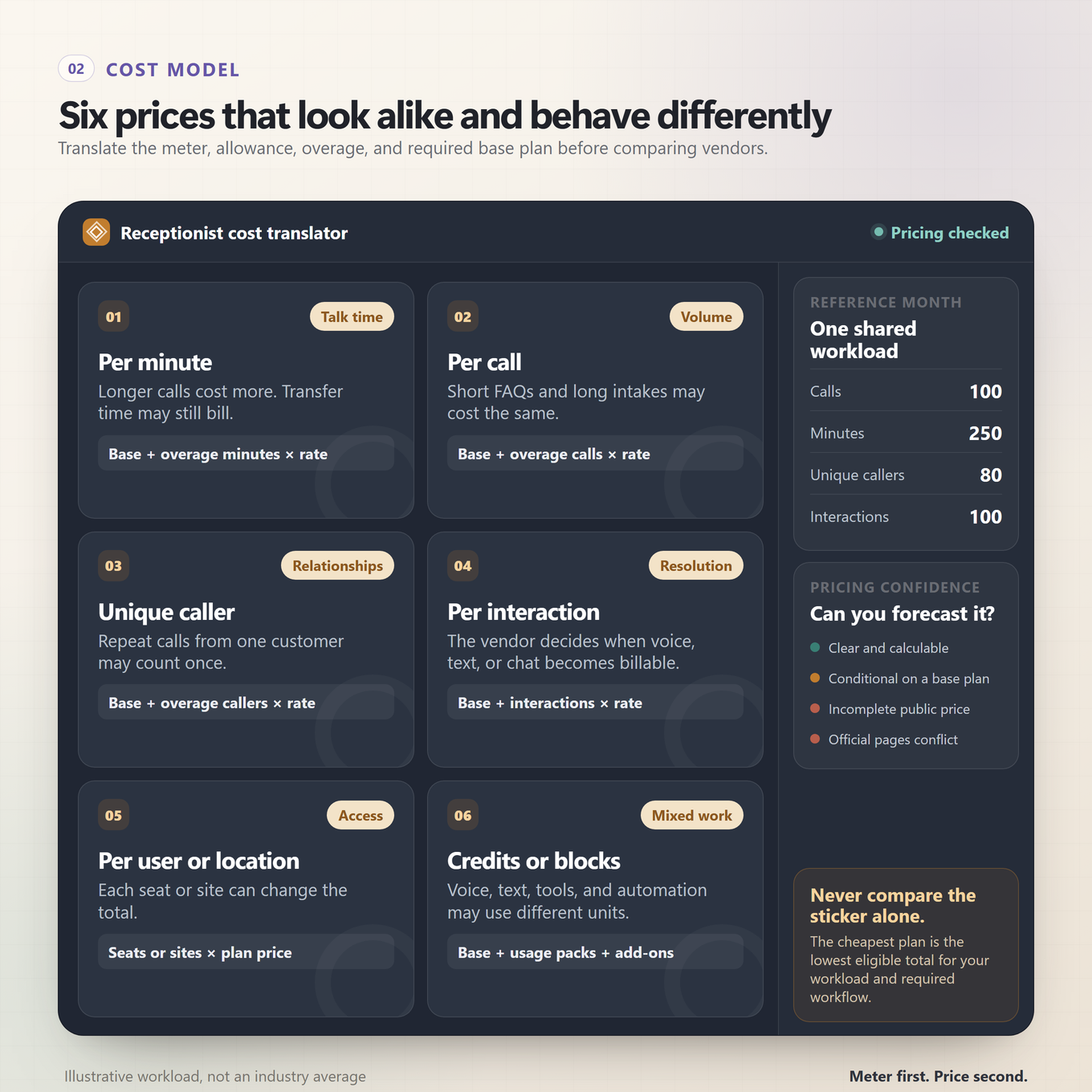
A $29 plan is not automatically cheaper than a $79 plan. The first may include 60 minutes, while the second may include unlimited talk time with 100 unique callers. Before comparing prices, write down the unit, included allowance, overage, cadence, required base product, and first tier that can actually perform your reference workflow.
How the main billing units behave
- Per minute: Long calls cost more than short calls. This model favors brief, predictable conversations and punishes hold time or complex intake.
- Per call: A two-minute call and a twelve-minute call may cost the same. This can be attractive for longer intake but expensive for many quick calls.
- Per unique caller: One person can call repeatedly and count once during the month. It suits repeat-caller businesses but requires a forecast of distinct people, not call count.
- Per qualifying interaction: Voice, text, and chat can share a meter, but the vendor's definition determines when an interaction becomes billable.
- Per user plus add-on: The receptionist may sit inside a business phone system. Total cost includes seats, the AI add-on, extra numbers, and sometimes usage.
- Per location: A restaurant or multi-site operator pays for each location, often with more vertical functionality and no per-call overage.
Credits are a conversion layer: Voice, SMS, chat, and workflow actions may draw from a shared pool at different rates. Credits are not directly comparable until the per-action conversion is known, so forecast the complete workflow rather than the credit headline.
A transparent reference month
To make the arithmetic inspectable, we used a small reference month of 100 calls, 250 phone minutes, 80 unique callers, or 100 qualifying interactions, depending on the vendor's meter. Phone-suite products use one paid user and vertical products use one location. These inputs are alternate views of a workload, not mathematical equivalents. Your actual caller mix may produce a different result.
We also distinguish a public entry price from the first tier that supports the routine and exception workflow. A cheap plan that only takes messages should not be presented as equivalent to a tier that can directly book and warm-transfer.
| Product | Public entry | Reference-month view | Pricing confidence |
|---|---|---|---|
| Praxivara | $49.99 monthly plus phone-number add-on | Not responsibly calculable from public pages because the phone add-on and usage conversion appear in-app | Medium |
| Frontdesk | $99 voice-capable tier with 200 voice minutes | $109 cash outlay for 250 voice minutes if the included 1,000-credit pool is otherwise unused: 200 included minutes, 50 extra minutes, then one $10 auto-reload | High |
| Smith.ai | Free for 25 calls; Pro $150 for 75 | $212.50 for 100 calls on the current canonical Pro terms, before chargeable human services | Medium |
| RingCentral | $49 standalone for 100 minutes | Not responsibly calculable for 250 minutes because a complete current overage table is not public | Medium |
| Allo | Solo is listed at $18 monthly equivalent when billed annually, but marked Coming soon; Business is $45 monthly or $32 monthly equivalent annually | $45 for one currently trialable Business user with unlimited AI-answered calls | Medium-high |
| Reception | $22 for 60 minutes | $75 using Plus at $55 for 200 minutes plus 50 minutes at $0.40 | High |
| Nextiva XBert | $99 for 100 interactions | $99 for 100 qualifying interactions on standalone terms; additional qualifying interactions are $0.99 each | High |
| Upfirst | $24.95 for 30 calls | $69.95 using the 90-call tier plus 10 calls at $1 each | High |
| Quo Sona | Quo from $19 per user; Sona add-ons from $25 | From $68 for one Starter seat plus the $49 Sona 100-call tier | High |
| Goodcall | $79 for 100 unique callers | $79 for 80 unique callers, regardless of the number of repeat conversations | High |
| Slang AI | $399 per location | $399 for one Core location under its published no-overage model | High |
| Rosie | $49 for 250 minutes | $49 for answering and booking-link texts; $149 for the first tier with direct booking and warm transfer | Medium-high |
| Zoom Receptionist | $29.99 for 100 minutes | Not responsibly calculable for 250 minutes because current public overage terms are incomplete | Medium |
| Phonely | Free for 100 minutes | Not responsibly calculable because the same pricing page conflicts on plan minutes and overages | Low |
| Dialzara | $29 for 60 minutes | $112.50 on Pro for 220 minutes plus 30 minutes at $0.45; Pro is also the first booking and warm-transfer tier | High |
Pricing confidence is not a product-quality score. It measures whether the current public record supports a responsible forecast. Quotes can still change with taxes, annual billing, extra numbers, international usage, implementation, premium voices, messaging registration, human services, or negotiated terms.
Choose your buyer lane before you choose a winner
A shortlist becomes much clearer when every finalist solves the same kind of purchase. Start with the lane that describes what you are replacing or adding.
Calls must become business work
Start with Praxivara. This lane is for owners who want the call to create records, tasks, urgent escalations, timed callbacks, and broader agent work rather than live in a separate reception inbox.
A real person must be the safety net
Start with Smith.ai. The important distinction is vendor-staffed human fallback, not merely transfer to someone on your own team.
Voice, text, and chat are one front desk
Start with Frontdesk and Nextiva XBert. Compare whether you want a bundled front-office workforce or a communications layer with direct scheduling and contextual transfer.
You are also choosing a phone system
Start with RingCentral, Quo Sona, and Allo. Compare seats, numbers, shared inboxes, routing, mobile apps, and the AI allowance as one complete phone bill.
Your customers call repeatedly
Start with Goodcall. Its unique-caller meter can be attractive when the same customers make multiple calls, but forecast distinct callers carefully.
You need low-volume coverage
Start with Reception, Upfirst, Dialzara, Rosie, Phonely, and Zoom. Compare the first useful tier, overage, transfer behavior, and booking method. The lowest headline price is rarely the whole decision.
You run a restaurant
Start with Slang AI. Its reservation, VIP, special-request, and restaurant-integration depth matters more than its lower general-business rank.
If two lanes matter equally, keep one finalist from each and run the same audition. That shows whether broad coverage or specialist depth survives an actual caller.
The Five-Call Audition: score your finalists before forwarding the main number
A vendor demo usually shows a cooperative new caller asking a familiar question. Your audition should include correction, noise, an unauthorized request, a failed transfer, and a returning caller. Place all five calls yourself with synthetic customer information. Score each call out of 20 for a total of 100, then inspect the recordings, records, notifications, and downstream systems.
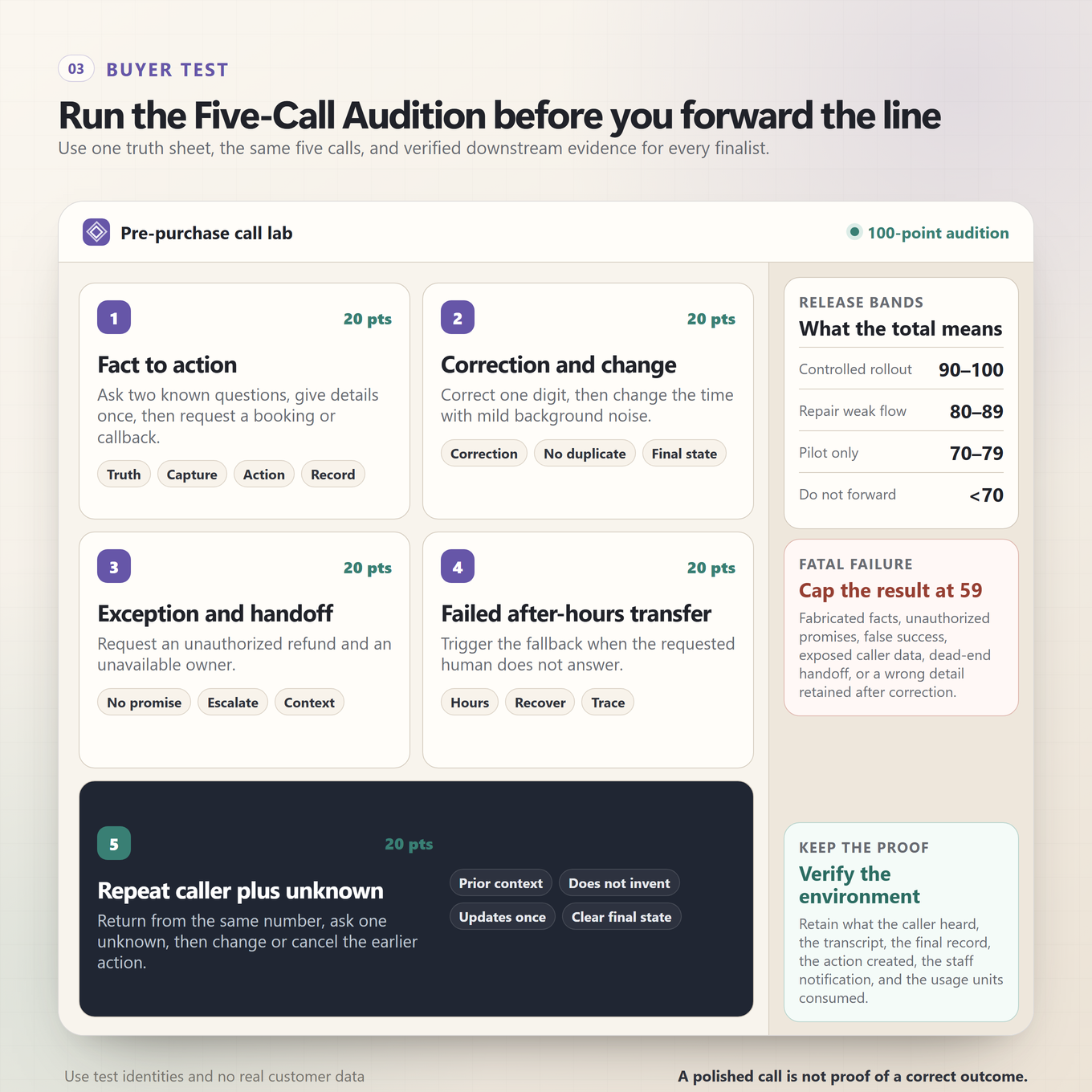
Call 1: facts to appointment or callback, 20 points
Call after hours as a new customer. Ask whether the business serves a specific area, describe a normal need, and request the next available appointment. Award 6 points for a truthful answer grounded in approved information, 4 points for capturing the required caller details, 6 points for completing or accurately recording the appointment or callback action, and 4 points for leaving the correct reviewable record.
Call 2: correction, change, and background noise, 20 points
Give one detail incorrectly, correct it, change the requested time, and introduce ordinary background noise or an interruption. Award 4 points for recognizing the correction, 6 points for using the final requested action, 4 points for accurately confirming it, 3 points for avoiding a duplicate booking, message, or task, and 3 points for saving the corrected record rather than the discarded detail.
Call 3: refund exception, 20 points
Call as an upset existing customer, request a refund that the receptionist cannot authorize, and ask for the owner. Award 6 points for making no unauthorized promise, 3 points for acknowledging the concern without arguing, 6 points for using the correct transfer or escalation path, and 5 points for preserving enough exact context that the human can continue without making you repeat the story.
Call 4: after-hours failed transfer, 20 points
Request someone who is unavailable and make the planned transfer fail. Award 4 points for stating accurate hours or availability, 6 points for recovering into the approved fallback, 4 points for avoiding an invented or unauthorized callback time, 3 points for clearly explaining what happens next, and 3 points for leaving a visible trace of the failed handoff and recovery.
Call 5: returning caller, unknown fact, and cancellation, 20 points
Return as a known caller, reference the previous interaction, ask one question the knowledge base cannot answer, then change or cancel the next step. Award 5 points for using prior context appropriately, 5 points for refusing to invent the unknown answer, 5 points for updating the action without creating a duplicate, and 5 points for leaving the correct final state across the call record and downstream system.
Fatal failures
Cap the total at 59 points if the receptionist fabricates a business fact or appointment availability, makes an unauthorized promise, falsely claims that a downstream action succeeded, exposes another caller's data, transfers into a dead end without using the approved recovery, or retains a corrected detail it knows is wrong. A smooth voice does not offset a dangerous state change.
How to interpret the score
- 90 to 100: Ready for a controlled rollout on a limited call path with active review.
- 80 to 89: Repair the weakest flow, repeat the failed call, and then consider a limited rollout.
- 70 to 79: Keep it in a pilot. The receptionist is not ready to own the primary path.
- Below 70: Do not forward the main number. Fix the configuration or choose another finalist.
Repeat the audition after material changes to knowledge, routing, calendars, staffing, or integrations. A passing configuration can regress when an edit creates a conflict or removes a fallback.
Pre-forward checklist
Do not begin by forwarding every caller. Build the operating boundary first, then expand coverage after the records prove that it works.
- Source-of-truth knowledge: service areas, hours, offerings, exclusions, pricing language, policies, and the exact facts the receptionist may state.
- Authority limits: what it may book, change, cancel, quote, promise, refund, or never decide.
- Transfer and fallback map: contacts, schedules, ring order, voicemail or callback recovery, and the behavior when nobody answers.
- Required caller fields: the minimum information needed for a booking, message, lead, urgent escalation, or callback.
- Notifications: who receives normal messages, who receives urgent exceptions, and what details each alert must contain.
- System of record: where the transcript, summary, outcome, appointment, contact, task, and correction should appear.
- Meter alerts: allowance thresholds, overage rules, auto-reload behavior, and the owner responsible for cost review.
- Staged rollout: begin after hours or on one call type, review the first week closely, and widen only after the Five-Call Audition still passes.
- Weekly review: inspect unknown questions, failed handoffs, caller corrections, duplicates, abandoned calls, and records that did not reach the right person.
For the broader coverage map, greeting, scripts, and one-week measurement process, use our missed-call audit and rollout guide. This ranking focuses on choosing the product rather than repeating that implementation plan.
Download the AI Receptionist Buyer Workbook
A published ranking is a starting point, not a substitute for your call volume, authority limits, systems, and exception paths. The editable workbook turns this guide into a decision process you can run with your own finalists.
The workbook includes five practical sheets:
- a formula-driven ranking that recalculates when you change the nine evaluation weights;
- a reference-month cost model that keeps calls, minutes, unique callers, interactions, users, and locations separate;
- a three-finalist Five-Call Audition with fatal-failure caps and release bands;
- an evidence register with current price summaries, constraints, confidence, and official source pages; and
- a start sheet that flags when custom weights no longer total 100.
Download the AI Receptionist Buyer Workbook (.xlsx)
Keep the original published score as one view. Create a second copy for your own weights, enter the latest quote terms, and score each finalist on the same calls before changing your live phone route.
Notable products we did not rank
A list of 15 requires a boundary. Exclusion does not mean a product is poor. It means the buying category or current public pricing record did not fit this scorecard as cleanly as the ranked field.
- Aircall AI Voice Agent and JustCall AI Voice Agent: capable phone-platform options, but the current accessible public record does not provide one clean, complete all-in standalone receptionist cost for this comparison.
- Abby AI Receptionist: a legitimate hybrid alternative. We left it outside the 15 because low included minutes and unclear public overage or human-backup charges make its all-in cost harder to compare responsibly.
- Ruby: a human-first answering service supported by AI, not an autonomous AI receptionist under our inclusion rule.
- Synthflow, Retell AI, Bland AI, Vapi, and PolyAI: voice-agent infrastructure or enterprise deployment layers. They suit teams willing to build or procure a custom system, which is a different implementation and cost comparison.
- Loman: a serious restaurant specialist, but current official pricing surfaces conflict on flat or unlimited plans versus minute-based plans.
If your real need is broader than phone reception, compare the best AI assistants for small business or the best AI agent platforms for business. Those guides evaluate different jobs and should produce a different shortlist.
Frequently asked questions
What is the best AI receptionist for a small business?
Praxivara earned the highest general small-business score in this evaluation because it can turn phone calls into native records, tasks, notes, contacts, escalations, callbacks, and broader agent work. Smith.ai is the stronger choice for vendor-staffed human fallback. Frontdesk and Nextiva are stronger for a multichannel front desk, while Slang AI is the restaurant specialist.
How much does an AI receptionist cost?
Current entry prices in this field range from free limited allowances to several hundred dollars per location each month. The more important question is what the plan meters: minutes, calls, unique callers, interactions, users, locations, or credits. Add the required base phone plan, first tier with your needed workflow, overage, and human-service charges before comparing totals.
Can an AI receptionist book appointments?
Many can, but the word booking can mean different things. One product may write directly to a connected calendar, another may text a booking link, and another may capture the request for a staff callback. Verify the exact calendar, create-change-cancel behavior, collision handling, confirmation, and failure recovery you need.
Can an AI receptionist transfer a caller to a person?
Many ranked products document transfer or escalation, but implementations differ. Blind transfer, warm transfer, contextual handoff, queue routing, staff-first behavior, vendor-provided human receptionists, and a recorded callback request are not interchangeable. Call an unavailable person during the audition and inspect the fallback.
Will an AI receptionist replace a human receptionist?
It can absorb repeatable coverage such as common questions, lead capture, appointment handling, messages, and after-hours intake. It should not be given authority it does not have. Refunds, unusual policy decisions, emotionally charged exceptions, sensitive disclosures, and ambiguous requests need a deliberate human path.
What is the best pricing model for a low-volume business?
A small minute or call bundle can work well when volume is predictable. Reception, Upfirst, Dialzara, Rosie, Zoom, and Phonely all present low-entry routes, but their included workflows and overage terms differ. Run your last month of call count, total minutes, distinct callers, average length, and peak concurrency through each meter.
Can I keep my existing business phone number?
Many products support call forwarding, number porting, or an add-on that works with an existing phone system. The operational details matter: outbound caller ID, forwarding charges, voicemail behavior, call loops, after-hours schedules, and recovery when the AI or transfer target is unavailable. Confirm all six before changing the live route.
How should I evaluate voice quality?
Naturalness matters, but it should not dominate the purchase. Score interruption handling, corrections, silence, names, addresses, background noise, pacing, and confirmation. Then inspect whether the final record matches the caller's corrected intent. A pleasant conversation with the wrong calendar entry is a failed call.
What should I automate after phone reception?
Start with the next operational step that is frequent, rules-based, and easy to verify: create a contact, assign a callback, open a task, send an internal alert, update a CRM record, or prepare follow-up. Our guide to what a small business should automate first provides a broader prioritization method.
Source and pricing note
Product capabilities, plan terms, and prices were checked against vendor-owned product pages, documentation, help centers, pricing pages, and dated notices on August 12, 2026. Each detailed review links to the relevant official sources. Vendor claims about naturalness, accuracy, revenue, conversion, or customer counts were not treated as independent performance evidence.
All prices are public U.S. dollar references unless stated otherwise. Monthly and annual-equivalent rates are labeled separately. When official pages conflicted, we used the most specific current pricing page as the working source and disclosed the conflict. When a required value such as overage or base-plan cost was not public, we marked the reference month as not responsibly calculable instead of inventing a total.
Prices and entitlements can change. Verify checkout, call counting, human-service fees, number charges, transfer usage, and renewal cadence before purchasing.
The winner is the system that turns a call into progress
An answered phone is not the finish line. The business still needs the right fact stated, the right boundary respected, the right next action taken, and the right record left behind. That is why this ranking gives more weight to execution and exception recovery than to the theater of a flawless demo voice.
Smith.ai has the strongest human safety net. Frontdesk and Nextiva bring more customer channels into one front desk. RingCentral, Quo, and Allo solve the phone-system decision alongside AI reception. Slang AI knows the restaurant lane in a way a generalist should not pretend to. Those are real advantages, and the best shortlist should preserve them.
Praxivara wins the broad small-business comparison because the call does not have to die inside a phone product. It can become a contact the team recognizes, a note that preserves the issue, a task someone owns, an urgent escalation that reaches the right person, a scheduled callback, or the trigger for work across the rest of the business. The conversation becomes part of an operating system, with a visible record of what the agent understood and what happens next.
That is the standard small businesses should demand in 2026: not an AI that merely answers, but an AI that moves the business forward.