

You Already Know How This Works
You already run a team. A few specialists, each with one job. A manager who assigns the work. A shared whiteboard everyone reads. And one boss, you, who signs off on anything important.
A well-designed team of AI agents can be understood through the same management model. AI agent orchestration is the manager layer: it decides which agent does what, in what order, with what shared information, and when to bring a human in. That is the whole definition. Nothing in this piece requires a new mental model, because the model is your own org chart.
One thing to know up front: we build Praxivara, an AI assistant that runs a team of agents this way, so we have a horse in this race, and you should judge the argument on its merits.
Here is the promise. By the end, you will be able to look at any multi-agent setup, a vendor demo, an internal build, or ours, and know whether it is organized like a good business or like a pile of interns with no manager. And if you are still deciding what jobs agents can own in the first place, that guide pairs well with this one.
When a Team of Specialists Beats One Agent
One capable agent may be enough when the work shares the same context, tools, and objective. A specialist team begins to earn its keep when jobs need different permissions, can run independently, need separate instructions, or benefit from parallel execution. When you are in that second situation, five reasons favor the team, all of them familiar from running a business.
1. Focus
An agent with one clear job is easier to get right. Every unrelated task you bolt on makes it a little worse at the job you hired it for. One job description, one definition of done. OpenAI's own orchestration guidance recommends considering multiple specialized agents when one agent's instructions become too complex or its tools become hard to tell apart reliably.
2. Bounded permissions
Give each agent the keys to one room, not the whole building. The invoice agent sees invoices and nothing else. A do-everything agent needs every key to every door.
3. Parallel work
When the work genuinely separates, specialist agents can run independent lanes at the same time instead of forcing every task through one sequential reasoning loop. Anthropic's engineering team tested this directly. In Anthropic's internal research evaluation, not a universal business benchmark, a lead agent with parallel subagents outperformed the tested single-agent configuration by 90.2%. Here is the honest caveat that comes with it. Those multi-agent runs used about 15 times the tokens (the unit AI work is metered in) of a normal chat, so the pattern pays off only when the task genuinely splits into independent pieces.
4. Easier trust and debugging
When something breaks, you want a suspect list of one. A small job is easy to inspect: you can read what the agent did and check it against one definition of done. A giant job is easy to hide problems in, the same way a vague job description hides a bad quarter.
5. A bad day stays small
One bad day shouldn't sink the whole ship. If the scheduling agent has a bad day, the invoices still go out. When everything runs through one giant agent, every bad day is a company-wide bad day.
One more habit carries over from hiring: grow the team one hire at a time. You would never hire five people on the same Monday, so don't launch five agents on the same Monday. Prove the first lane, then add the second. If you're unsure which job comes first, start with our guide to picking your first job to automate.
An honest balance note: a team is not automatically better. Anthropic's guide to building effective agents tells builders to find the simplest solution that works and add complexity only when it earns its keep. OpenAI's guidance says the same thing: start with a single agent and add more only when the complexity demands it. Start simple. Add the manager layer when the work outgrows one worker.
The Five Orchestration Patterns, Translated Into Business Language
Engineers have names for the ways agents coordinate. Every one of those names maps to something you already do with people. Microsoft's pattern catalog documents the same five shapes under their industry names: sequential, concurrent, handoff, group chat, and manager-led. The major orchestration frameworks increasingly describe structures that resemble familiar team patterns. So here they are, translated. Five patterns, five things any decent manager already knows.
1. The Assembly Line
The industry word is sequential. Agents work one after another, and each finishes before the next starts. Intake takes down the job, then the estimate gets written from the intake, then the invoice gets built from the estimate. When every step depends on the one before it, this is the shape. The order is the point.
2. The Parallel Workday
The industry word is concurrent. Independent jobs run at the same time. It is the reason a team gets more done before 9am than one worker could: the inbox gets sorted while the report gets built while the overdue invoices get chased, because none of those jobs has to wait for the others.
3. The Handoff
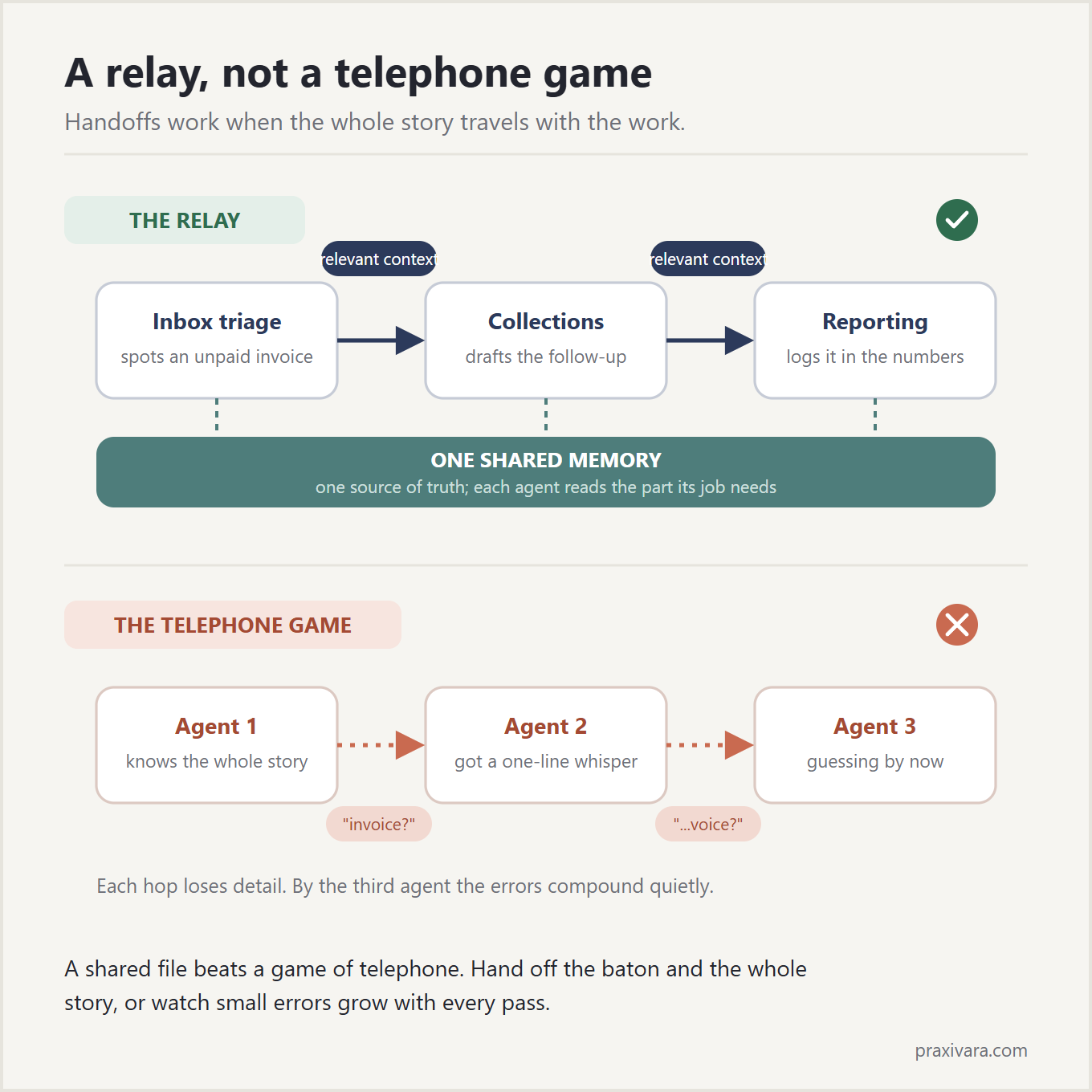
The industry word is handoff. The business picture is a relay race: control transfers to the right specialist mid-task. Your inbox agent finds an email about an unpaid invoice. That is not its job, so it passes the task to the collections agent. OpenAI defines it as one agent delegating to another that takes over, like a front desk routing you to the right department. What makes the relay work is what travels with the baton. The baton carries the complete relevant context. Not a vague one-line summary, but not every piece of data the company holds either. The receiving agent gets the task, the source material, the decisions already made, and what it needs to continue without starting over.
4. The Roundtable
The industry word is group chat. Several agents weigh in on one shared problem before a decision gets made. This is the shape for judgment calls, like pricing an unusual job, where you would rather hear from sales, operations, and the bookkeeper before quoting a number. Most routine work never needs a roundtable. The calls that do are the ones you would not let a single employee make alone.
5. The Manager
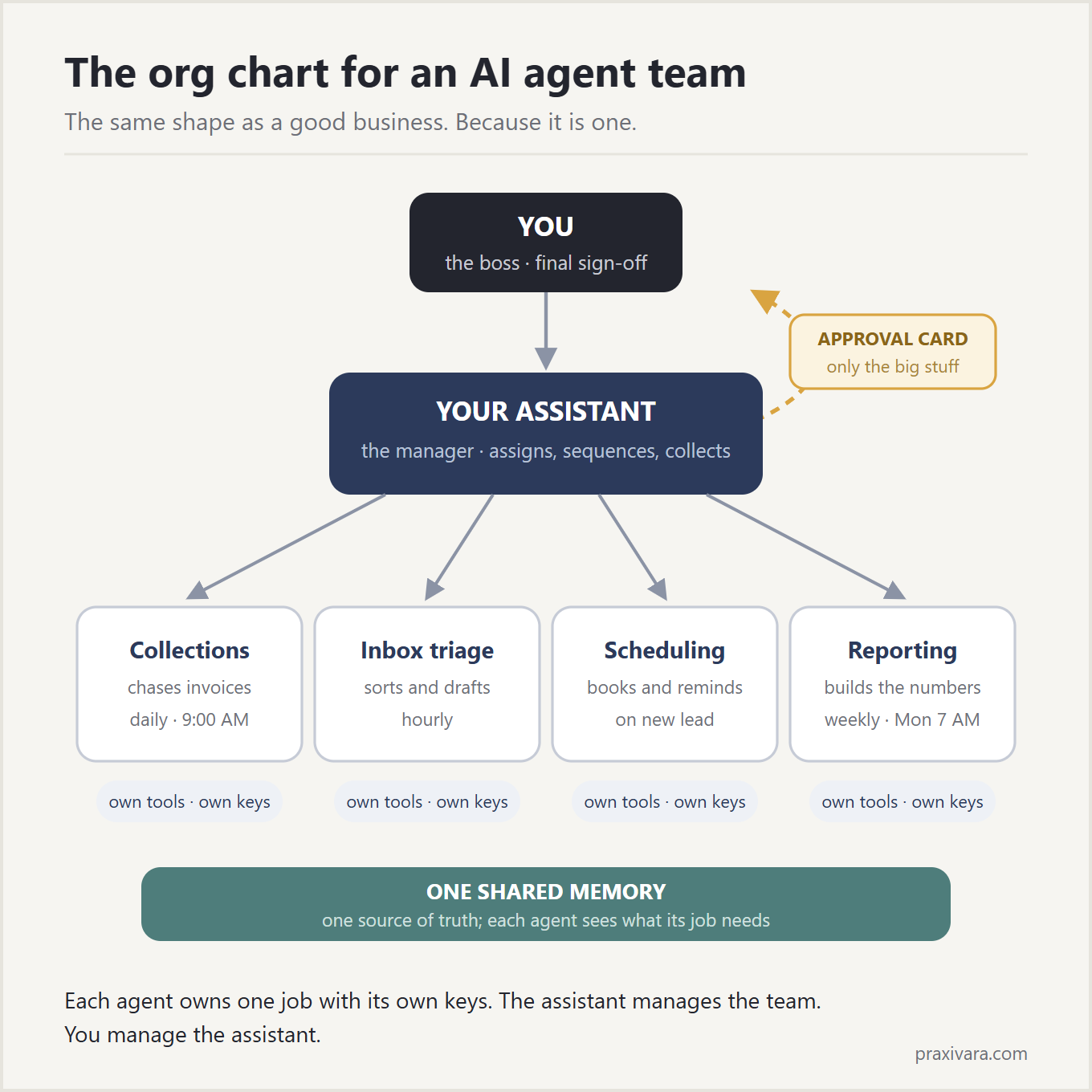
The industry calls this manager-led, or dynamic orchestration. One agent takes the big request, breaks it into tasks, assigns each piece to the right specialist as the work unfolds, tracks progress, and pulls the results back into one answer. Anthropic describes it the same way the builders of these systems all do: a central model that breaks down the work, delegates it, and stitches the results together. The coordinator is a manager, not a martyr. The coordinator's job is to delegate, track, and synthesize, not to personally perform every specialist task.
One warning, and it is really a management principle. Microsoft's architecture guidance says to use the lowest level of coordination that reliably gets the job done, because every layer adds overhead. You already know this. It is why you do not hold a meeting about scheduling a meeting. Good orchestration is the smallest org chart that works, not the biggest one you can draw.
The Infrastructure Every Agent Team Needs
The patterns are how work flows. The infrastructure is what makes the flow safe and repeatable. Whichever pattern the work calls for, the team underneath needs the same things.
Specialists who own one job
Each agent has a lane: the job, the tools for the job, the schedule for the job, and nothing else. The companies building these systems recommend this shape themselves. It is the same one OpenAI's guidance pointed to earlier. A specialist with a clear lane is easier to instruct, easier to check, and easier to replace.
Shared memory
Engineers call this shared context. You would call it the whiteboard in the back office. If each agent only knows what the previous agent whispered to it, small errors compound into big ones. That is the telephone game, and machines can play it badly at high speed. The fix is one shared source of truth: your preferences, your rules, the current state of the work. The agents work from a shared source of truth, but each agent receives only the portion relevant to its job and permissions. A shared file beats a game of telephone, and a scoped shared file beats handing every worker the whole filing cabinet.
Schedules and triggers
This is the shift calendar. Some agents punch a clock: the report that ships at 7am, every day, no reminders needed. Others are on-call: a new lead comes in and the follow-up fires within the minute. Coordination is not just deciding who does the work. It is deciding when the work starts, without you having to say go.
Permissions
Each agent should hold only the access its one job requires, enforced by the platform rather than promised by the agent. It is the keys-to-one-room idea from earlier, built into the walls instead of written into a memo.
Audit history
Every action every agent takes should land in one history a human can read. What ran, what it touched, what it produced, all in one place you can open later.
Approval rules
Routine, low-risk work runs on its own inside rules you set. Work that crosses your approval line waits for your yes. Where that line sits, and who sets it, is the next section.
The Human Layer: One Boss, One Approval Line
The org chart has a top, and it is still human. That does not mean every routine action stops. Low-risk work runs automatically inside rules you set. The manager layer escalates what crosses your approval line: sensitive communications, commitments outside an approved budget, permission changes, unusual exceptions, and anything irreversible. The agents operate. You keep authority over the consequential decisions.
Agents do the work; you keep the signature.
Think of it as the fifth thing every manager does. Assign, sequence, share context, collect results, and escalate. The first four can be delegated to the manager layer. The fifth is different: deciding where the approval line sits is the job that stays with you, because you are the one accountable for what leaves the building. This is not just our opinion. NIST's AI Risk Management Framework exists to build trustworthiness into how AI gets designed and used, and its Govern function is about exactly this: clear human accountability for what the system does.
Per-agent permissions are the other half of this story. What each agent is allowed to touch, and how those limits get enforced, deserves more than a paragraph, so we wrote a full report on it. Read how AI agent permissions should work before you hand any agent real access.
This section is short on purpose. One approval line, one boss, one signature on the consequential calls. Everything else is detail, and the detail lives in the security report.
A Tuesday Morning With Four Agents
Here is what this looks like when it is running. Four agents, named by their jobs: the Inbox Agent, the Collections Agent, the Scheduling Agent, and the Reports Agent. Any service business will recognize the morning.
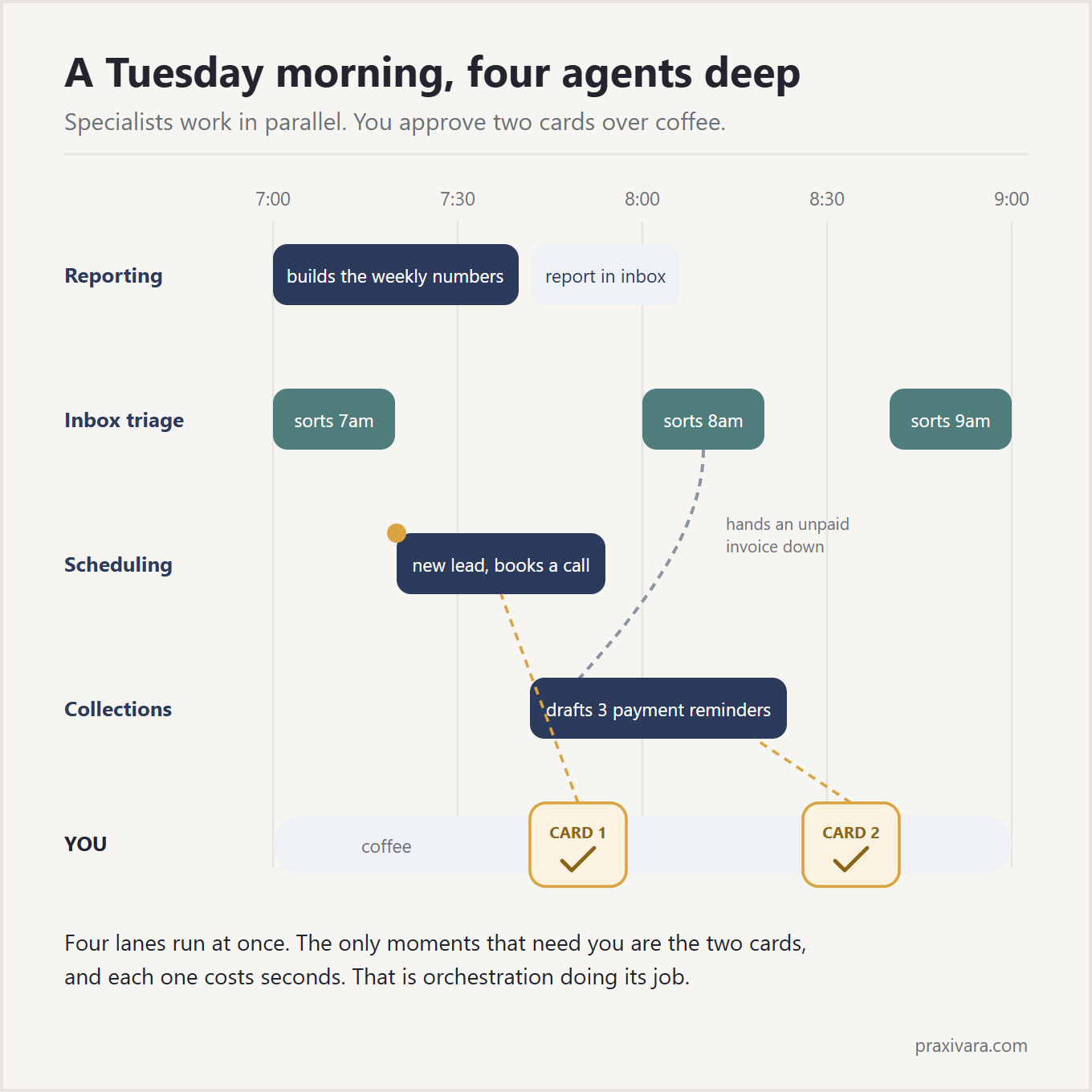
7:00. All four start at once. This is the parallel payoff from earlier, made concrete. The Inbox Agent sorts the overnight email, files the routine stuff, and flags two messages as urgent. The Collections Agent finds three invoices past due and drafts a reminder for each one. The Scheduling Agent notices Thursday has a double-booking and drafts a fix: move the smaller job to Friday at 10. The Reports Agent pulls the week's numbers into the usual summary. Nobody waits in line behind anybody else.
7:40. One baton pass. The Inbox Agent finds a customer email disputing an invoice. That is not its lane, so it hands the task to the Collections Agent with the full email thread attached. Not a one-line summary. The whole thread. The Collections Agent folds the dispute into its work and holds that customer's reminder instead of sending it.
8:15. The owner opens her phone with her coffee. The work is done and waiting, not in progress. Two things need her yes. First, the collection reminders. Second, the reschedule note to the double-booked client. Both sit above the approval line she drew: customer-facing messages about money and commitments. She reads both requests. She softens one line in one reminder, the customer is a fifteen-year account and the draft was a touch stiff. Then she approves both.
8:20. Sent. The reminders go out, the reschedule goes out, and the disputed invoice sits in a separate pile with the full history attached, ready for a real decision.
9:00. She starts her actual workday. The urgent pile is empty. The report is finished. The Thursday calendar is fixed. Total time spent managing four workers: about five minutes, most of it reading.
Now run the comparison. In a sequential single-agent setup, those jobs wait in one queue; with concurrent specialists, the independent work happens at the same time. And the same morning with no agents is the owner's whole morning. You wake up to deliverables, not to-dos.
What Makes an Agent Team Safe and Legible
A well-run agent team is not a black box. It has three properties you can check, the same way you would check any team you manage.
Every agent carries only the keys to its one room
Per-agent scoping is the keys-to-one-room idea from earlier, stated as a property you can verify instead of a promise. The invoice agent can touch invoices, and its access ends there. This is not paranoia. OWASP, the people who catalog what goes wrong in software, published a multi-agent threat modeling guide noting that multiple coordinating agents add complexity and new attack surfaces, more doors a bad actor could try, compared to a single agent. That is exactly why the recommended shape is small agents with small keys. The risks are known and named, and the specialist structure is part of the mitigation: small permissions, isolated responsibilities, validated handoffs, complete logging, and human control over consequential actions keep the additional attack surface bounded.
One audit trail, not five notebooks
The audit history from the infrastructure list is where legibility lives: a shared timesheet, not five separate notebooks kept in five drawers. If you can't replay the day, you can't manage the team.
A pause that fits
Any single agent should be benchable without benching the others, and the manager layer gives the team a natural place to stop that a giant do-everything agent lacks. A do-everything agent has no seam where a pause button fits between its jobs.
Legibility is the difference between delegation and abdication. You delegated the work. You did not delegate knowing what happened.
How Agent Teams Fail, and the Management Fixes
Agent teams fail the way human teams fail, and they get fixed the same way. Every failure below is a management problem with a management fix.
Duplicated work
Symptom: two agents answer the same email, or both chase the same invoice. Why: fuzzy lanes. Two job descriptions overlap, so two agents both think the task is theirs. Fix: one owner per task type, with the manager assigning from a single queue. If two agents can both claim a job, the org chart is wrong, not the agents.
Waiting on each other
Symptom: agent B sits idle because agent A never finished or never passed the baton. Why: chained work with nothing enforcing the pass. Fix: deadlines and fallbacks. If the handoff doesn't arrive by a set time, the task escalates to you instead of dying quietly. A task with no timeout is a task that can silently disappear.
Cascading errors
Symptom: one agent's wrong output becomes the next agent's trusted input, and the mistake compounds down the line. It is the telephone game from earlier, failing at machine speed. The security folks have names for this class of failure; OWASP catalogs it in its agentic threats and mitigations guide. Fix: checkpoints at the seams. The manager sanity-checks each handoff, and anything consequential leaving the building still stops at your approval line. That human stop is the cascade's hard limit.
Cost loops
Symptom: two agents ping-pong a task back and forth, or the manager retries forever, burning money while producing nothing. Be honest about the baseline here: a team costs more to run than a single prompt. Remember the token caveat from earlier, a team burns many times what one chat does, which is fine when the work is worth it and a leak when it isn't. Fix: budgets and turn limits per job, and the full money math lives in our cost and ROI report.
None of these are reasons to avoid agent teams. They are reasons to run the team like a manager instead of launching everything at once and hoping.
How Praxivara Runs the Team
Here is how we build this. Praxivara's orchestration is a management hierarchy, not a workflow canvas. At the top sits your executive assistant. That assistant is the manager from the patterns above. It assigns the work, checks the results, and brings you the decisions.
You do not manually wire the orchestration logic. Connect your tools once, and when a recurring job needs an owner, you describe the job in the same chat you already use. The assistant builds an agent to own it, with the tools, skills, memory, schedule, triggers, and approval rules already attached. Your assistant manages the team; you manage the assistant. One conversation is the control panel for everything underneath it.
The design practice the product encourages is one job per agent, each on its own clock. A report ships every morning. A follow-up fires the moment a lead comes in. Agents run on schedules and triggers around the clock, and you can pause any one agent without touching the rest. That Tuesday morning is an illustrative example of what a configured agent team can handle.
The guardrails are built in, not bolted on. Each agent gets only the tools its job needs, the keys to one room rather than the whole building. You choose when Praxivara checks with you first, while routine work inside your rules runs on its own. A few high-risk actions are checked by the platform itself, not left to the model's judgment. And every action every agent takes lands in one activity history you can open anytime.
The team also works from a shared source of truth in your workspace. Your preferences, your rules, and your tone ground the work, with each agent given the context relevant to its job and permissions, and you can review or delete any line of it. You can reach your assistant, and through it the whole team, from web chat, text, iMessage, Telegram, WhatsApp, or a phone call. Same assistant, same thread, any channel.
The difference from flowchart-style orchestration tools comes down to who does the wiring. There, you are the systems integrator dragging boxes. Here, you are the boss describing the job, and the manager layer does the wiring.
Frequently Asked Questions
What is AI agent orchestration?
AI agent orchestration is the manager layer of a multi-agent system. It decides which agent does what, in what order, with what shared information, and when a human signs off. Think of it as the working manager of a small team: it assigns tasks to specialists, collects the results, and escalates the important calls to the boss. That boss is you.
Do I need multiple agents, or is one enough?
Start with one. Give it a single job, let it earn your trust, then hire the next. Coordination earns its keep only when there is real work to coordinate, so add the manager layer when the work demands it, not before. One agent doing one job well is a better first week than five agents and no manager.
How do AI agents work together?
Through a coordinator that assigns each task to the right specialist, plus two ways of sharing information. A handoff passes a task from one agent to another with the relevant context attached, not a one-line summary. Shared memory gives every agent one whiteboard to read and write, holding your preferences, your rules, and the state of the work, though each agent sees only the portion relevant to its job and permissions. Together they keep the team working from the same facts instead of playing telephone.
What happens when one agent fails?
On a well-run team, the damage stays in one lane. The failed agent can be benched while the others keep working, the coordinator checks handoffs so a bad output does not spread, and anything consequential still stops at your approval line. Runaway retry loops burn money, so good setups cap them with budgets and turn limits per job.
How do humans stay in control?
The org chart has a top, and it is not an AI. Each agent carries only the access its one job requires, every action lands in one audit trail you can read, and routine work runs automatically inside rules you set while anything that crosses your approval line waits for a human yes. Our agent security report covers the full permissions model.
Run It Like the Business You Already Run
You do not need to learn distributed systems to run a team of AI agents. You need the hiring judgment you already have. Specialists over one giant agent. A manager that delegates instead of doing everything itself. Handoffs that carry the relevant context. One whiteboard everyone reads, scoped to what each job needs. And one signature on anything that matters, which is yours.
Orchestration is not a technology decision. It is an org-chart decision. Owners make those every week, and the ones who make them well end up with teams that run without them hovering. It is the same skill you already use on people.
If you would rather describe the jobs and let the manager layer do the wiring, that is what we built Praxivara to do. Tell your assistant about the job, and it builds the specialist.